What are Subagents?

Co-founder at King’s Cross Labs · ex-LinkedIn PM & Forbes 30 Under 30
Send this guide to yourself
Get the link in your inbox so you can read it whenever you're ready.
Your email will also be saved for future updates.
You asked Claude to draft hooks for ten topics. It did them one at a time. Topic 1, wait. Topic 2, wait. Topic 3... You sat there for twenty minutes watching a progress bar that was really just you, waiting.
That's the difference between one agent and subagents. One agent does everything in sequence. Subagents let your main Claude spin up helpers that work at the same time. Ten topics, ten workers, one prompt from you.
Why this matters
If you're already using Claude Code for real work, you've probably hit the ceiling where one conversation just isn't enough. Big research jobs, batch content, code reviews across multiple files. These are the tasks where subagents change the game.
Boris Cherny, who built Claude Code, recently shipped an update so subagents run as background tasks instead of blocking your whole session. That means you can kick off ten parallel jobs, keep working on something else, and check in when they're done. This is the closest thing to having a small team inside your terminal.
What is a subagent?
A subagent is a separate Claude instance that your main agent spawns to handle one specific job. Think of it like delegating to a coworker: you stay the manager, they go do the thing, and the results come back to you.
Each subagent gets its own context window, its own tools, and its own instructions. It doesn't share your conversation history. It just gets a focused brief: "Research Topic 3 and write three hook options." When it's done, the main agent collects the output and folds it into your session.
The key word is parallel. Instead of Claude doing Task A, then Task B, then Task C, it spawns three subagents that all run at once.
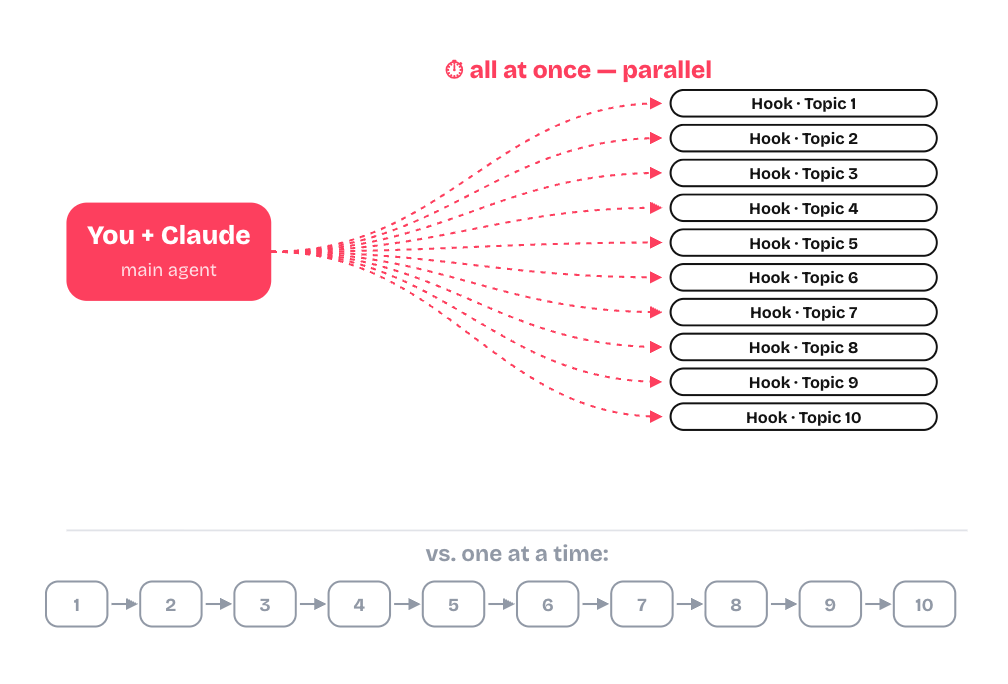
In the diagram above, "You + Claude" is the main agent. Each "Hook · Topic" box is a subagent working on its own piece. The bottom row is what happens without subagents: same ten jobs, but you're waiting through all of them in order.
Subagents vs. agents
This trips people up, so let's be clear.
The main agent is the Claude you're talking to in your terminal session. It's the orchestrator. It reads your request, decides what needs to happen, and either does the work itself or delegates to subagents.
A subagent is a helper the main agent creates on the fly. It's temporary, focused, and usually disposable. Once the job is done, it's gone.
A custom agent (defined in .claude/agents/) is different. That's a persistent specialist you write once and reuse. You might have a "code reviewer" agent with its own instructions and model settings, or a "research" agent that always cites sources. Custom agents are like hiring someone with a specific job description. Subagents are like asking an intern to go handle this one thing right now.
| Main agent | Subagent | Custom agent | |
|---|---|---|---|
| Who creates it | You, when you open a session | Main agent, on demand | You, ahead of time |
| Lifespan | Your whole session | One task | Permanent (until you delete it) |
| Best for | Orchestrating, deciding, synthesizing | Parallel one-off work | Repeatable specialized roles |
Key insight: You don't talk to subagents directly. You talk to the main agent, and it talks to them. Your job is to describe the outcome you want. Claude figures out how many helpers to spin up.
How to invoke subagents
You don't need a special command to get started. Plain English works.
1. Ask for parallel work in natural language
The simplest way: tell Claude what you want done in parallel.
Spawn a subagent for each of these 10 topics. Each one should research the topic and draft 3 hook options. Run them all at the same time.Claude reads that, creates one subagent per topic, and kicks them all off together. When they finish, it brings the results back into your main session.
This works for any batch job where the pieces don't depend on each other: researching competitors, drafting emails, reviewing files, generating variations.
2. Use /agents to create reusable specialists
If you find yourself spawning the same kind of subagent over and over, /agents lets you define a permanent one. Open it, give your agent a name, write its instructions, and optionally pick a model.
I wrote about this in my advanced commands guide. The short version: /agents is how you build a roster of specialists you can call on anytime, instead of re-explaining the job every session.
3. Define custom agents as files (for power users)
If you want even more control, create a markdown file in .claude/agents/ in your project. Each file gets a name, description, and instructions. Claude uses the description to decide when to call that agent automatically.
---
name: hook-writer
description: Writes Instagram hooks for a given topic
---

You are a hook writer for short-form social content.
Given a topic, write 3 hook options under 15 words each.
Match a direct, conversational tone. No fluff.
Now whenever you ask Claude to write hooks, it can pull in this agent without you naming it.
4. Check on background subagents
Here's the part that used to be confusing: subagents used to run inside your main chat, which meant you were blocked until they all finished. The update changed that. Subagents now run as background tasks, so your session stays free.
The catch: it's not always obvious they're running. To check, click the three dots at the top of your session and select Background tasks.
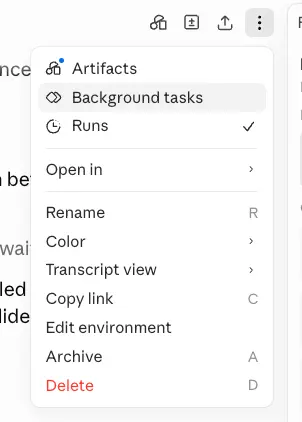
From there you can see which subagents are still running, which ones finished, and jump into any individual subagent's work if you need to.
When to use subagents (and when not to)
Use them when:
- You have 3+ independent tasks that don't need each other's output
- You're doing batch work (content, research, code review across files)
- You want speed more than you need a single coherent thread
Skip them when:
- The tasks depend on each other (Task B needs Task A's result first)
- You need one tight, coherent piece of writing (one agent is better)
- The job is small enough that spawning helpers costs more time than it saves
A good rule of thumb: if you'd assign it to three different people on a team, use subagents. If you'd do it yourself in one sitting, just ask the main agent.
Here are some related guides to check out:
Frequently asked questions
- What are subagents in Claude Code?
- Subagents are separate Claude instances your main agent spins up to work on different tasks at the same time. Instead of doing ten jobs one after another, Claude fans them out to ten helpers that run in parallel. Each gets its own context window, tools, and focused brief, then reports back to your main session.
- What's the difference between a subagent and an agent?
- A subagent is a temporary, disposable helper the main agent creates on the fly for one task. A custom agent (defined in .claude/agents/) is a persistent specialist you write once and reuse. Think of it as briefing an intern for a single job versus a coworker with a standing job description. The main agent is the one you actually talk to, and it orchestrates both.
- How do I run subagents in Claude Code?
- Just ask in plain English. For example: "Spawn a subagent for each of these 10 topics and run them all at the same time." Claude creates one helper per task and kicks them off together. For repeatable roles, use /agents or drop a markdown file in .claude/agents/ to define a reusable specialist.
- When should I use subagents instead of one agent?
- Use them when you have 3+ independent tasks that don't depend on each other, like batch research, content, or code review across files. Skip them when tasks build on each other, or when you need one tight, coherent piece of writing. Rule of thumb: if you'd hand it to three different people, use subagents; if you'd do it in one sitting, just ask the main agent.
Want to build your first AI agent?
Build Your First Agent 101 is the next step! You'll get step by step guides, video tutorials and starter prompts to create your first agent in half a day, customized to your own workflow.
Learn more