3 AI Travel Features

Co-founder at King’s Cross Labs · ex-LinkedIn PM & Forbes 30 Under 30
Send this guide to yourself
Get the link in your inbox so you can read it whenever you're ready.
Your email will also be saved for future updates.
I'm on a Princess cruise in Alaska with friends right now. We used AI to plan a lot of it, but not just by pasting our dates into ChatGPT and hoping for an itinerary. No, no.
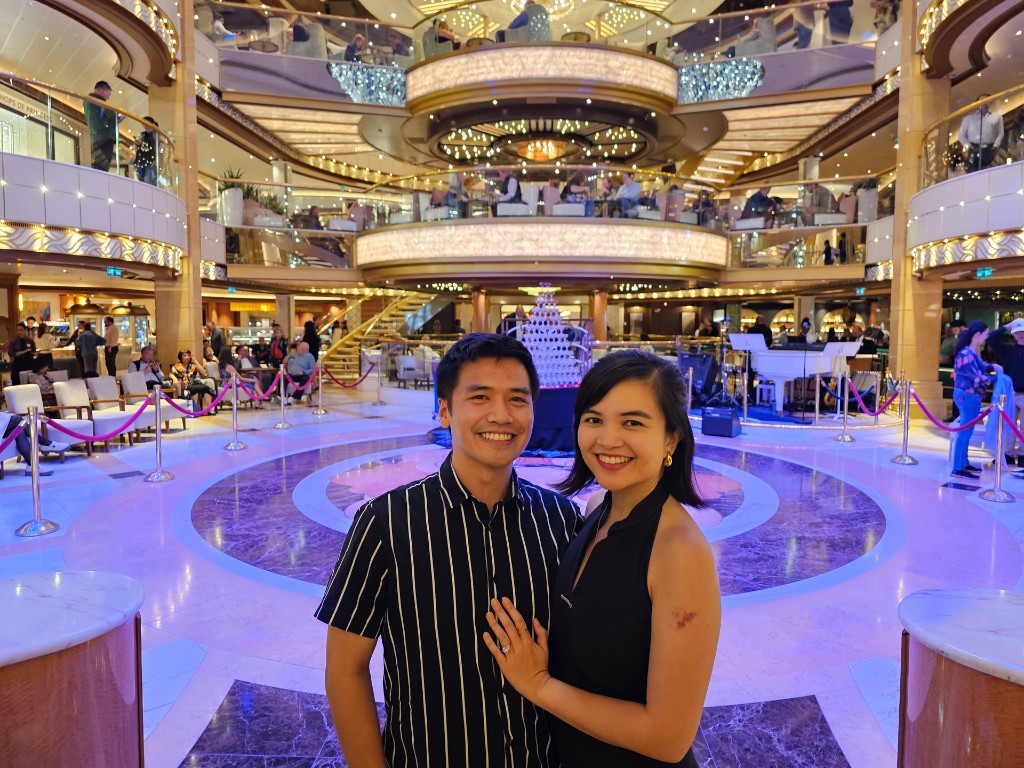
Instead, we use 3 features in apps most people don't know about. Honestly I didn't know about them until my friend used it! The 3 are: Google Gemini Ask Maps, Reddit's thread summaries, and Notion AI for group planning.
That setup works for any trip: weekend away, family vacation, work conference, friend group abroad.
Most travel stress is research plus coordination. You want real picks from actual travellers, not sponsored listicles. You want a strong short list before you land somewhere new. These three sit inside tools a lot of people already use.
I stopped looking for a new travel chatbot. The useful stuff is already inside Google Gemini Ask Maps, Reddit, and Notion.
1. Google Gemini Ask Maps — find places without reading every review
If you pay for Google One AI Premium (or another tier with Gemini in Google apps), open Google Maps and tap Ask Maps in the filter row below the search bar. That is the Google Gemini Ask Maps feature.
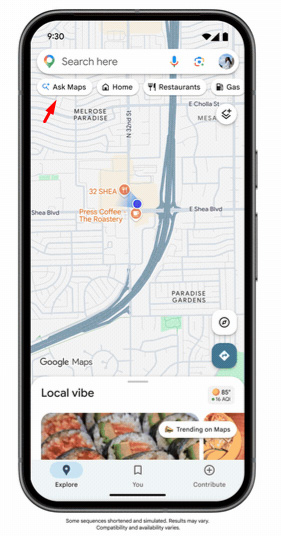
Ask in plain language: best coffee near the train station, kid-friendly lunch spots, bars with trivia tonight. You can stack a few asks in one go, like coffee and a movie theater nearby.
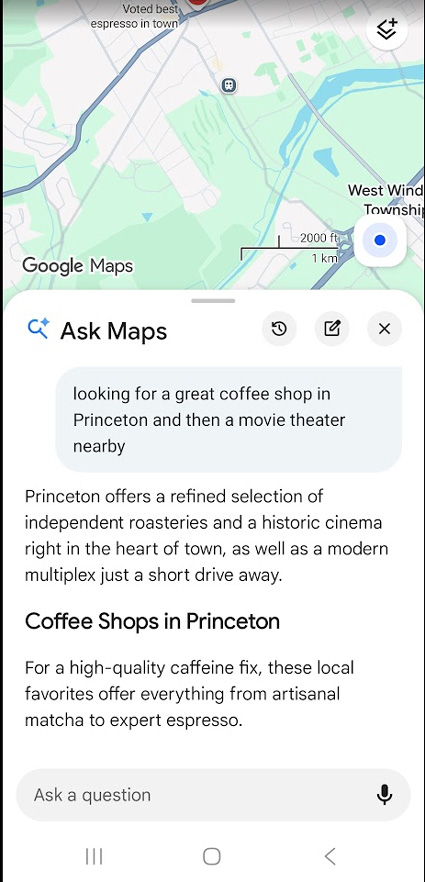
It reads Google reviews, summarizes what people actually said, and links you to the listings. You are not opening twelve tabs to read "great vibe, slow service" for the fifth time.
Pin the neighborhood or city first, then get specific. "Best brunch in the French Quarter" beats "best food in New Orleans." On this trip I asked for best coffee in Skagway before we got off the ship. Same trick in any city you do not know well.
Treat the AI answer as a shortlist. Tap the listing and check hours before you walk there.
2. Reddit AI — honest recommendations without reading hundreds of comments
I have used Reddit for travel advice for years. City subs, trip threads, what to skip. The threads are good. They are also long.
Reddit now shows an AI summary on many travel questions. It pulls the main recommendations out of comments across relevant threads, often with quotes from real posts. I did not expect much. On travel posts it has been solid for "worth it or overrated" and what people actually pack or do in port.
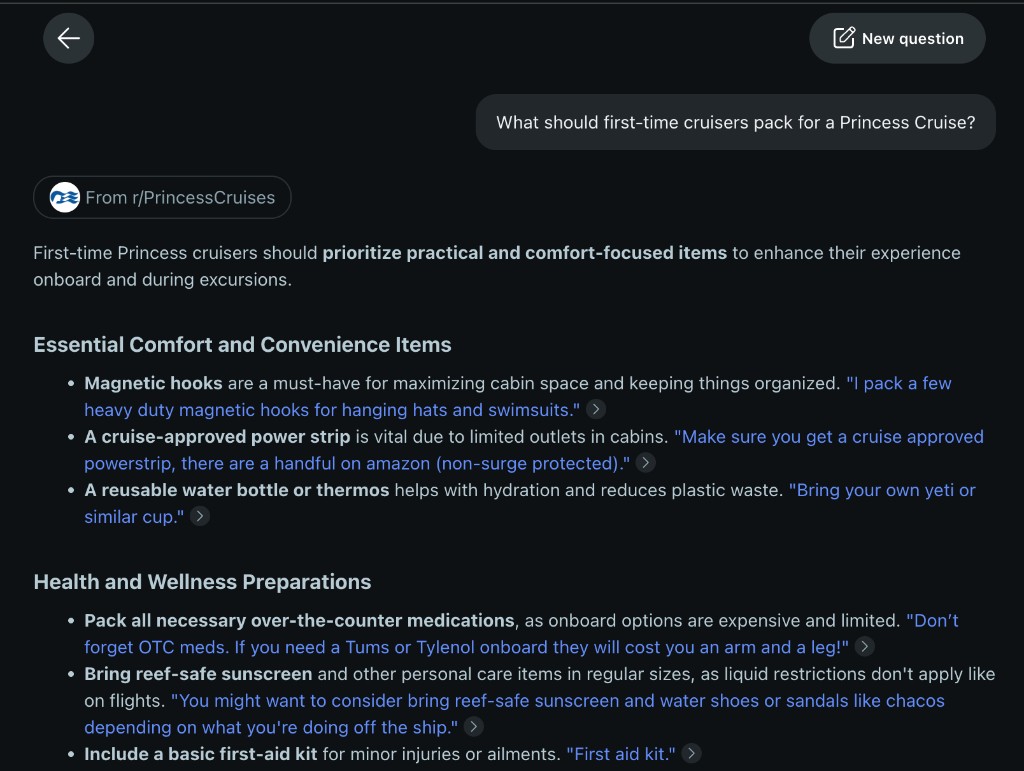
It also surfaces the subreddit and the source threads if you want to read further. That matters when you want the summary fast but still trust the crowd behind it.
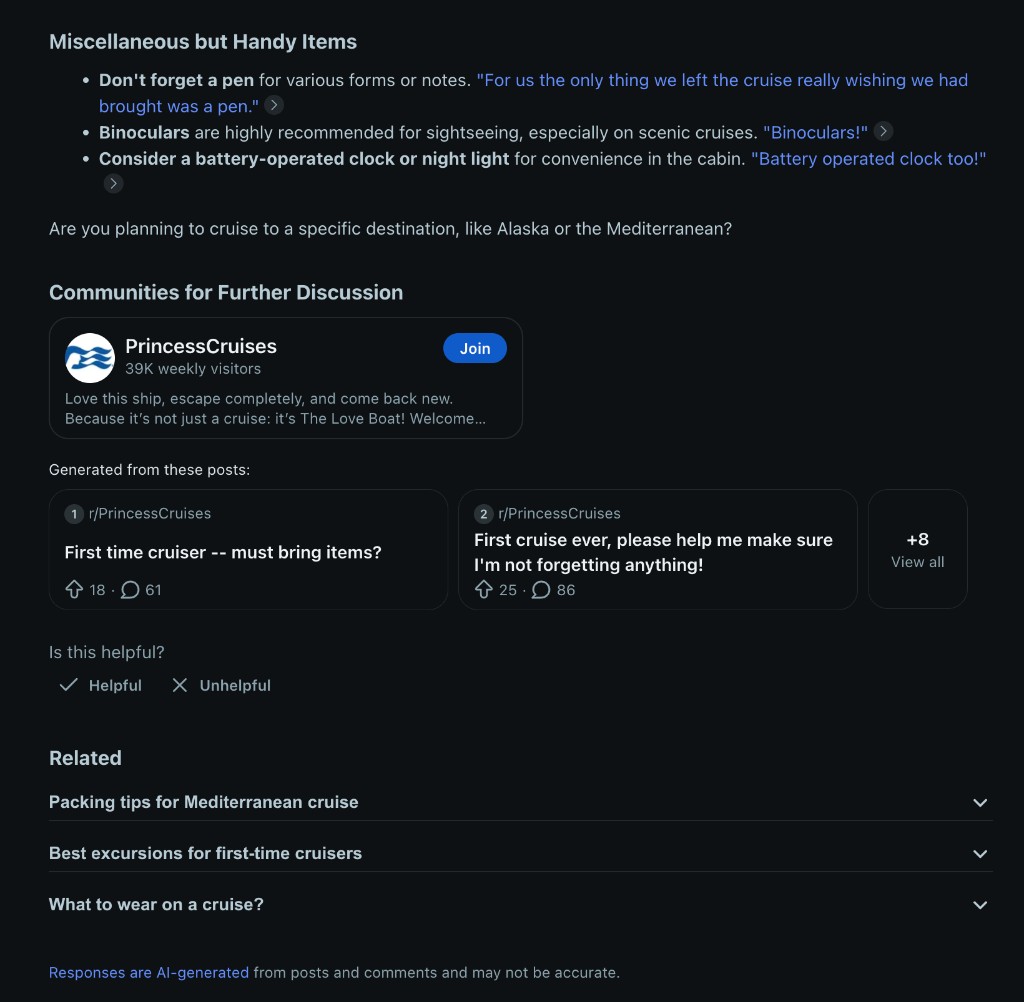
I read the summary first. If two or three places keep coming up, I look them up on Maps for distance and hours. Reddit for what. Maps for where.
During our cruise that saved us from camping in a 200-comment thread about excursions.
3. Notion AI — turn messy trip docs into a plan your group can vote on
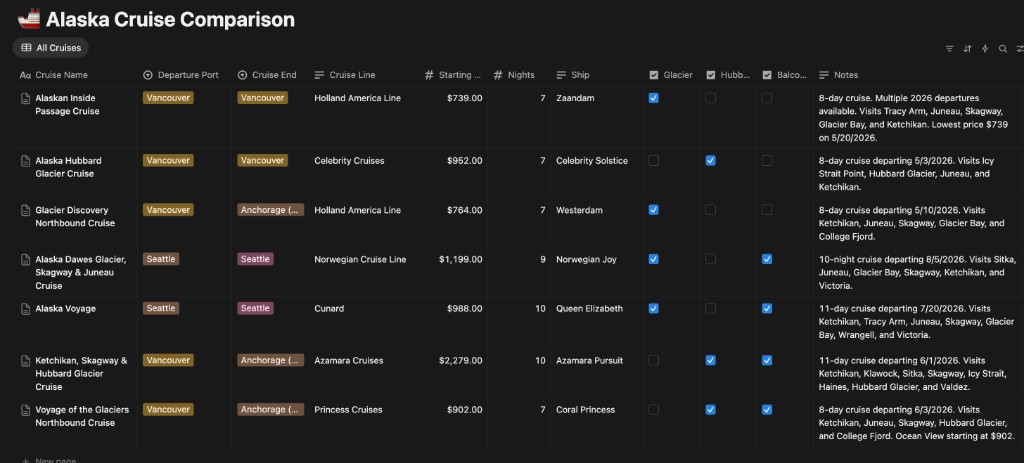
Group trips mean PDFs, confirmation emails, and links buried in the chat. Before we booked this Alaska cruise, we compared a bunch of itineraries side by side. We pasted the details into Notion and asked Notion AI to build a table: cruise line, departure port, nights, starting price, ship, glacier stops, and notes on each route.
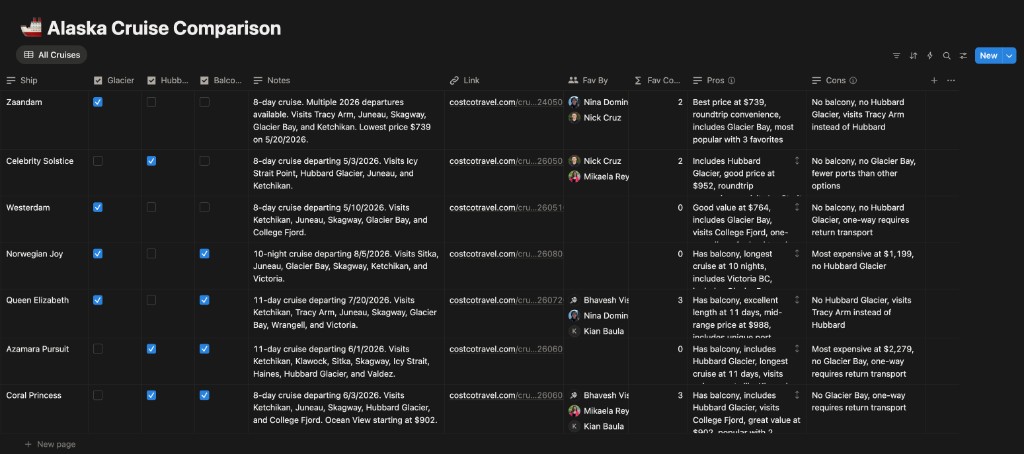
Then we had Notion AI add Pros and Cons columns plus a Fav By vote so everyone could mark favorites without another endless group chat. The AI summaries made it much faster to see tradeoffs (price vs. balcony vs. one-way routing) before we picked a ship.
Once we were on the cruise, we did the same thing with port guides and excursion sheets: upload, turn into a table, share, vote. When we were stuck between two options, we highlighted the rows and asked Notion AI to compare time, cost, and how much walking was involved. Same workflow for a bachelorette trip, a family reunion, or a work offsite.
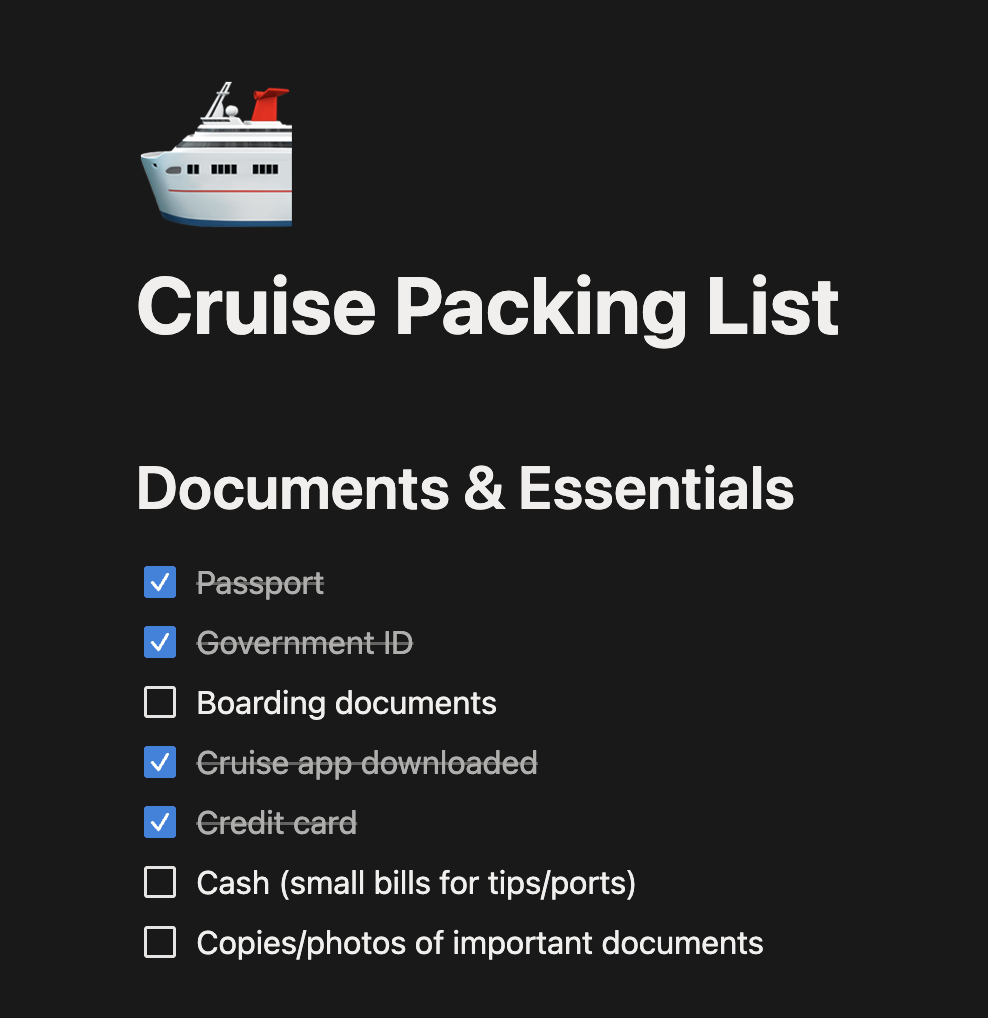
We also used Notion AI for a shared packing list. We pulled what Reddit AI surfaced on what first-time cruisers actually pack, pasted that into Notion, and asked Notion AI to turn it into a categorized checklist. We shared the page so everyone could duplicate it and pack from the same list.
Additional Reading
Here are some related guides to check out:
Frequently asked questions
- What's the best AI tool for planning a trip?
- You probably don't need a new travel chatbot. The most useful AI is already inside apps you use: Google Gemini's Ask Maps, Reddit's thread summaries, and Notion AI for group planning. Ask Maps finds places without reading every review, Reddit summarizes real traveler advice, and Notion AI turns messy trip docs into a plan your group can vote on. Together they cover the two hard parts of travel: research and coordination.
- How do I use Google Maps AI to find places?
- If you have Google One AI Premium (or another Gemini tier), open Google Maps and tap "Ask Maps" in the filter row below the search bar. Ask in plain language like "best coffee near the train station," and it reads reviews, summarizes them, and links the listings. Pin the neighborhood first so answers stay specific, then check hours before you walk over.
- Can AI summarize a long Reddit thread for travel advice?
- Yes. Reddit now shows an AI summary on many travel questions that pulls the top recommendations out of comments across threads, often with quotes. It also links the source subreddit and posts so you can trust the crowd behind it. A good workflow: read the summary first, and if two or three places keep coming up, look them up on Maps for distance and hours.
- How can my group plan a trip together with AI?
- Paste your options into Notion and ask Notion AI to build a comparison table, then add Pros, Cons, and a "Fav By" vote column so everyone marks favorites without another endless group chat. You can do the same with port guides, excursion sheets, and a shared packing list. It turns scattered PDFs and links into one plan the whole group votes on.
Want to build your first AI agent?
Build Your First Agent 101 is the next step! You'll get step by step guides, video tutorials and starter prompts to create your first agent in half a day, customized to your own workflow.
Learn more