How to Do Agentic Trading on Robinhood (Safely)

Co-founder at King’s Cross Labs · ex-LinkedIn PM & Forbes 30 Under 30
Send this guide to yourself
Get the link in your inbox so you can read it whenever you're ready.
Your email will also be saved for future updates.
On May 27, 2026, Robinhood launched Agentic Trading in beta. You connect an AI agent to your Robinhood account and it can place trades for you, which is why I'm half intrigued and half nervous. Robinhood's own docs say agents can misread you, screw up, and do stuff you didn't ask for.
So this isn't a "here's how to get rich" post. It's what launched, what you can actually do with it, how to wire it up without wrecking your main portfolio, and how I'd set mine up if I turn it on. This is not financial advice! AI agents aren't financial advisors. I'm only talking about the tool.
Official docs and disclosures: Agentic Trading overview.
Why this matters
Until now, "AI and stocks" mostly meant pasting tickers into ChatGPT and getting a paragraph back. Agentic Trading crosses a different line: the agent can actually place orders, not just talk about them.
Robinhood's answer is a separate, pre-funded account. The agent can read your whole portfolio for context, but it only spends the cash you move into that sandbox. You get a push notification on every trade, a live activity feed and P&L in the app, and you can disconnect the agent with one tap if you want trading to stop. Even if you never fund an Agentic account, that combo is worth understanding: capped spending, real-time visibility, and a hard off switch.
It's not the only shape this is taking. Interactive Brokers also has an official Claude connector, but the model is different: Claude drafts trade instructions and you approve them in IBKR's queue. No agent hitting buy on its own. Still the same bigger shift, though. Brokers are wiring AI into real accounts, and we're all figuring out how much autonomy we're comfortable with.
The separate account is a fence. The AI can look at everything but only spend what's inside the fence, and how much you deposit is your risk dial.
What Robinhood actually launched
1. A dedicated Agentic account, not your main portfolio
You open another self-directed investing account and fund it with cash reserved for the agent. The agent can read positions, balances, and order history across your Robinhood accounts so it has context, but it can only place trades inside the Agentic account, which means your main holdings stay untouched.
2. MCP connection to whatever AI you already use
You connect through MCP (Model Context Protocol), an open standard that lets AI tools plug into apps and take action instead of only chatting. You paste one URL into your platform, authenticate, and Robinhood handles the rest. Supported options include Claude Code, Claude Desktop, ChatGPT (Developer Mode), Codex, Codex CLI, Cursor, and other MCP-compatible tools.
3. Oversight in the Robinhood app
Robinhood built the product around visibility: every trade triggers a push notification, you can follow activity and P&L in the app in real time, and you can disconnect the agent with one tap whenever you want trading to pause.
4. Beta, stocks only for now
At launch the product supports equities only. Robinhood says options, crypto, futures, and more are coming as the beta expands, and access is still rolling out account by account, so you'll get an email when it's available to you.
What you can do with Agentic Trading
Once connected, the agent can check buying power, pull account info, and place orders using Robinhood's order types. You're still the one who chose the platform, connected MCP, and wrote the prompts. Robinhood's support article lists example prompts below. Treat them as illustrations, not stock picks.
1. Build a portfolio from a theme
"Look through news and industry reports to build a portfolio of lesser-known tickers across the AI supply chain."
2. Automate a rule-based strategy
"Buy $100 of [ticker] every time the price drops 2% or more in one day."
3. Rebalance toward target weights
"Rebalance my Agentic account to 20% in [ticker A] and 80% in [ticker B]."
4. Analyze risk across what it can see
"Look at my portfolio and tell me what risks I'm exposed to." The agent can use broader read access for that kind of analysis, but any trades it places still have to go through the Agentic account.
5. Research one ticker
"Why is [ticker] up today?" or "Use news, sentiment, and recent quotes to build a bull and bear thesis for [ticker]."
Robinhood's marketing also talks about rebalancing for concentration risk, monitoring a sector, or backtesting mean reversion before you deploy. Those are fine starting points for your own thinking. They are not recommendations to copy verbatim.
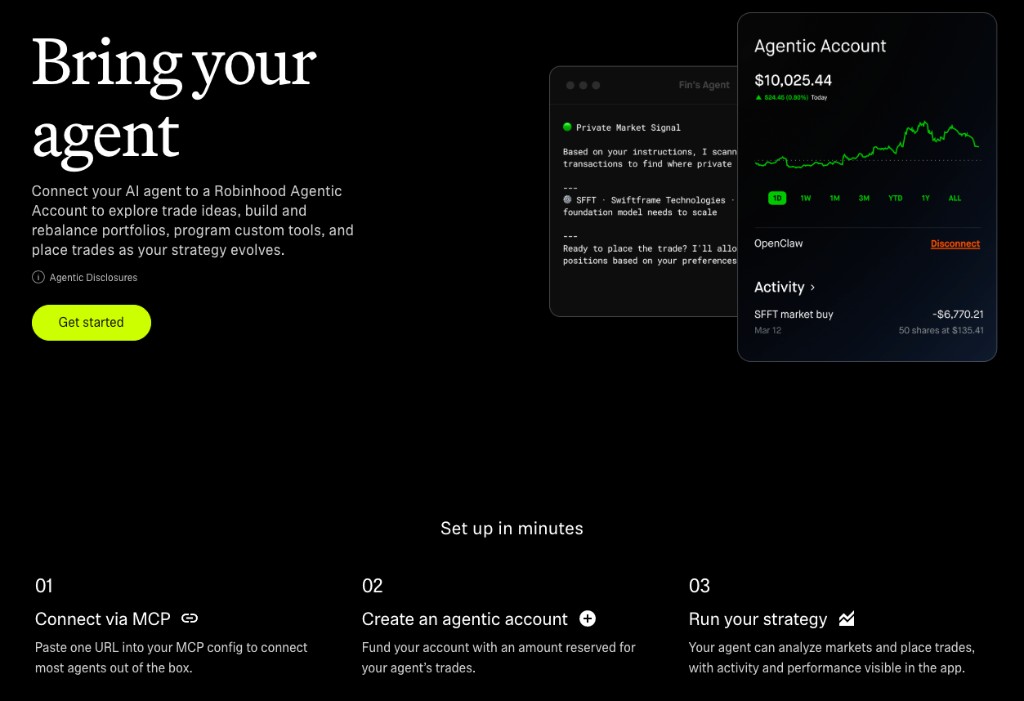
How to set it up
Connect your AI platform
1. Wait for access if you don't have it yet
Agentic Trading is still rolling out, so if you haven't gotten Robinhood's access email yet, hold off on the rest of this guide until you do.
2. Add the Robinhood Trading MCP link
Use the same URL on every platform: https://agent.robinhood.com/mcp/trading
Claude Code — in terminal:
claude mcp add robinhood-trading --transport http https://agent.robinhood.com/mcp/tradingThen type /mcp, select robinhood-trading, and authenticate.
Claude Desktop — Settings → Connectors → Add custom connector → paste the link above.
ChatGPT — Developer Mode on → Settings → Apps → Create app → same MCP link.
Cursor — Settings → Cursor Settings → Tools & MCPs → Connect → paste the link.
Codex / Codex CLI — MCP servers (Streamable HTTP), or codex mcp add robinhood-trading --url https://agent.robinhood.com/mcp/trading, then /mcp.
If you get stuck on a specific platform, the step-by-step instructions and troubleshooting notes are in Robinhood's Agentic Trading overview.
Open and fund the Agentic account
3. Finish onboarding on desktop
After you connect MCP and sign in, Robinhood walks you through opening an Agentic account. You need a primary individual investing account in good standing first, and Robinhood currently requires you to open the Agentic account and authenticate your agent on desktop. If you start on mobile, copy the onboarding URL and finish in a desktop browser.
4. Fund only what you'd shrug off losing
Transfer cash into the Agentic account because that balance becomes the ceiling on what your agent can spend. Most of the safety advice in this guide is really just detail around that one funding decision.
Run your strategy (carefully)
5. Start with research, not live orders
I'd begin with portfolio commentary, market research, or draft orders and only move to execution once I'm comfortable with how the agent interprets my instructions. Robinhood can also preview trades when you ask to place an order, so you can review size, side, and symbol before anything goes through.
6. Watch the feed the first week
Treat the first week like a pilot, not a launch: every trade should hit your phone, and if something looks wrong you disconnect the agent in the app instead of hoping it self-corrects.
Safety first
Robinhood's disclosures are blunt for a reason. You're responsible for trades your agent places, and if you tell it to act without checking with you each time, it can submit orders without another confirmation. You can lose your entire Agentic account balance. Read the overview and the linked disclosures before you move money.
1. Treat the Agentic account like a sandbox
Fund it with money you'd be fine never seeing again, not "mostly fine" money you were saving for something else. That deposit is your downside cap if the agent misreads a prompt late at night.
2. Leave trade notifications on
Notifications are your real-time audit trail. If you're not getting pinged on every fill, you won't know what changed until you open the app later.
3. Stay in the loop early
Preview trades, approve before execution, or keep prompts narrow like "analyze only, don't trade." Full autonomy is something you graduate into once you trust the behavior, not something you turn on by default.
4. Know the kill switch
You can disconnect the agent from the Robinhood app at any time, and if a trade looks fraudulent or simply wrong, support can compare what you asked for against what actually executed.
5. Remember the read access is wide
A connected agent can see account numbers, positions, balances, and your full transaction history across Robinhood, even though trades are fenced to the Agentic account. Only connect agents on platforms you trust with that level of visibility.
How I'd set mine up
This section isn't a trading strategy. It's the order I'd actually follow if I turned the feature on.
1. Safety first, and I'd still use Robinhood support
I'd run Robinhood's setup flow and contact support when something feels unclear, and I'd also tell the agent in plain English that I want trades previewed or confirmed until I trust it. "Help me set this up" is not the same as "trade unsupervised."
2. Context files with my rules
I'd use the same playbook as CLAUDE.md for work: a folder the agent reads every session with my strategy summary, max position size, sectors I won't touch, allowed order types, trading hours, and what "done" means. I'd put something explicit in TRADING.md like: "This is my strategy: [rules]. Never trade outside the Agentic account. Never exceed $X per order." Vague prompts get vague trades, and I've learned that the hard way with Claude on everything else.
3. Sandbox mode for a while
I'd start with a small balance and boring prompts, then watch how the agent interprets news and respects my limits. Week one for me would be about understanding the system, not trying to beat the market.
4. Only put in money I'm willing to lose.
Financial fundamentals should always apply, AI or not!
Enjoy trading!
Additional Reading
Here are some related guides to check out:
Frequently asked questions
- Can an AI actually place trades on Robinhood?
- Yes. Robinhood's Agentic Trading (in beta) lets you connect an AI agent through MCP, and it can place real stock trades, not just talk about them. The key safety design is a separate, pre-funded Agentic account: the agent can read your whole portfolio for context but can only spend the cash you move into that sandbox. This isn't financial advice, just how the tool works and how to set it up carefully.
- How do I keep AI trading from wrecking my main portfolio?
- The whole safety model is the separate Agentic account. You fund it with cash reserved for the agent, and that balance is the ceiling on what it can spend, so your main holdings stay untouched. Fund it with money you'd genuinely be fine losing, keep trade notifications on as a real-time audit trail, and know you can disconnect the agent from the app with one tap. Start with research-only prompts before you allow live orders.
- How do I connect an AI agent to Robinhood?
- Once you have access (it's rolling out account by account), add Robinhood's trading MCP link, https://agent.robinhood.com/mcp/trading, to your platform of choice, whether that's Claude Code, Claude Desktop, ChatGPT Developer Mode, Cursor, or Codex, then authenticate. You finish opening and funding the Agentic account on desktop. Robinhood's overview article has per-platform steps and troubleshooting.
- Is agentic trading safe?
- It carries real risk, and Robinhood is blunt about it: you're responsible for trades your agent places, an agent can misread you and submit orders you didn't intend, and you can lose your entire Agentic account balance. The safeguards are there to contain that: a capped sandbox account, a push notification on every trade, and a one-tap kill switch. Treat the first week like a pilot with a small balance, and preview or confirm trades until you trust the behavior. This is not financial advice.
Want to build your first AI agent?
Build Your First Agent 101 is the next step! You'll get step by step guides, video tutorials and starter prompts to create your first agent in half a day, customized to your own workflow.
Learn more