How to Setup Global Context for Claude (CLAUDE.md, USER.md)

Co-founder at King’s Cross Labs · ex-LinkedIn PM & Forbes 30 Under 30
Send this guide to yourself
Get the link in your inbox so you can read it whenever you're ready.
Your email will also be saved for future updates.
Every time you start a new Claude session with no setup, you're asking Claude to help you do your job without telling it anything about you, your company, or what good work looks like. It's like hiring a new team member every single day and making them figure out the basics from scratch. This guide fixes that. It walks you through the exact markdown files I use so Claude knows exactly who I am before I type a single prompt.
One note before we start: this guide covers global markdown files — the ones that apply across every session. In future guides, I'll go deeper on project-specific markdown files, which let you give Claude targeted context for specific work. For now, think of these global files as Claude's default brain. Without them, every session starts empty.
How Claude Works
For every session in Claude Cowork and Claude Code, when you point Claude to a project folder, it looks for a claude.md file. That's the session start. It reads the claude.md first, follows the references inside it to determine what other context files to load, then it starts executing your prompt or skill.
If there's no claude.md, Claude just starts. No context, no background, no preferences. It has no idea who you are.
The problem: a blank session means Claude defaults to generic. Generic tone, generic structure, generic assumptions about what you need. You end up editing more, prompting more, explaining the same things over and over.
Recommended Starter Files
You don't need a lot. Here's where I'd start:
about-me.mdoruser.md— who you are, how you work, what good output looks like for you. Have Claude interview you to build this.anti-ai-writing.mdorvoice-and-style.md— the rules that keep you sounding like you, not like a chatbot. Bans specific words and sentence patterns.projects.md— your active projects so Claude knows what you're actually working on.
A few guidelines before you build these:
- These are just recommendations. Add more as you figure out what you keep repeating to Claude.
- Keep every file short. Not 20,000 words. Under 2,000 tokens per file. When in doubt, ask Claude to trim it.
- Your
claude.mdshould also stay short. It loads at the start of every session, so a bloated one hurts more than it helps. Skills load on demand.claude.mdloads every single time.
Key insight: The goal isn't to give Claude everything. It's to give Claude exactly what it needs so you stop repeating yourself.
Step 1: Build your about-me.md or user.md file
This file tells Claude who it's working with. Your role, your standards, your preferences, your rules. You write it once, and Claude reads it at the start of every session.
The easiest way to build it: have Claude interview you.
Copy this prompt and run it in Claude Cowork or Claude Code:
You are building my about-me.md file for my Cowork folder. This file will be read by Claude at the start of every session to help you do my job with me. It needs to be concise and high-signal.

Your job: interview me using AskUserQuestion (20 questions), then compile the answers into a condensed about-me.md under 2,000 tokens.

## How to interview me

Use AskUserQuestion for every question. One question at a time. Let me use "Other" to dictate long answers when I need to.

If I give a vague answer, push back. Ask for a specific example or rephrase. Don't accept "I like to keep things clear" without knowing what clear looks like in my work.

Follow interesting threads. If something unexpected comes up, go deeper before moving on.

## What to cover (15-20 questions, adapt based on what matters for my role)

WHO I AM (3 questions)
- What do I do? What's my role, my company, my industry?
- Who do I work with or work for? (clients, team, stakeholders, audience)
- What does a good week of work look like for me?

HOW I WORK (4 questions)
- What tools do I use every day and how?
- Walk me through how I start a typical task from zero to done.
- What does my review/editing/QA process look like?
- When I hand something off (to a client, a boss, a reader), what does "done" look like?

WHAT GOOD LOOKS LIKE (4 questions)
- Show me or describe the best output you've produced recently. What made it good?
- What separates great work from average work in your field?
- When you look at someone else's work and think "this is good," what are you reacting to?
- If I had to judge your work, what should I be looking for?

WHAT YOU HATE (4 questions)
- What's an example of bad work in your field? What specifically makes it bad?
- What patterns, shortcuts, or habits in your industry make you cringe?
- When Claude writes something for you and it's wrong, what's usually off? (tone, structure, detail level, assumptions)

YOUR RULES (3 questions)
- What do you never do in your work? Hard lines you won't cross.
- What are the 2-3 non-negotiables that every piece of your work must have?

YOUR OPINIONS (3 questions)
- What do you believe about your field that most of your peers would push back on?
- What tools, methods, or trends do you think are overrated? What's underrated?

## Output format

After the interview, compile everything into a single markdown file. Do NOT save raw Q&A transcripts. Extract the patterns from my answers and write them as condensed prose and bullet points.

Structure:

# ABOUT ME: [My Name]

## Who I am
[2-3 sentences. My role, my work, my audience/clients. Current facts and numbers if relevant.]

## How I work
[My daily tools, my process, how I start tasks, how I review, what "done" looks like. Short paragraphs.]

## What good looks like
[What I value in my own work and others'. The standards I hold. Condensed from examples I gave.]

## What I hate
[Patterns, shortcuts, and mistakes that bother me. What "wrong" looks like. Specific, not vague.]

## My rules
[Numbered list. Hard lines and non-negotiables.]

## Instructions for Claude
[10 numbered rules for how to work with me. Derived from everything above. Focus on what Claude must DO and NOT DO, not abstract principles.]

Target: under 2,000 tokens total. Every sentence should carry signal. If a sentence could be cut without losing information, cut it.

Save the file as about-me.md in my ___ folder.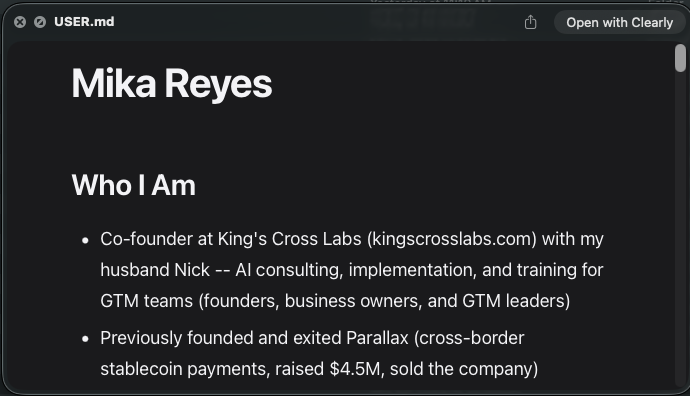
Step 2: Build your anti-ai-writing.md or voice-and-style.md file
You hate AI writing. I hate AI writing. This file is the fix.
Without it, Claude writes like Claude: polished, slightly formal, and full of patterns you can spot from a mile away. "Here's the reality." "It's not just X, it's Y." "Let me break it down." With this file loaded at the start of every session, Claude writes more like you, and filters out the patterns that make it sound like a robot.
Mine bans 80+ specific words (delve, harness, tapestry, elevate, the usual suspects), kills reframe sentence patterns, and limits paragraphs to 3 sentences max. Here's a copy-paste snippet from mine:
## Tone
- Transparent, educational not preachy, conversational, confident but humble
- Optimistic, aspirational but grounded
- Like telling a story to a friend
- Make AI feel attainable, not intimidating

## I sound like
- Direct and honest, no fluff
- Conversational, not corporate
- Confident in our choices without being preachy
- Humble about what we don't know yet
- Specific (real numbers, real examples, real stories)
- A smart friend who figured something out and is excited to share it

## I never sound like
- Generic business advice ("10 tips to succeed")
- Hustle culture ("grind harder", "rise and grind")
- Humble-bragging
- Apologetic about our choices
- AI-generated ("Here's the reality", "Here's the problem", "it's not just this... it's also that", "Here's why that matters", "Let me break it down")
- Pretending we have it all figured out
- Jargon-heavy or corporate-speak
- Tech-bro gatekeeping ("you need to learn to code first")

## Recurring phrases
- "staying time-rich"
- "our journey to $1M"
- "with just 2 people"
- "you don't need to be a developer"
- "here's exactly how"
- "AI for normal people"
- "your favorite time-rich founder"
- "this is what time-rich looks like"

## Always include in content
- Specific numbers (progress to $1M, actual costs, real metrics)
- Concrete KCL examples or real AI workflows
- Tie to one content pillar
- "Time-rich" reference (at least once)

## Never include in content
- Generic advice we haven't followed
- Claims we haven't achieved
- Apologies for our approach
- Hustle culture language
- Pretending we have it figured out
- Abstract AI theory without a real use case
You don't need to copy mine. But you need something here. Start with the words and sentence patterns that make you cringe when you read them. Be specific.
Step 3: Build your projects.md file
This file gives Claude context on what you're actually working on: your active projects, their goals, key details, and who's involved. Without it, Claude treats every task in a vacuum.
Now, I want you to try writing the prompt for this one yourself.
You know the principles from step 1: have Claude interview you, keep it under 2,000 tokens, make every sentence carry signal. Apply that same logic here and write a prompt that builds your projects.md file. Use the about-me.md prompt as a template.
Tip: Ask Claude to interview you. Cover what each project is, what success looks like, what stage it's at, and who's involved. That's the core of what Claude needs.
Step 4: Create your claude.md file
Think of claude.md like CSS for your Claude sessions. The global claude.md in your main folder (this might be a hidden .claude folder that Claude will create upon first session) applies everywhere. A claude.md in a project folder layers on top of that. A file in a subfolder layers on top of that. More specific context always wins.
The hierarchy:
~/.claude/claude.md— global, applies to every single session./claude.mdin a project folder — project-specific, layers on top of global- Subfolder
claude.mdfiles — most specific, override everything above
This global file is the one constant across every session, whether you're in Claude Cowork on the desktop app or Claude Code in your terminal.
Use this prompt to build yours:
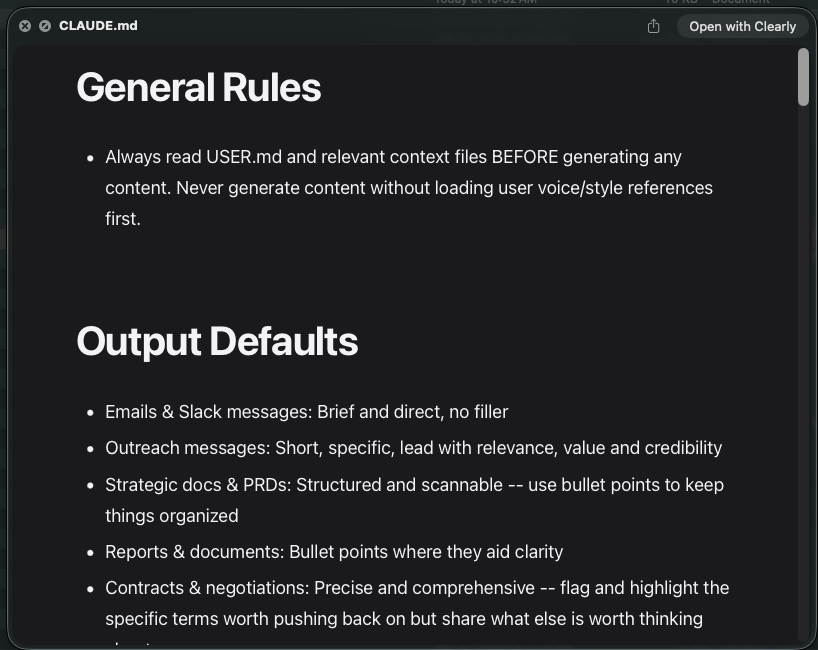
Help me create a claude.md file in this project folder that references my about-me.md and voice-and-style.md at the start of every session. Keep it token efficient, under 2,000 tokens total. Ask me questions about anything else you think I should be mindful of when creating this file.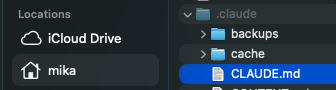
Keep it short. Anthropic has noted that bloated claude.md files make Claude worse at following your instructions, not better. If you have workflows that only apply sometimes, those belong in Skills, not in claude.md.
Key insight: Skills load on demand.
claude.mdloads every single time. Keep the always-on file lean.
Here are some related guides to check out:
Frequently asked questions
- What is a CLAUDE.md file and why do I need one?
- A CLAUDE.md is a markdown file Claude reads at the start of every Cowork or Claude Code session, so it knows who you are, how you work, and what good output looks like before you type anything. Without it, every session starts blank and Claude defaults to generic tone, structure, and assumptions. It's the difference between a teammate who knows your context and a new hire figuring out the basics every day.
- What files should I set up to give Claude context?
- Start with three: an about-me.md (or user.md) for who you are and how you work, a voice-and-style.md for the rules that keep you sounding like you, and a projects.md for what you're actively working on. Then a short claude.md ties them together and loads first. Keep each file short, under 2,000 tokens, and have Claude interview you to build them.
- How long should my CLAUDE.md be?
- Short. It loads at the start of every single session, so a bloated one actually makes Claude worse at following your instructions, not better. Keep it under about 2,000 tokens and have it reference other high-signal files rather than cramming everything in. Anything that only applies sometimes belongs in a skill, which loads on demand, not in claude.md.
- How do context files layer or override each other?
- More specific context wins. A global claude.md in your home .claude folder applies to every session, a claude.md in a project folder layers on top of it, and a subfolder's file overrides everything above. Think of it like CSS: the closest, most specific file takes precedence. That lets you keep universal preferences global and project details local.
Want to build your first AI agent?
Build Your First Agent 101 is the next step! You'll get step by step guides, video tutorials and starter prompts to create your first agent in half a day, customized to your own workflow.
Learn more