How to Set Up Grok Bot with 7 Ideas

Co-founder at King’s Cross Labs · ex-LinkedIn PM & Forbes 30 Under 30
Send this guide to yourself
Get the link in your inbox so you can read it whenever you're ready.
Your email will also be saved for future updates.
Grok Bot is a chat app of named AI teammates that keep working after you close your laptop. You download it, sign in with Cursor Ultra, Teams Premium, or SuperGrok Heavy, create one bot per job, and message it like a coworker.
I've opened it and clicked around. I have not lived in it the way Lenny has. The useful part is the public rosters. Below is the setup, the three-bot team I'd give a marketer or founder, then seven ideas people are already running.
Why bother
I still open Claude and ChatGPT when I want a draft in a box. Grok Bot is for work that should keep going in Gmail after you lock your phone. Same split I wrote about in chat-based vs agentic AI.
OpenClaw already proved you can give an agent a computer. It also made a lot of people nervous, because you were wiring keys and permissions yourself. Grok Bot is that idea as a downloadable app: plugins, a cloud computer, a chat list. Lenny Rachitsky called it "like OpenClaw, but super easy, reliable, and less scary to use." I keep coming back to that line because it's the honest comparison.
Each of these setups gives a bot one job. Several put a Chief of Staff at the front door so you're not routing everything yourself.
It's paid, and it's still in beta. Cursor Pro and Pro+ do not include it. There's a usage-credit trial, but a long agent run can burn that credit in one sitting. If you want to keep it, budget for Cursor Ultra (about $200/month), a Teams Premium seat, or SuperGrok Heavy.
How do you set up Grok Bot?
Download the app, sign in with the same Cursor account that owns your plan, create your first agent, then connect only the plugins that job needs.
1. Confirm you have access. Sign in with the Cursor account on Ultra, Teams Premium, or SuperGrok Heavy. Team Standard seats don't get in. Enterprise is a waitlist.
2. Put it on desktop and your phone. Get the macOS app from x.ai/bot and the iOS app from the App Store so the same bots follow you. Usage is one bucket across both. Cursor's Grok Bot getting-started guide covers the same flow.
3. Create one bot, not a department. Hit New (or Cmd/Ctrl+N) → Create new agent. Give it a name, a color, a title, and a job in the profile description. The docs are blunt: "General Helper" gives the bot nothing to hold onto. Write it like a contractor brief. Example: "Own my morning briefing. Read calendar and inbox, flag what actually matters, never send email without approval."
4. Connect plugins for that job only. Open Plugins in the sidebar (on iOS: avatar → Plugins). Add Gmail, Calendar, Slack, Notion, GitHub, whatever that one bot needs, and finish login in the browser. If a site has no plugin, the bot can use the cloud computer's browser, and you sign in there. The bot doesn't see your password. Don't paste API keys into chat. Cursor has a separate secrets flow for that.
5. Put the safety rule in the description, not the chat. Chat is for today's task. The profile is for rules that should stay true: never send, post, pay, or delete without approval. Drafts only. Run one small test (a briefing, a draft reply, a research memo) before it touches customers.
Treat every login as shared. Grok Bot's computer belongs to your account, not to each bot. A Gmail session you sign in for Support Triage is available to Finances too. That one caught me off guard.
What starter team should a marketer or founder create first?
Three bots. A Chief of Staff as the front door, a Content bot that drafts and never posts, and a Research bot that brings quotes. That's enough to feel the product without a 20-bot orchestra you'll ignore by Thursday.
If you've used Paperclip, this is the chat version of that org chart. If you've never run an agent at all, your first practical agentic AI plan is the better first hour. Then come back and make these three.
6. Chief of Staff (front door + daily briefing). Name it something you'll actually tap. Job: "You are my chief of staff. Every morning, read calendar and inbox and send me a short briefing: top 3 priorities, anything slipping, what can wait. You route work to my other bots. You never send external messages without approval." Connect Calendar and Gmail. Same habit as a Claude daily briefing, except this one can keep going after you lock your phone.
7. Content (drafts only). Job: "You draft Instagram, TikTok, and LinkedIn from a brief I give you. You do not post. You do not invent facts. You ask me when the voice is off." Connect nothing on day one except maybe a Drive or Notion folder of past posts. Posting is the thing that gets people in trouble.
8. Research (receipts, not vibes). Job: "When I give you a topic, find what people are actually saying on Reddit, X, and TikTok, and bring quotes, URLs, and the disagreement. No generic summaries." You can later teach it a last-30-days research skill. Until then, a scoped research memo is a clean first test, because nothing customer-facing goes out.
9. Ask Chief of Staff to audit the roster. After you have more than two bots, paste Debbie O'Brien's prompt:
Take a look at me and what I do. Find all info you can on me. Take a look at the bots I have created. These are your team. See if we need to change anything or add more bots. What is the best way of managing these bot teams. What else will make me super productive.
Then do the cleanup it suggests. Kill empty "New Agent" bots. Write a real job in every description. Stop adding publishers.
Don't start at 12 bots. The cap is 50 bots and group chats combined. Derya's screenshot below is proof you can go wide. It's also proof coordination gets annoying fast. Add a specialist when a job repeats, not because the sidebar looks cool.
7 ideas people are already running
These are the seven public rosters, in the order they posted them. I would not copy a SpaceXAI product org onto a one-person content shop. Match the pattern to your week.
1. Lenny's life-ops roster (post)
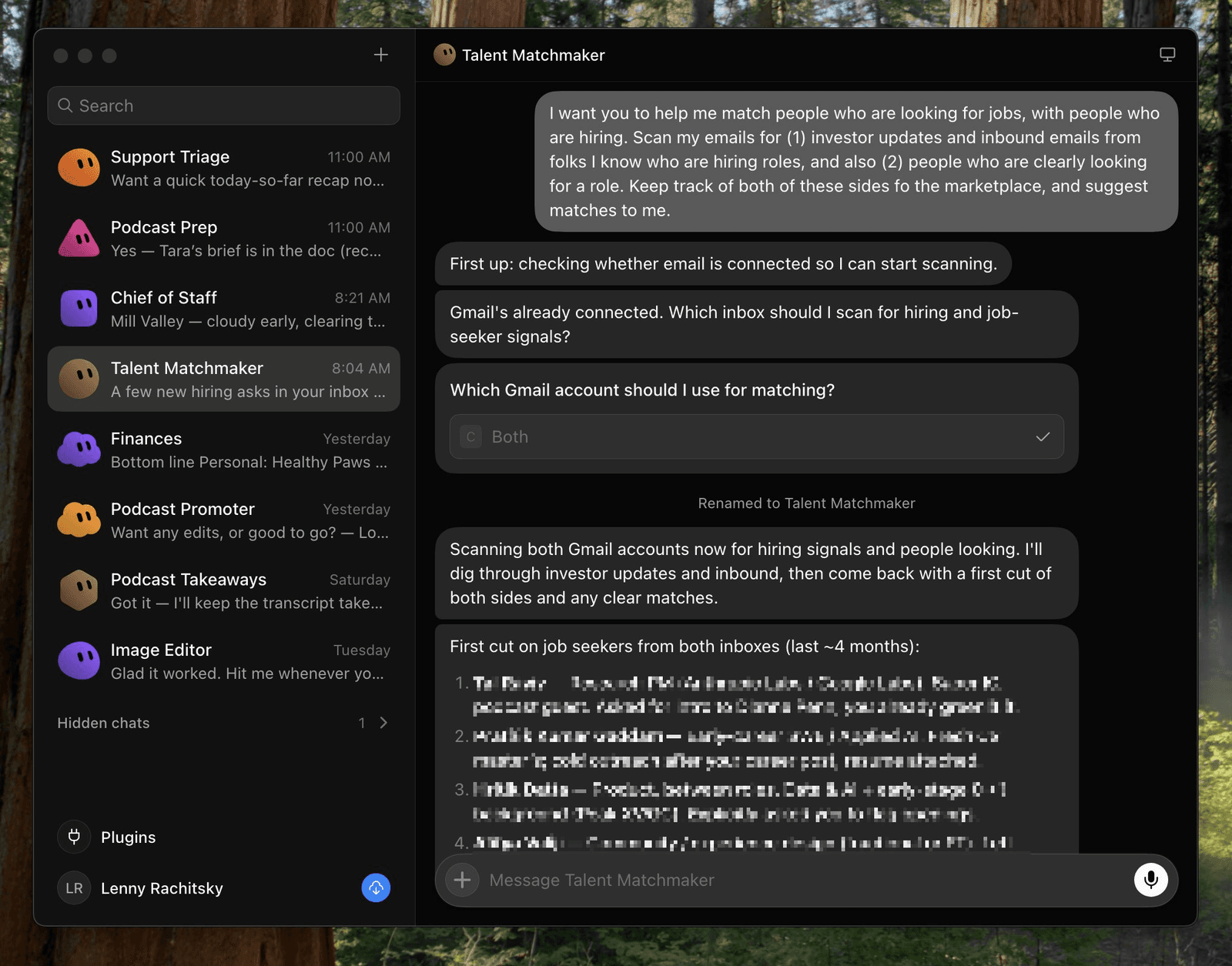
Lenny's sidebar is a personal operating system: Support Triage, Podcast Prep, Chief of Staff, Talent Matchmaker, Finances, Podcast Promoter, Podcast Takeaways, Image Editor. In the post he names four jobs that have already helped: matchmaking job-seekers with hiring companies from his inbox, auto-replying to support emails, scanning credit-card statements for subscriptions to cancel, and writing podcast-guest briefs.
Talent Matchmaker is one paragraph, not a workflow diagram. Scan both Gmails for people hiring and people looking. Keep both sides of the marketplace. Suggest matches. Gmail was already connected. The bot renamed itself and started the first cut.
This is life admin plus inbound. Not "build me a company."
2. Maxime's named specialists, with one lead who refreshes context all day (post)
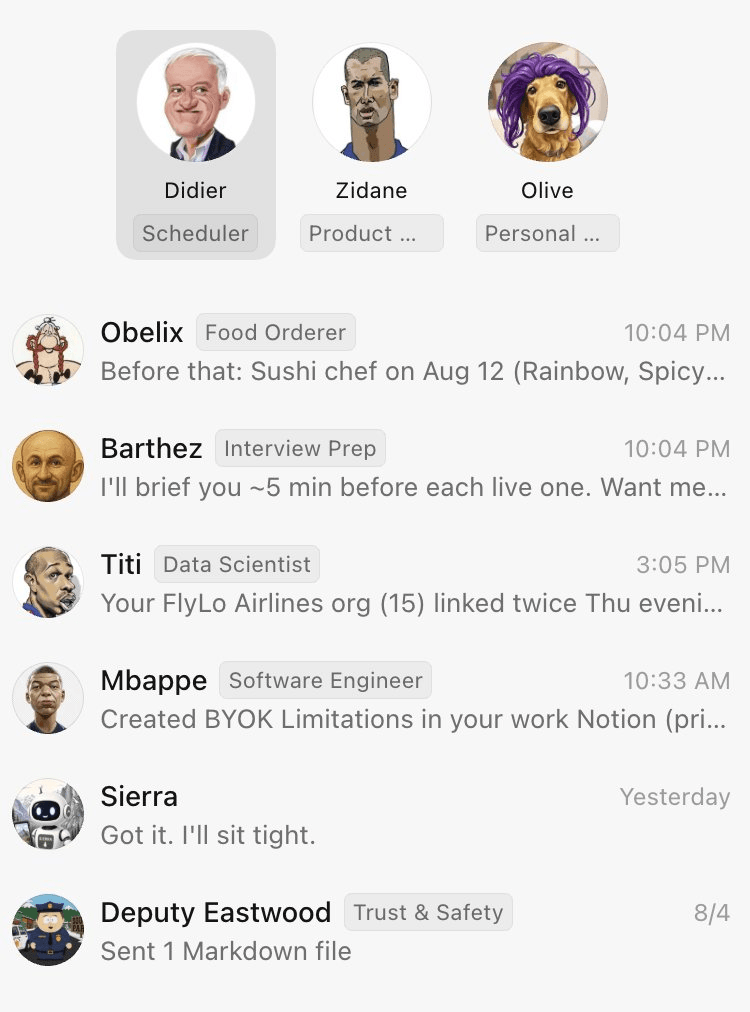
Maxime Prades leads product at SpaceXAI, so this is an insider setup. His point still holds. The more specialized he made them (custom skills, personalities, memories, routines), the more useful they got. Zidane "basically runs the team" and refreshes context on what Maxime is working on, multiple times a day.
The screenshot is a French-football org chart: Didier (Scheduler), Zidane (Product), Olive (Personal), then Obelix (Food Orderer), Barthez (Interview Prep), Titi (Data Scientist), Mbappe (Software Engineer), plus Trust & Safety. The names are a bit much. The lanes are the part I'd copy. One of them is writing to Notion.
3. n2parko's product/eng org chart (post)
Also SpaceXAI product. He says there's a learning curve, then lists the team he actually uses:
- Chief of staff: day-to-day, calendar, Slack/email
- Eng mgr: breaks down engineering work and delegates
- Eng (×5): executes, spins off and manages cloud agents
- Data analyst: his most-used bot, with warehouse access
- PM Pete: new product ideas, research, feedback, docs
This is closer to subagents than to a content calendar. Copy it if you are the PM, the eng manager, and the analyst, and you're tired of being all three. He didn't attach a screenshot. The list is the recipe.
4. Debbie's Chief of Staff designs the team (post)
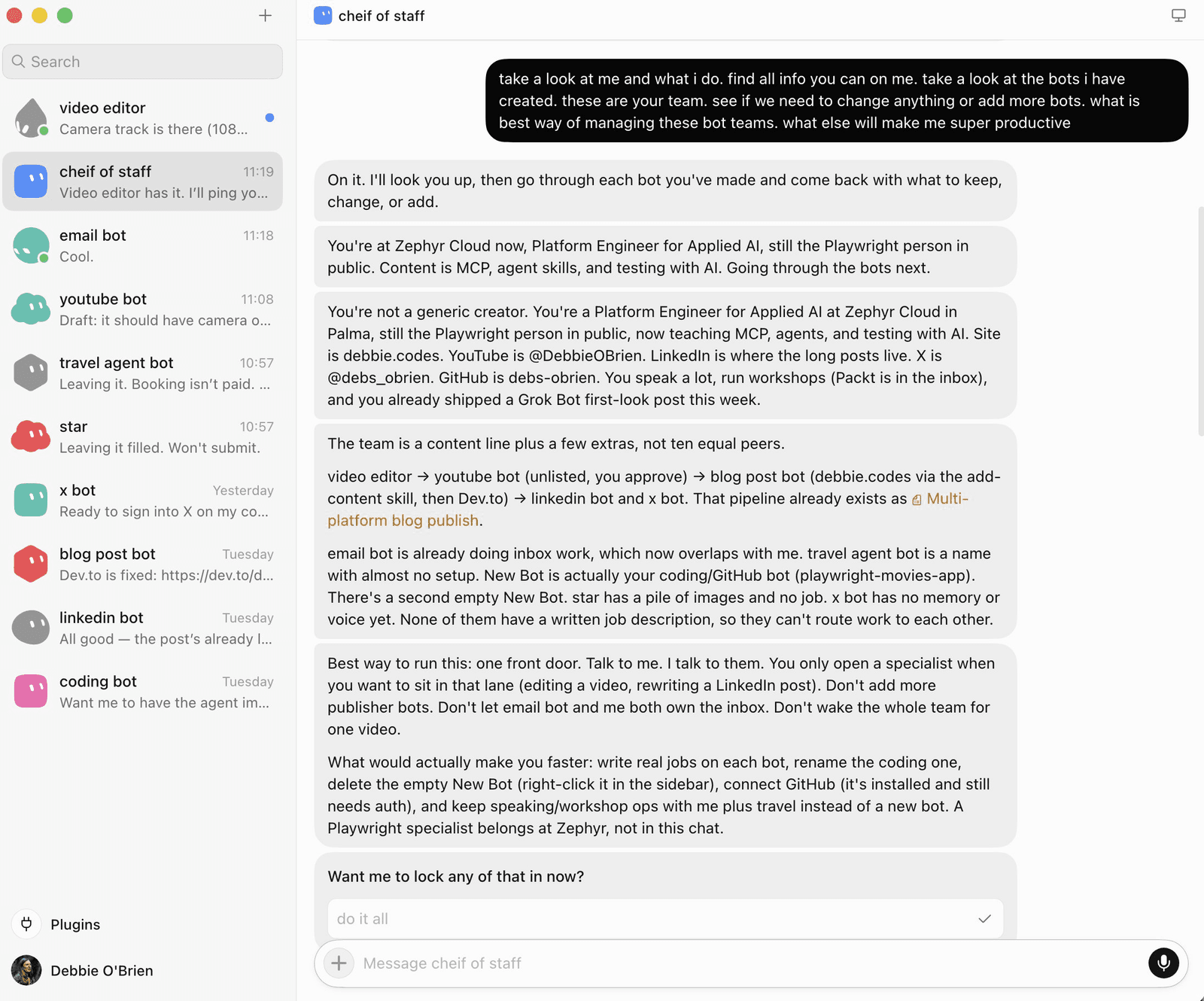
If I only kept one trick from this list, it would be this. Debbie already had a content pipeline of bots (video editor → YouTube → blog → LinkedIn / X) plus email, travel, coding. She made a Chief of Staff and asked it to research her, inspect the roster, and propose how to manage it.
The CoS came back with an org review: overlapping duties between email bot and itself, empty unnamed bots, missing job descriptions, GitHub not connected, and a recommendation to use CoS as the single front door. It even mapped her content pipeline as a skill. Then it asked, "Want me to lock any of that in now?"
Do this after you have 3+ bots, or whenever the sidebar looks messy.
5. Farzad's content studio under a Master orchestrator (post)
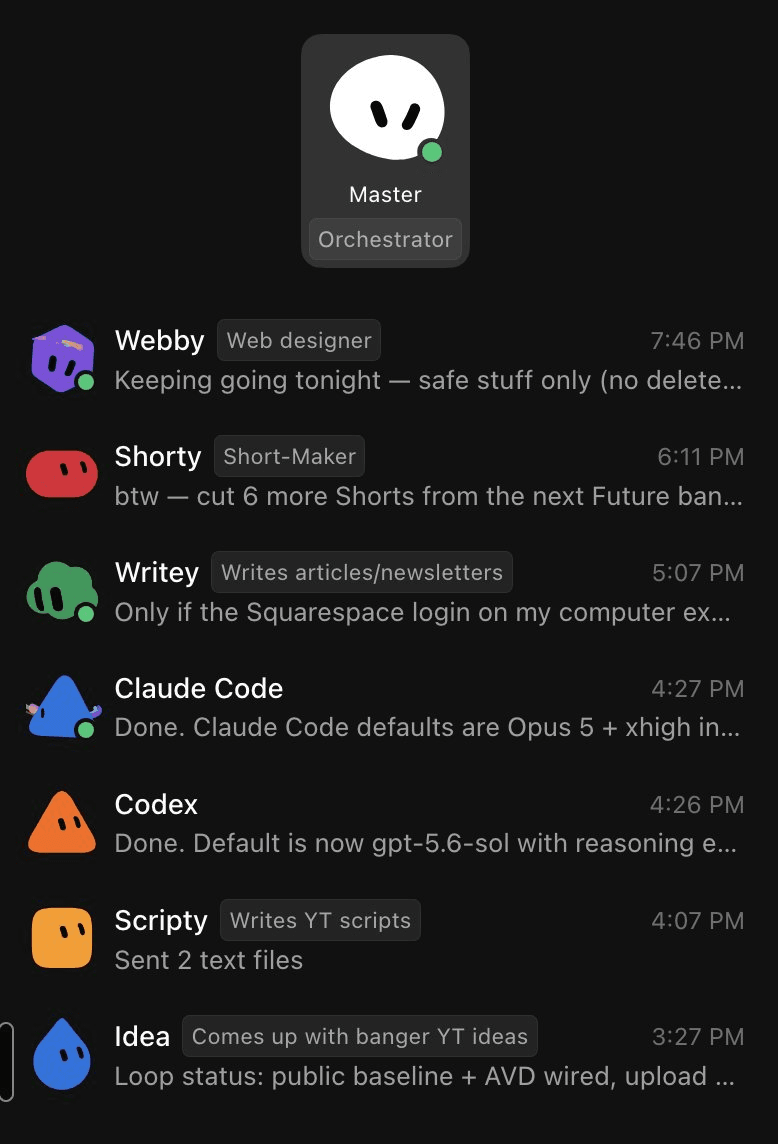
Creator version of Maxime's org. Master (Orchestrator) sits on top. Under it: Webby (web designer), Shorty (short-form), Writey (articles/newsletters), a Claude Code specialist, a Codex specialist, Scripty (YouTube scripts), Idea (video ideas). Farzad's line: "SUPER easy to spin these up and get them working."
He split Claude Code and Codex into two bots instead of one "coding" blob. Same rule as everywhere else. One tool-shaped job, one bot. This is the one I'd steal for a content week that also has light building.
6. Derya's two-dozen science swarm (post)
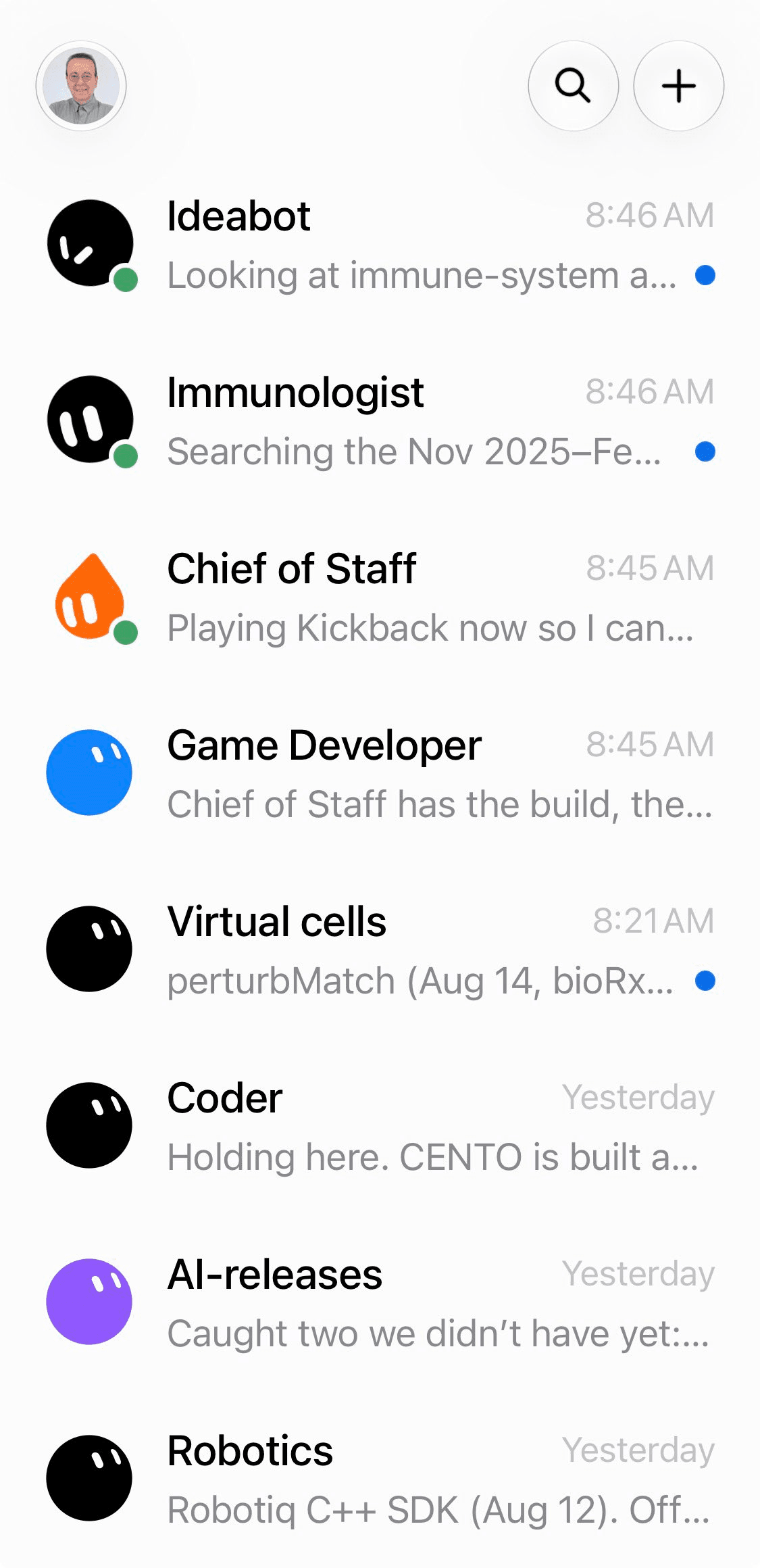
Derya Unutmaz is running about 24 bots and says he's barely started. Visible in the screenshot: Ideabot, Immunologist, Chief of Staff, Game Developer, Virtual cells, Coder, AI-releases, Robotics. They work interactively. His own caveat: "still challenge to coordinate the orchestra to be in sync."
This is what a research lab looks like when every topic gets an owner. For most people it's the warning label, not the starter pack. I would not begin here.
7. Jon's plumbing company, named like a real staff (post)
Jon ONeill owns a drain/sewer company. He says Grok Bot is generating real customers and saving him $2,000 a month. That's his claim, not an audited number.
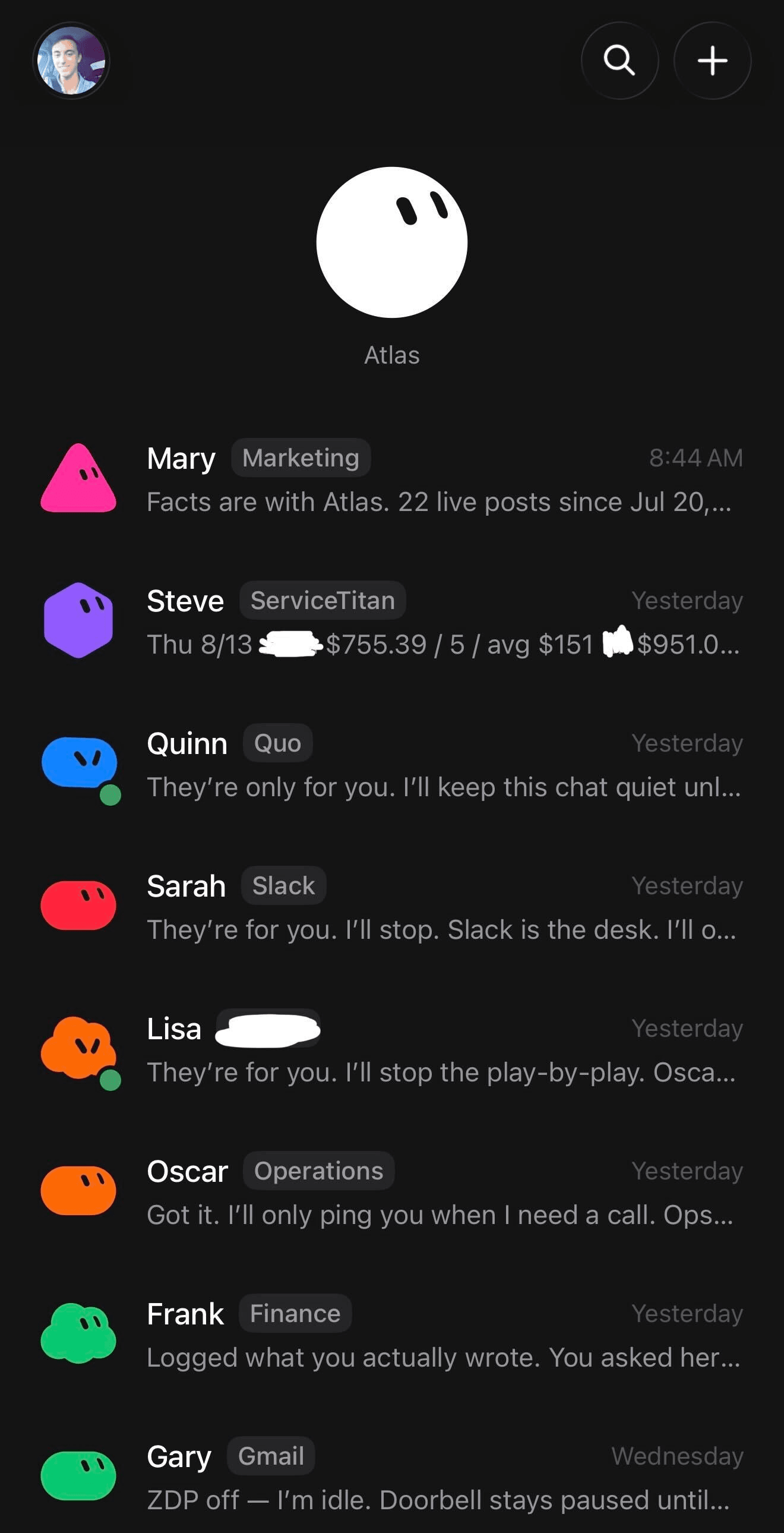
The screenshot is the part I trust more: an orchestrator named Atlas, then specialists named like employees and tied to tools. Mary (Marketing), Steve (ServiceTitan), Quinn (Quo), Sarah (Slack), Lisa, Oscar (Operations), Frank (Finance), Gary (Gmail).
If you run a local or services business, name bots after the function and the system of record. Marketing talks to Atlas. Finance does not also run Slack. Anything that reaches a customer stays on approve-then-send.
Here are some related guides to check out:
Frequently asked questions
- Can I use Grok Bot without paying for Cursor Ultra?
- Only on a short usage-credit trial, or if you already have SuperGrok Heavy or a Cursor Teams Premium seat. Cursor Pro and Pro+ do not include it, and a long agent run can burn the trial credit in one sitting. For ongoing use, plan on Ultra, Premium, or SuperGrok Heavy.
- How many Grok Bot agents should I create at the start?
- Three: a Chief of Staff, a Content bot that drafts and never posts, and a Research bot. Add a specialist only when a job repeats, because the computer and logins are shared across every bot on your account. The product cap is 50 bots and group chats combined, which is plenty, and also how people end up with a messy sidebar.
- Is it safe to connect Gmail or Slack to Grok Bot?
- Connect the plugin, sign in yourself, and put a hard rule in the bot description: drafts only, no sending, posting, paying, or deleting without approval. The cloud computer is shared across all of your bots, so treat a login as available to the whole roster, not just the bot you meant it for. Start with a briefing or a draft, not a live customer email.
- What's the difference between Grok Bot and OpenClaw?
- Grok Bot is the packaged version of the same idea: agents with a computer that can use your tools. OpenClaw is more DIY, you wire the machine, keys, and permissions. Grok Bot is a download-and-message app with plugins, a cloud computer, and a chat list of named teammates, which is why people keep calling it easier and less scary.
Want to build your first AI agent?
Build Your First Agent 101 is the next step! You'll get step by step guides, video tutorials and starter prompts to create your first agent in half a day, customized to your own workflow.
Learn more