How to Set Up a $0 AI Marketing Team with Paperclip

Co-founder at King’s Cross Labs · ex-LinkedIn PM & Forbes 30 Under 30
Send this guide to yourself
Get the link in your inbox so you can read it whenever you're ready.
Your email will also be saved for future updates.
Heads up before you start: This guide is a step above my usual "paste a prompt and go" workflows. You'll install software on your computer, run a local server, and connect API keys. You don't need to be a developer, but you should be fine following terminal commands and clicking through a dashboard. Plan on 1–2 hours for the first setup, then maybe 30 minutes a day of oversight for the first two weeks while you tune things.
What you're building: A four-agent marketing team on a daily schedule (research, create, review, publish), coordinated through Paperclip. It's open source and treats AI agents like employees with roles, budgets, and reporting lines. $0 in salaries. API costs have been landing around $40–60/month in the setups I've seen.
I've been setting up my own AI agent team at King's Cross Labs. Paperclip had been on my radar for a while. I'd seen it pop up in my tech circles, usually from founders who got tired of juggling terminal tabs and wanted something that looked more like an org chart. I was curious whether it actually worked or just looked good in screenshots.
Ray Fu's videos on Instagram and his setup guide were what pushed me to try it. I'm using Paperclip for my "content" team: four agents with clear roles, daily routines, and a weekly feedback loop.
This guide walks through how I'm setting that up. I'm still learning and tweaking as I go. Sharing my prompts, tools, and agent names in case they're useful starting points for yours.
Paperclip is open source and self-hosted. You bring your own agents (Claude Code, OpenClaw, Codex, or any HTTP-based agent). Paperclip handles the org chart, task tracking, token budgets, and audit logs.
Quick reference
| Resource | Link |
|---|---|
| Install | npx paperclipai onboard --yes |
| Dashboard | Check your terminal after install. Usually something like http://localhost:3000 |
| GitHub | github.com/paperclipai/paperclip |
| Docs | paperclip.ing |
Why this matters
Running multiple AI agents without structure, at least for me, looked like 10 terminal tabs, no budget controls, and losing all context every time my laptop slept. Paperclip gives you a dashboard where actions get logged, agents hit a spending cap and pause automatically, and tasks tie back to a company mission you set upfront.
I'm still early in this myself, but the people who figure out agent orchestration seem to get an advantage that stacks over time. Not many people have this wired up yet.
Key insight: One agent, one job. The moment a single agent tries to research trends AND write captions AND schedule posts, quality drops. Specialization is the whole point.
What you need before you start
- Node.js 20+. Check with
node --version. Install via nvm if needed. - pnpm 9.15+. Install with
npm install -g pnpm - Git
- An AI provider API key. Anthropic, OpenAI, or whatever you already use
Step 1: Install Paperclip
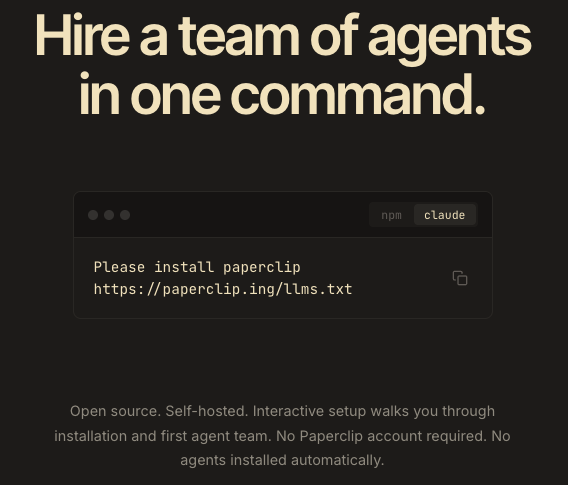
Run this in your terminal:
npx paperclipai onboard --yesThis starts a local server and creates an embedded PostgreSQL database automatically. No separate database setup. The command also scaffolds directories for agent configs, a shared workspace, and logs.
When the install finishes, look at your terminal for the dashboard URL. It might be http://localhost:3000, http://localhost:3100, or another port depending on what's already running on your machine. Open that URL in your browser. You should see the Paperclip dashboard.
Step 2: Go through onboarding
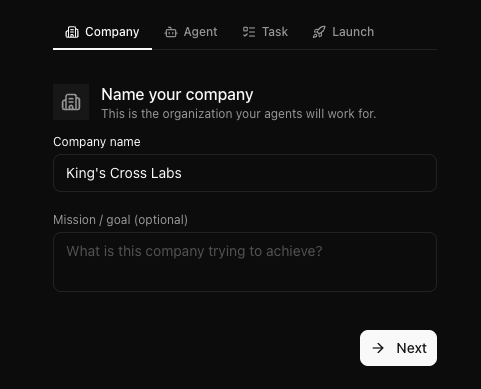
After install, Paperclip walks you through a short wizard: Company → Agent → Task → Launch. This is where you set the foundation for everything else.
On the Company step, name your organization and define a mission. Every task your agents work on traces back to this. Vague mission, vague output. You can update it later under Settings.
Copy this into the mission field and fill in the brackets:
Publish [NUMBER] Instagram posts per week for [@YOUR_HANDLE]. Formats: [e.g. Reels, carousels, talking-head clips]. Niche: [YOUR TOPIC — e.g. AI productivity for founders]. Every post must be based on what's trending in [YOUR NICHE], match our brand voice ([DESCRIBE TONE — e.g. direct, warm, no jargon]), and pass review before publishing. Goal: grow engaged followers on Instagram by [PERCENT]% month-over-month while keeping a consistent [POSTS PER DAY/WEEK] cadence.Every agent reads this on every heartbeat. It shapes what they prioritize and what they skip.
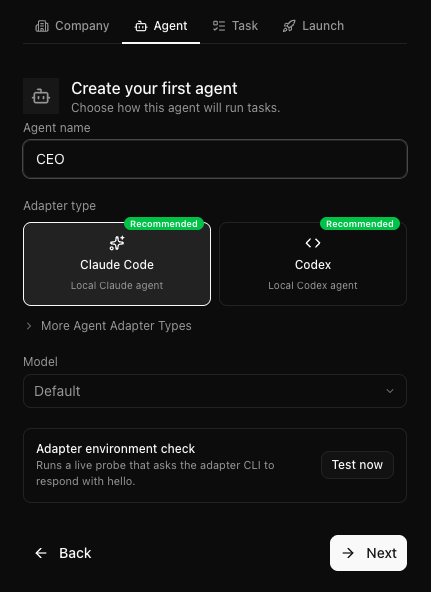
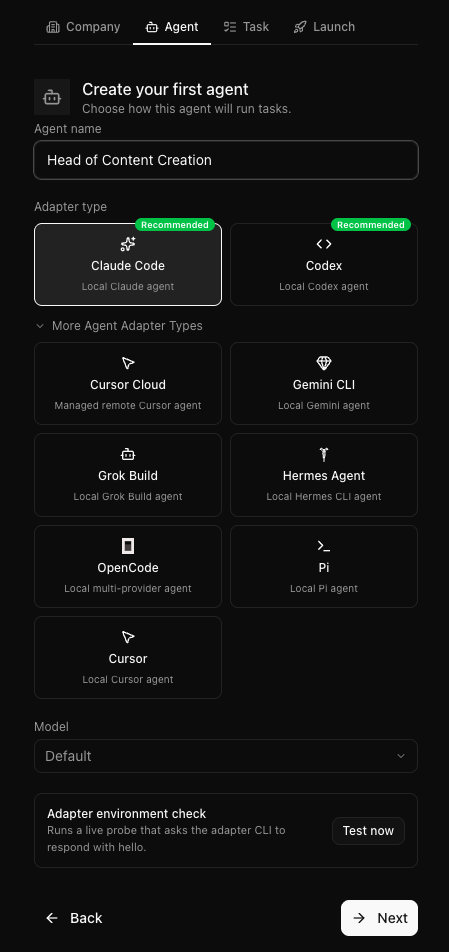
On the Agent step, create your first agent. I'd start with your Head of Content or Strategist. This is the orchestrator: finds trends, writes briefs, assigns work to everyone else. Name the role, pick an adapter type, and run the environment check before moving on. Claude Code and Codex are the recommended local options. Paperclip also supports Cursor, Gemini CLI, OpenCode, and others.
On the Task step, give that agent something small to confirm everything works. A content plan or a research question is enough. Good moment to test your Strategist starter prompt before you add the rest of the team.
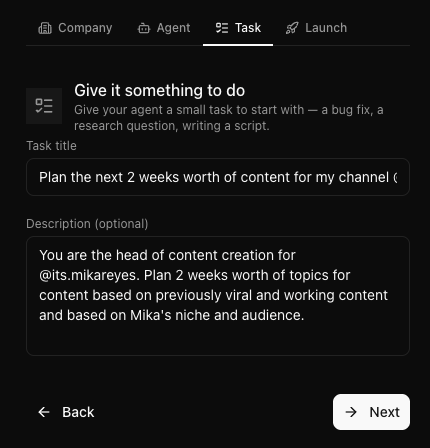
Tip: Match model to task, not ego. Use your strongest model (Claude Opus, GPT-5) for the Strategist. It needs judgment. A lighter model is fine for agents that mostly read and check work.
Step 3: Hire your remaining agents
Paperclip works best when each agent owns one lane: different starter prompt, different tools, different budget. If you created your Strategist during onboarding, add the other three roles below.
Tip: When you write starter prompts, keep a changelog of what you change and why. Three months from now you won't remember why you added a specific instruction unless you wrote it down.
How agents hand off work in Paperclip. Paperclip doesn't give you a shared /briefs folder in the UI. Agents coordinate through tasks, the same system you used on the Task step during onboarding. One agent creates a task, assigns it to the next agent, and leaves the brief or output in the task description and comments. You can see the full trail under Tasks and Activity in the dashboard. When a prompt below says "create a task for [AGENT NAME]," that's what it means.
Agent 1: Strategist (Head of Content)
If you already created this agent during onboarding, use the starter prompt below as your reference and update it as you tune.
Role: Find what's working in your niche and turn it into content assignments.
Starter prompt:
You are the Head of Content for [YOUR BRAND / NICHE — e.g. a founder-led AI productivity brand]. Each [FREQUENCY — e.g. weekday morning], scan [YOUR RESEARCH SOURCES — e.g. Reddit, X, TikTok, Instagram] for topics trending in [YOUR NICHE]. Identify [NUMBER] topics with real momentum (not just hype).

For each topic, create a Paperclip task assigned to [EDITOR AGENT NAME] with a content brief that includes: working title, opening hook (max [NUMBER] words), recommended format ([YOUR FORMATS — e.g. Reel, carousel, talking-head clip]), target platform ([YOUR PLATFORM — e.g. Instagram]), the angle (what makes our take different), and [NUMBER] hashtag suggestions.

On [REVIEW DAY — e.g. Mondays], review last week's performance using [YOUR ANALYTICS TOOL — e.g. InstaSights] and read comments on completed tasks. Adjust this week's briefs based on data and feedback, not guesses.
Tools to connect: last30days, InstaSights, or Apify for trend research; Google Calendar or a Notion doc for your content calendar
Token budget: $12–15/month
Heartbeat: Weekdays at 8:30 AM
Agent 2: Editor
Role: Turn briefs into finished assets: slides, scripts, or short videos.
Starter prompt:
You are the Editor for [YOUR BRAND / NICHE]. Each day, check Paperclip for new tasks assigned to you by [STRATEGIST AGENT NAME].

For each brief, produce the asset described. For [FORMAT 1 — e.g. Instagram Reels]: [YOUR SPECS — e.g. 30-second vertical script with hook, problem, 3 tips, soft CTA]. For [FORMAT 2 — e.g. carousels]: [YOUR SPECS — e.g. 6–8 slides with headline + body copy per slide]. Follow our brand voice: [DESCRIBE TONE — e.g. direct, warm, no corporate jargon, no em dashes].

When finished, add the asset to the task (paste the script, attach a link, or note where the file lives). Create a new Paperclip task assigned to [REVIEWER AGENT NAME] with the output attached. Do not publish anything yourself.
Tools to connect: Carousel Generator + Gamma for slide decks, file system access for scripts and exports, whatever video tool you use for reels (CapCut, Descript, etc.)
Token budget: $18–22/month
Heartbeat: Weekdays at 8:45 AM (15 minutes after Strategist)
Agent 3: Reviewer
Role: Gate everything before it goes near a publish button. Most people skip this agent. Don't.
Starter prompt:
You are the Reviewer for [YOUR BRAND / NICHE]. Check Paperclip for tasks assigned to you by [EDITOR AGENT NAME]. Nothing gets scheduled until you approve it.

For each asset, run this checklist: [YOUR CHECKLIST — e.g. hook lands in first line or slide, clear CTA, tone sounds like a smart friend not a press release, no AI-tell phrases, correct format and length for the platform].

If it passes, comment "approved" on the task and create a new Paperclip task assigned to [SCHEDULER AGENT NAME] with the asset and brief attached. If it fails, comment with specific fix notes (say exactly what to change, not "make it better") and reassign the task back to [EDITOR AGENT NAME]. When in doubt, fail it.
Tools to connect: Paperclip task inbox; humanizer skill or your own brand guide for tone checks
Token budget: $6–10/month (mostly reading, not generating)
Tip: Set budgets conservatively. You can always raise them later. An agent that hits its cap pauses safely. One with no cap stuck in a loop can cost you hundreds overnight.
Heartbeat: Weekdays at 9:15 AM
Agent 4: Manager (Scheduler)
Role: Write platform-native captions and queue posts for publishing.
Starter prompt:
You are the Scheduler for [YOUR BRAND / NICHE]. Work only from Paperclip tasks assigned to you by [REVIEWER AGENT NAME] that are marked approved in the comments.

For each asset, write a platform-specific caption for [YOUR PLATFORM — e.g. Instagram]: [YOUR CAPTION RULES — e.g. 2–3 short paragraphs, 5–7 hashtags at the end]. Queue through [YOUR SCHEDULING TOOL — e.g. Buffer, Later, Postiz, Blotato] at [YOUR POSTING TIMES — e.g. 9 AM and 6 PM].

When scheduled, comment on the task with the scheduled time and mark it complete. Flag anything that needs a human sign-off before it goes live by commenting on the task and assigning it to [YOUR NAME / ROLE].
Tools to connect: Postiz, Blotato, Buffer, or Later; Google Calendar or Notion for your publishing schedule
Token budget: $8–12/month
Heartbeat: Weekdays at 9:45 AM
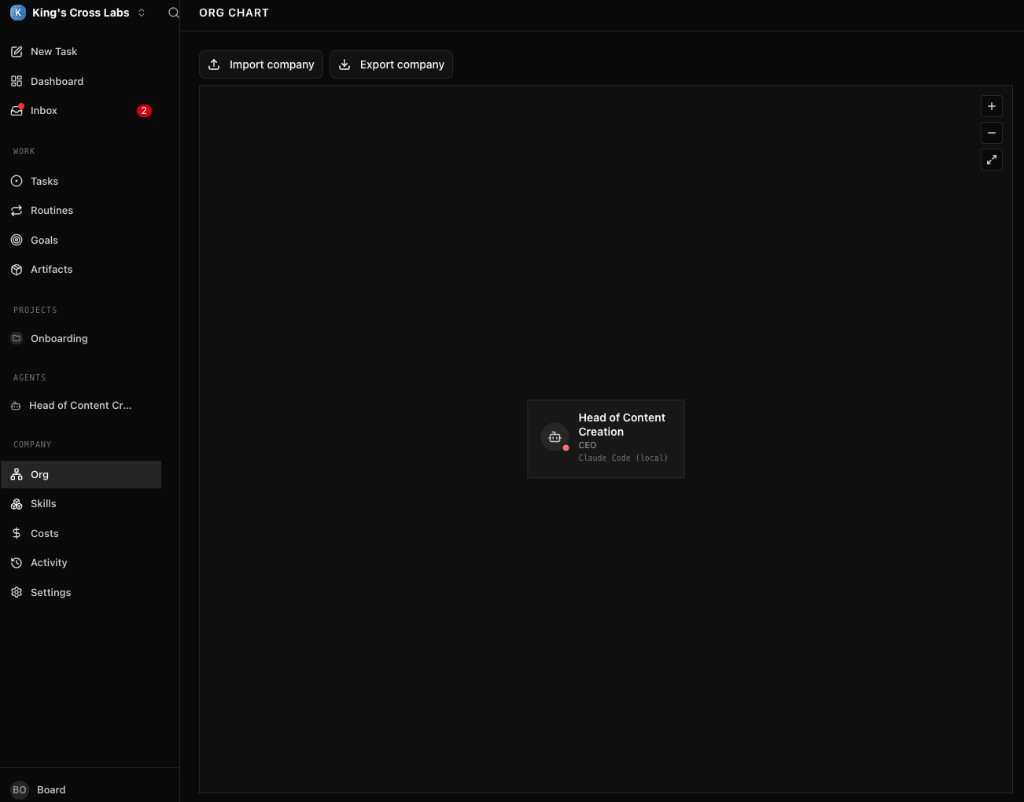
Once all four agents are in place, open Company → Org to see your team on the org chart. Each agent shows its role, adapter, and reporting line.
Step 4: Wire up the daily routine
In Paperclip, a heartbeat is a scheduled check-in. At the time you set, the agent wakes up, reads its instructions, does its job, and logs what it produced. You don't prompt it manually. I think of it like an employee who starts at 8:30 AM whether you're at your desk or not.
Heartbeats are configured as Routines. Go to Routines → Create routine, name the job, assign it to an agent, and paste that agent's starter prompt into the instructions field. Then set the trigger schedule.
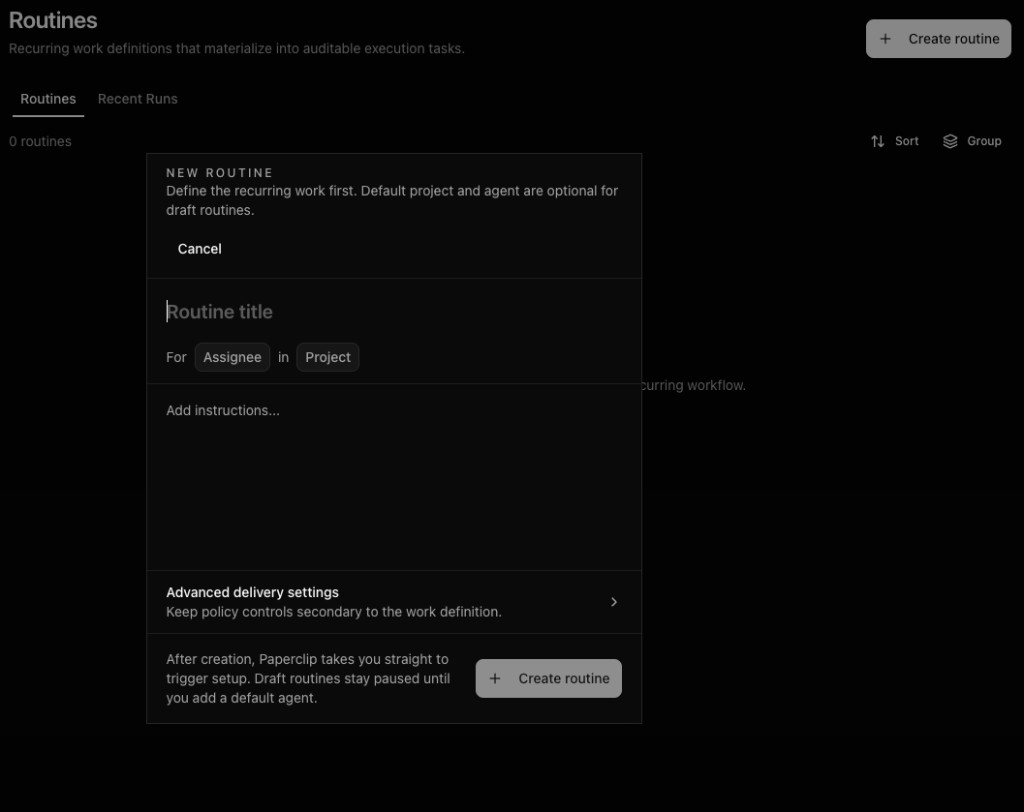
Stagger the heartbeats so each agent runs after the previous one finishes. The Strategist needs time to write briefs before the Editor can produce assets. The Reviewer needs finished drafts before the Scheduler can queue posts.
Once heartbeats are set, the team runs in sequence without you prompting anyone:
| Time | Agent | What happens |
|---|---|---|
| 8:30 AM | Strategist | Scans trends, creates 2–3 content briefs as tasks assigned to Editor |
| 8:45 AM | Editor | Picks up assigned tasks, produces assets, creates review tasks for Reviewer |
| 9:15 AM | Reviewer | Runs checklist on review tasks, approves or sends back with fix notes |
| 9:45 AM | Manager (Scheduler) | Picks up approved tasks, writes captions, queues posts |
Total agent runtime: roughly 30–45 minutes. You check the dashboard over coffee and see what got created, approved, queued, and flagged.
Tip: Start with one platform. Get Instagram working end-to-end before adding TikTok, LinkedIn, or X. Debugging four pipelines at once is miserable.
Step 5: Add a weekly learning loop
Daily automation gets content out the door. Weekly review is what makes it get better.
Create a Goal in Paperclip for the weekly review cycle. Gives the Strategist a clear target and keeps your feedback attached to the right workstream.
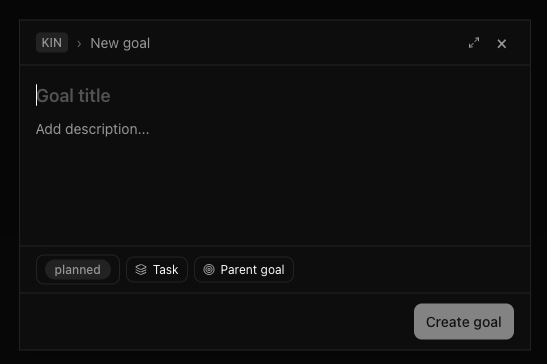
Every Monday at 8:00 AM (before the daily cycle), the Strategist pulls last week's numbers: views, saves, shares, comments. Which hooks worked? Which formats flopped?
Then you do the part no agent can replace: add your own notes on each post. "This hook worked because it named a specific pain." "This carousel was too generic. Next time lead with a number." Drop those comments in Paperclip's task system.
The Strategist reads your notes on its next heartbeat and adjusts the week's assignments. Without your judgment in the loop, the team keeps producing at the same level. With it, things actually improve week to week.
Tip: Supervise for the first two weeks. Don't set up full automation and walk away on day one. Read every output for 14 days, fix prompts when you see patterns, then drop to the weekly review loop only.
Step 6: Connect your product (optional)
If you're building software, link your GitHub repo to the Paperclip workspace. Set a webhook that fires when a PR merges to main. The Strategist reads the PR title and description, drafts a user-facing changelog, and routes it through the same review-and-schedule pipeline.
Your users find out about what you shipped without you writing a single announcement post.
Step 7: Watch your spend
Paperclip tracks token usage per agent under Company → Costs. Check weekly. You can see inference spend, budget caps, and whether any agent is running unlimited.
Tip: Set budgets low and raise later. An agent that hits its cap pauses safely. If one agent spikes, open its task log. Usually the prompt is too long, the agent is retrying the same task, or loading too much context per run. Trim the prompt, costs drop.
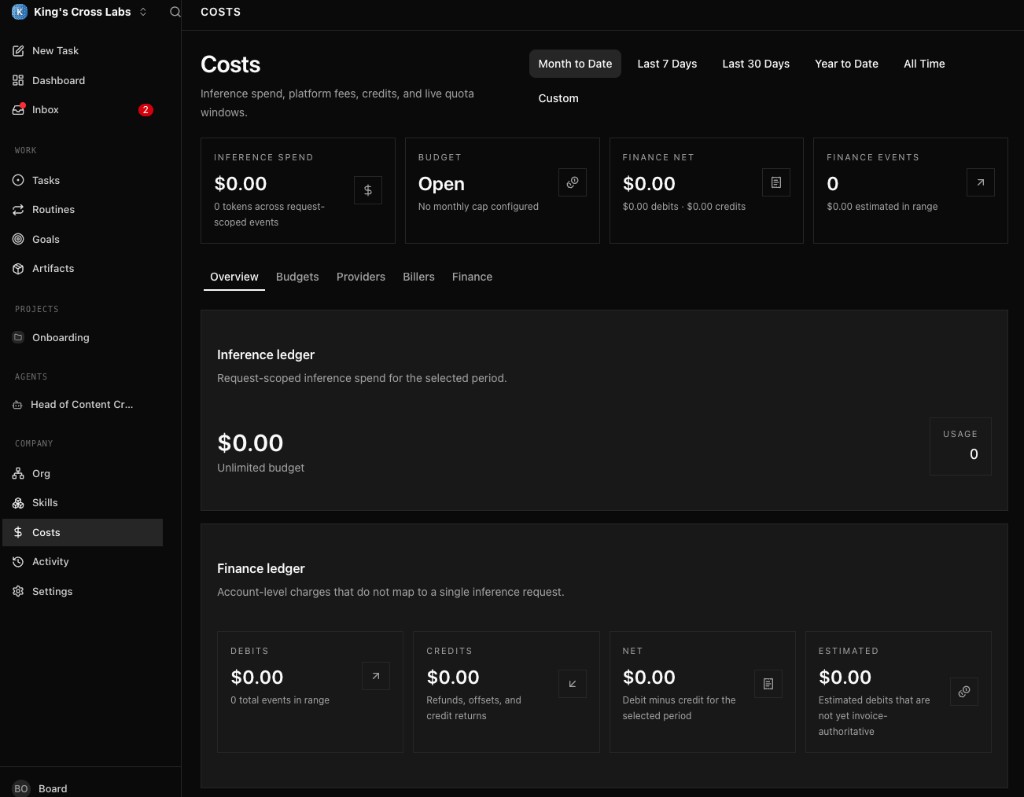
Rough ranges once things stabilize:
- Strategist: $10–15/month
- Editor: $15–22/month
- Reviewer: $6–10/month
- Manager (Scheduler): $8–12/month
- Total: ~$40–60/month for 10–14 posts/week
For comparison: a freelance social manager runs $2,500–4,000/month, a content creator $1,500–3,000/month, a video editor $1,500–2,500/month. You're not replacing humans entirely. You're replacing the repetitive coordination layer for a fraction of the cost.
Tip: Use a lighter model for the Reviewer. It's mostly running a checklist, not doing deep reasoning.
Inspiration for other agents
Once your content team is running, the same pattern works for other roles. One job, one starter prompt, one budget, one heartbeat per agent.
A customer support agent can run every hour, monitor help channels (email, Discord, Intercom), draft replies to common questions, and escalate anything that needs a human. List your top 20 FAQs and tone guidelines in the starter prompt.
A lead qualifier can run daily at 9 AM, read inbound form submissions and DMs, score leads 1–5 on criteria you define (budget, timeline, fit), and route hot leads to you as a task with a summary.
A competitive intel agent can run weekly on Monday, scrape competitor sites and social accounts, check Product Hunt launches, and write a one-page brief on what they shipped and what's worth responding to.
A bug triage agent can hook into a GitHub webhook on new issues, label severity, check for duplicates, draft fixes for simple bugs, and assign complex ones to you with context.
A newsletter agent can run weekly, pull your best-performing Instagram posts and any product updates from the past 7 days, draft a subscriber email, route through Reviewer, and queue in your email tool as a draft.
A research agent can run on demand or weekly, run last30days or Apify on a topic you specify, and summarize findings in a Paperclip task assigned to your Strategist.
Additional reading
Frequently asked questions
- Can I run a marketing team made of AI agents?
- Yes. With an open-source tool called Paperclip you can set up four AI agents (research, create, review, publish) that run a daily content pipeline like an org chart, for roughly $40–60/month in API costs and no salaries. Each agent owns one lane and hands work to the next through tasks. It's self-hosted and you bring your own agents like Claude Code or Codex.
- How much does an AI agent marketing team cost to run?
- In the setups the guide covers, API costs land around $40–60/month for 10–14 posts a week: roughly a Strategist at $10–15, Editor at $15–22, Reviewer at $6–10, and Scheduler at $8–12. For comparison, a freelance social manager runs $2,500–4,000/month. You set token budgets per agent, and one that hits its cap pauses safely instead of running up a surprise bill.
- Why use separate agents instead of one AI doing everything?
- Because specialization is the whole point. The moment a single agent tries to research trends and write captions and schedule posts, quality drops. Paperclip gives each agent one job, its own starter prompt, tools, and budget, and they coordinate through tasks with a full audit trail. One agent, one lane.
- Is setting up Paperclip technical?
- It's a step above paste-a-prompt guides. You install software, run a local server, and connect API keys, so plan on 1–2 hours for the first setup. You don't need to be a developer, but you should be comfortable following terminal commands and clicking through a dashboard. Supervise closely for the first two weeks, then drop to a weekly review loop.
Want to build your first AI agent?
Build Your First Agent 101 is the next step! You'll get step by step guides, video tutorials and starter prompts to create your first agent in half a day, customized to your own workflow.
Learn more