What is a Skill?

Co-founder at King’s Cross Labs · ex-LinkedIn PM & Forbes 30 Under 30
Send this guide to yourself
Get the link in your inbox so you can read it whenever you're ready.
Your email will also be saved for future updates.
I kept re-explaining myself to Claude.
Every time I wanted to write a LinkedIn post, I'd paste in my voice doc, my audience notes, my hook examples. Every. Single. Time. And every time it worked great, but I was doing all the remembering. I was the machine.
Then I set up a content Skill and everything changed.
Where do Skills fit?
You've probably heard that AI is only as good as the context you give it. Context is everything the AI knows about you and the task before it starts working.
There are a few ways to give Claude that context:
A long prompt with everything in it. Works fine. But now you need a prompt library and you're copy-pasting constantly.
A text file you upload before each conversation. Faster. You store your instructions somewhere and hand them over when needed.
A Project in Claude where your files live and every new chat inside that project inherits them. Much better. But you have to open the right project every time.
Skills. All of the above, except it activates on its own.
That last part is the whole thing. You don't invoke a Skill. It invokes itself. Claude recognizes what you're trying to do and pulls in the right knowledge automatically, in any conversation.
The Neo moment
Think about the scene in The Matrix where Neo gets kung fu uploaded directly into his brain. He blinks, and then he just knows it.
Skills work exactly like that. You build a knowledge package: your instructions, your best practices, your examples, your specific guidance for a task. You upload it to Claude's Skills section. And from that point on, Claude just knows it. No uploads, no reminders, no "read this file first." It's already there.
The difference between Skills and every other method is the "anywhere, anytime, automatically" part. Projects are tied to a project. Prompts are tied to wherever you saved them. Skills travel with you across every single conversation you have.
Key insight: Context files need you to say "read my file first" every time. Projects need you to open the right one. Skills just work.
The part that made it real for me
I create a lot of content. Instagram scripts, LinkedIn posts, carousels, email newsletters. Different formats, different platforms, different hooks.
At some point I realized I could stop being the one who remembers what works.
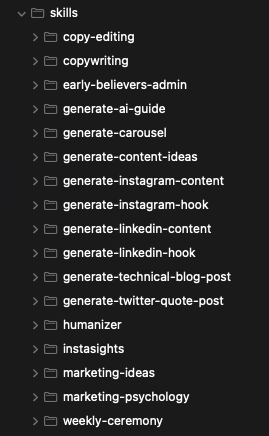
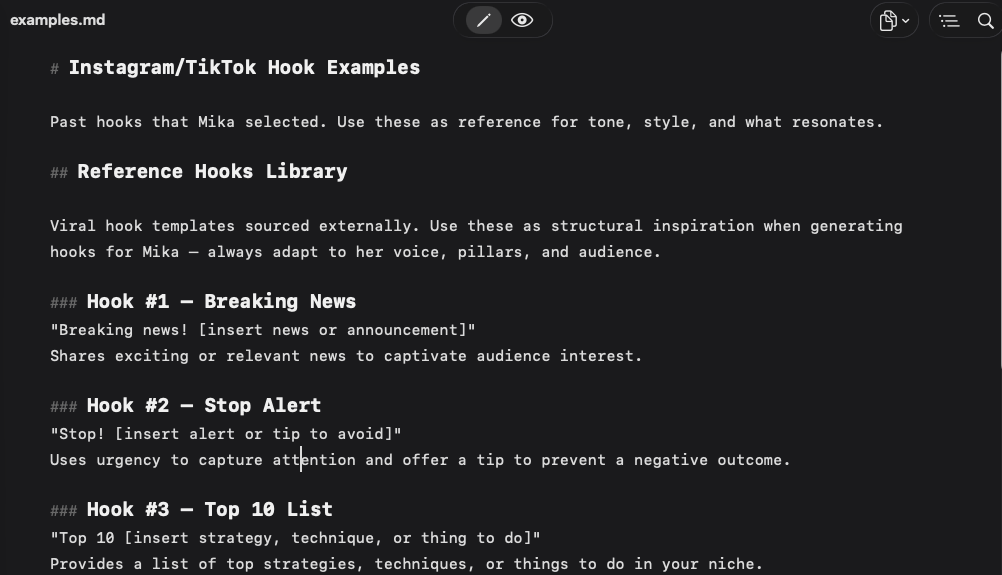
Here's how my content Skill works now: I use it to brainstorm hooks. I make the video. I watch which hooks get traction and which ones flop. The winners go into an examples.md file that my Skill references. The next time I generate hooks, it's already learned from what worked last time.
The Skill compounds. Every piece of content I create teaches it something. Every good hook I add makes the next round of hooks better. I'm not starting from scratch anymore. I'm building on top of everything I've already figured out.
That's what I mean when I say Skills are machines that get smarter the more you use them. You're not just saving time today. You're investing in something that gets more valuable over time.
The actual problem with Skills (and why I wrote this)
Anthropic's official guide for Skills reads like it was written for software engineers. Which, to be fair, it was.
There are code blocks. There's technical jargon. The entire thing assumes you know what a markdown file is and how to structure a system prompt.
But I want to make AI accessible for people who don't have a technical background. So I'm making this guide for anyone to understand what Skills are and how to use them!
What I actually use Skills for
My most-used Skills right now:
/weekly-ceremony fires every Sunday and runs my planning ritual: reviewing the week, setting intentions, checking in on the journey to $1M.
/daily-briefing starts my mornings with a calendar overview, GTM and AI news, and content ideas for Instagram and LinkedIn.
/weekly-standup preps Nick and I for our Monday founder sync at King's Cross Labs.
/content-generator is the compounding machine. It knows my voice, my audience, my formats, and every hook I've tested. It gets smarter every time I use it.
None of this requires any code. These are instructions, examples, and preferences wrapped in a slash command.
Where to start
If you keep re-explaining the same things to Claude, start here. Write down what you always have to say, turn it into a Skill, and test it on the task you do most often. One well-built Skill is worth a month of copy-pasting.
If you already use Claude Projects, do this next. Take the context files you've built and convert your best one into a Skill so it works everywhere, not just inside that project.
If you create content regularly, this one compounds the fastest. Build a content Skill with your voice doc and a few hook examples, then feed it every time something performs well. Watch what happens after 30 pieces of content.
Additional Reading
Here are some related guides to check out:
Frequently asked questions
- What is a Claude skill?
- A skill is a knowledge package (your instructions, best practices, and examples for a task) that you upload to Claude once, and from then on Claude pulls it in automatically whenever it recognizes you're doing that task. The key difference from other methods is that it activates itself: you don't invoke a skill, it invokes itself, in any conversation. Think of the Matrix scene where Neo gets kung fu uploaded: you build the package once and Claude just knows it.
- How is a skill different from a prompt or a project?
- A long prompt works but means constant copy-pasting; a project keeps your files in one place but you have to open the right one every time. A skill is all of that except it activates on its own and travels with you across every conversation, no "read this file first" needed. Context files need you to remember them; skills just work.
- Why do people say skills "compound"?
- Because a good skill gets smarter the more you use it. My content skill brainstorms hooks, I publish and watch what performs, the winners go into an examples file the skill references, and the next round of hooks is already better. You're not starting from scratch each time; every use teaches it something, so you're investing in something that gets more valuable over time.
Want to build your first AI agent?
Build Your First Agent 101 is the next step! You'll get step by step guides, video tutorials and starter prompts to create your first agent in half a day, customized to your own workflow.
Learn more