7 New Creative Tools as Claude Connectors

Co-founder at King’s Cross Labs · ex-LinkedIn PM & Forbes 30 Under 30
Send this guide to yourself
Get the link in your inbox so you can read it whenever you're ready.
Your email will also be saved for future updates.
Most creative software has a learning curve that stops people before they ever start. You've been meaning to try Blender or get into Premiere for months. Between the tutorials and the interface, it never happens.
Anthropic just released connectors for 7 creative tools. The setup is a few clicks. The skill wall just got a lot shorter.
These aren't plugins that require a developer. They're official connectors built by Anthropic that let Claude communicate directly with the software. You describe what you want in plain English inside Claude, and Claude talks to the tool for you. If you've avoided creative software because of the complexity, this is for you.
The tools now connected to Claude
1. Tool: Ableton
One of the most widely used digital audio workstations. Claude can now interact with it directly, which helps producers automate repetitive parts of a session without losing flow.
2. Tool: Adobe Creative Cloud
This covers Photoshop, Premiere, Express, and 50+ apps across the Creative Cloud suite. You describe what you want in plain English, and Claude executes it inside Adobe tools.
3. Tool: Blender
Blender is free, powerful, and notoriously hard to learn from scratch. With the connector, you describe a 3D model in plain English and Claude builds the first version for you.
4. Tool: Canva
Canva gives you fast design workflows for social, slides, and marketing assets. With the connector, you can search, create, and export Canva designs through Claude.
5. Tool: Resolume Arena
Resolume Arena is used for live visuals and performance setups. The connector helps you work faster on visual directions, cues, and creative iteration.
6. Tool: SketchUp
SketchUp is used by architects, interior designers, and furniture designers. Describe a layout or concept and Claude helps create a starting model so you are not beginning from a blank canvas.
7. Tool: Splice
Splice is where music producers find royalty-free samples. With the connector, you can search Splice from inside Claude without switching contexts.
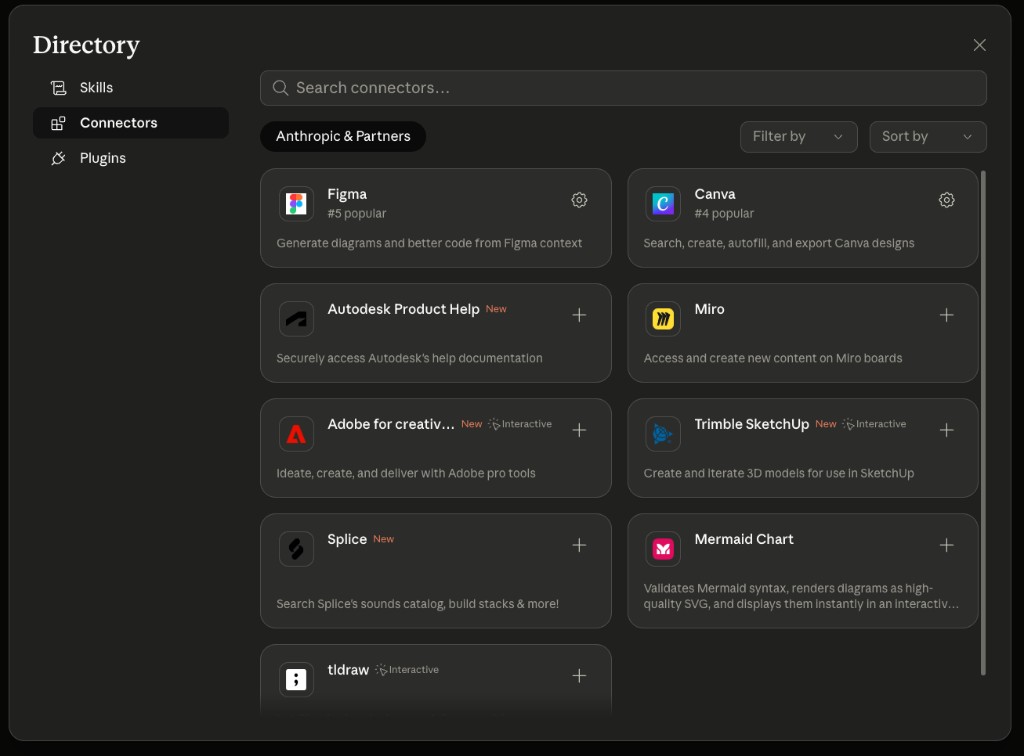
How to connect a tool
Go to Claude.
Click Customize in the top right.
Open Connectors.
Click Browse Connectors.
Search for your tool and click Add.
Additional Reading
Here are some related guides to check out:
Frequently asked questions
- What creative tools can Claude connect to?
- Anthropic released official connectors for creative software including Ableton, Adobe Creative Cloud (Photoshop, Premiere, and 50+ apps), Blender, Canva, Resolume Arena, SketchUp, and Splice. You describe what you want in plain English inside Claude, and Claude talks to the tool for you. They're official connectors, not developer plugins, so setup is just a few clicks.
- How do I connect a tool to Claude?
- Go to Claude, click Customize in the top right, open Connectors, then Browse Connectors, search for your tool, and click Add. That's the whole setup, no code required. Once added, Claude can interact with that software directly from your prompts.
- Can Claude help me use hard software like Blender without learning it?
- That's exactly the point of these connectors: they shorten the skill wall on software with steep learning curves. With Blender, for example, you describe a 3D model in plain English and Claude builds the first version, so you're not staring at a blank canvas. Same idea for SketchUp layouts, Adobe edits, and Ableton sessions.
Want to build your first AI agent?
Build Your First Agent 101 is the next step! You'll get step by step guides, video tutorials and starter prompts to create your first agent in half a day, customized to your own workflow.
Learn more