Caveman (Cut Token Usage)

Co-founder at King’s Cross Labs · ex-LinkedIn PM & Forbes 30 Under 30
Send this guide to yourself
Get the link in your inbox so you can read it whenever you're ready.
Your email will also be saved for future updates.
Caveman Claude Code sounds like a joke, but it's both funny and practical.
I didn't think it would work when I first saw it. Then I tried it and started seeing the same thing others were reporting: much shorter responses and real output-token savings, often up to 75% in the right tasks.
That's the reason this took off. It's not just "lol Grug talk." It's a direct way to cut waste when Claude is verbose.
Why this matters
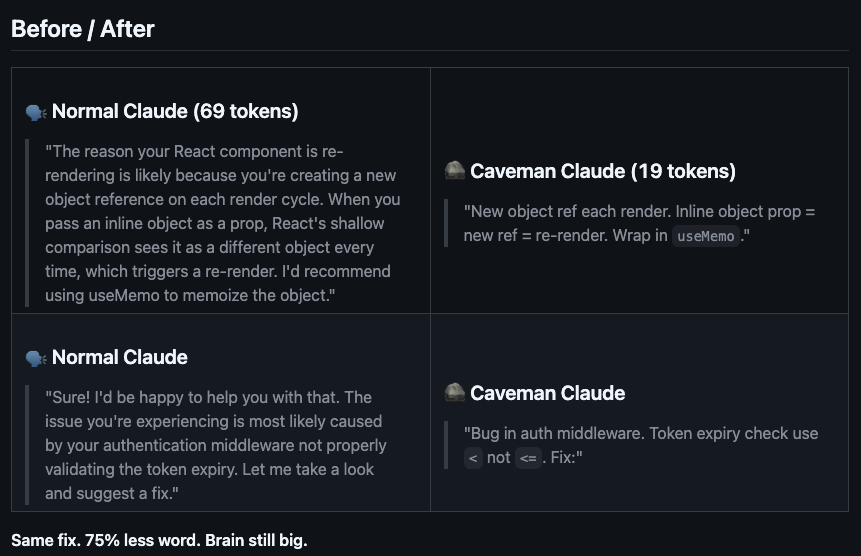
Claude Code has a token-consumption problem in everyday use. You ask for a simple function and get the code plus polite filler like "I'd be happy to help with that" or "Let me search the web for you."
Those pleasantries add up across many turns. Caveman is helpful because it strips that layer out and pushes Claude to do the task first, give the result, and stop.
A few examples from the discussion you shared make the impact concrete:
- normal Claude for a web-search task: ~180 tokens
- Caveman Claude for the same task: ~45 tokens
- "I executed the web search tool": ~8 tokens
- "Tool work": ~2 tokens
Each tiny wording change is small on its own. Across a full workflow, those swaps can save 50-100 tokens repeatedly.
How Caveman started
I first saw it on Reddit and scrolled past because it looked like another meme project. Later, it had around 10,000 upvotes and people were posting real usage results.
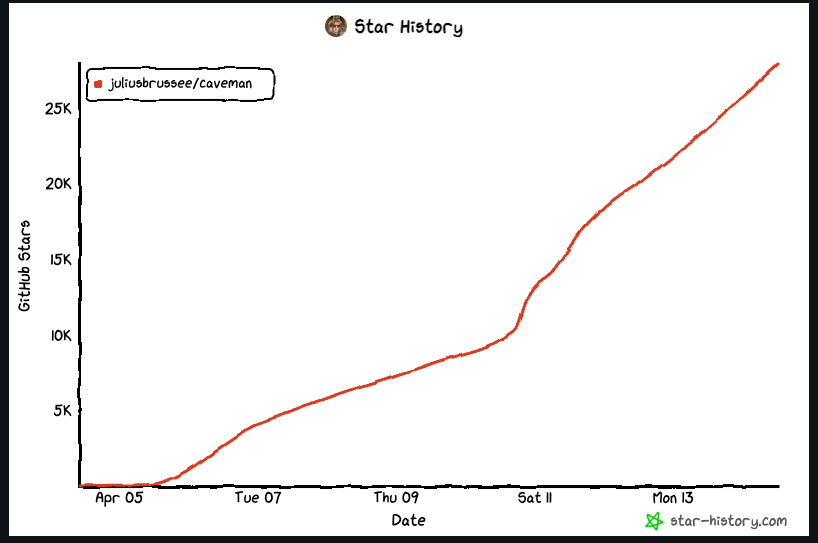
Julius Brussee packaged the idea into an installable skill at github.com/juliusbrussee/caveman. It quickly passed 5,000 stars and hit #1 trending.
There was even a link in the repo to a March 2026 paper suggesting concise response constraints can reduce token usage and sometimes improve accuracy. That gave the meme some technical weight.
Why Caveman cuts tokens
The mechanism is simple: remove ceremony.
Normal assistant style includes setup language, transition language, status narration, and optional explanation by default. Caveman rewrites the style policy so the model prioritizes:
- short sentences (often 3-6 words)
- no filler or preamble
- tool first, result first
- no explanation unless requested
Key insight: Caveman is best as a style optimization for verbose replies, not a complete cost optimization strategy.
This style constraint does not change pricing itself. It changes output length, and output length directly affects output-token spend.
What the Reddit thread got right
Here's the Reddit thread: reddit.com/r/ClaudeAI/comments/1sble09/taught_claude_to_talk_like_a_caveman_to_use_75
The auto-generated TL;DR across 400+ comments was basically: this is peak efficiency and hilarious.
People liked it because they are tired of wall-of-text answers. The famous line, "Why waste time say lot word when few word do trick?", captured the whole point.
But the caveats are important:
- The 75% claim is mostly about output tokens.
Total cost can still be dominated by input context (chat history, files, tool traces) re-read on every turn. - Forcing a caveman persona can reduce clarity in some cases.
You can save tokens and still lose answer quality if the task needs nuanced reasoning. - It's a practical hack, not a magic bullet.
Great for trimming response bloat, not a full fix for overall AI spend.
Where to start
- Download the skill here: github.com/juliusbrussee/caveman. You can also download the skill file to your skills folder, or copy the contents of the skill and recreate it yourself.
- Use Caveman on repetitive coding and execution-heavy tasks where verbosity slows you down. Just call
/cavemanin your prompt. - Keep normal style for tasks that need deep reasoning, nuance, or detailed teaching.
- Track both token reduction and response quality so you know where the tradeoff is worth it.
Additional Reading
Here are some related guides to check out:
How to download
Install from GitHub: github.com/juliusbrussee/caveman
Frequently asked questions
- What is the Caveman Claude Code skill?
- Caveman is a Claude Code skill that forces short, no-filler replies (think "why waste time say lot word when few word do trick") and can cut output tokens by up to 75% on the right tasks. It strips out the ceremony (setup language, status narration, polite filler) so Claude does the task, gives the result, and stops. It started as a Reddit meme and became a top-trending installable skill by Julius Brussee.
- Does Caveman actually save money on Claude?
- It reduces output tokens, which lowers output-token spend, but it's a style optimization, not a complete cost fix. Your total bill can still be dominated by input context (chat history, files, and tool traces re-read every turn) that Caveman doesn't touch. Treat it as a practical way to trim verbose replies, not a magic bullet for overall AI spend.
- When should I not use Caveman?
- Skip it for tasks that need deep reasoning, nuance, or detailed teaching. Forcing the terse caveman persona can cost you answer quality even while it saves tokens. It shines on repetitive coding and execution-heavy work where verbosity just slows you down. Track both token reduction and response quality so you know where the tradeoff is worth it.
Want to build your first AI agent?
Build Your First Agent 101 is the next step! You'll get step by step guides, video tutorials and starter prompts to create your first agent in half a day, customized to your own workflow.
Learn more