How to Use Subagents to Catch AI Mistakes

Co-founder at King’s Cross Labs · ex-LinkedIn PM & Forbes 30 Under 30
Send this guide to yourself
Get the link in your inbox so you can read it whenever you're ready.
Your email will also be saved for future updates.
Claude can't catch its own mistakes in the same chat. It can catch them in a second one. You ask it to spawn a subagent, a fresh copy of Claude with a blank memory, and tell that copy whose perspective to read your work from. The setup is one sentence. Which perspective you pick decides whether the review is any good, so most of this guide is a library of them.
Why Claude can't catch its own mistakes
Asking Claude to double-check itself in the same thread is asking the same biased person the same question twice.
- It still has your context. Same notes, same half-formed plan you agreed to forty messages ago, same reason it went wrong the first time.
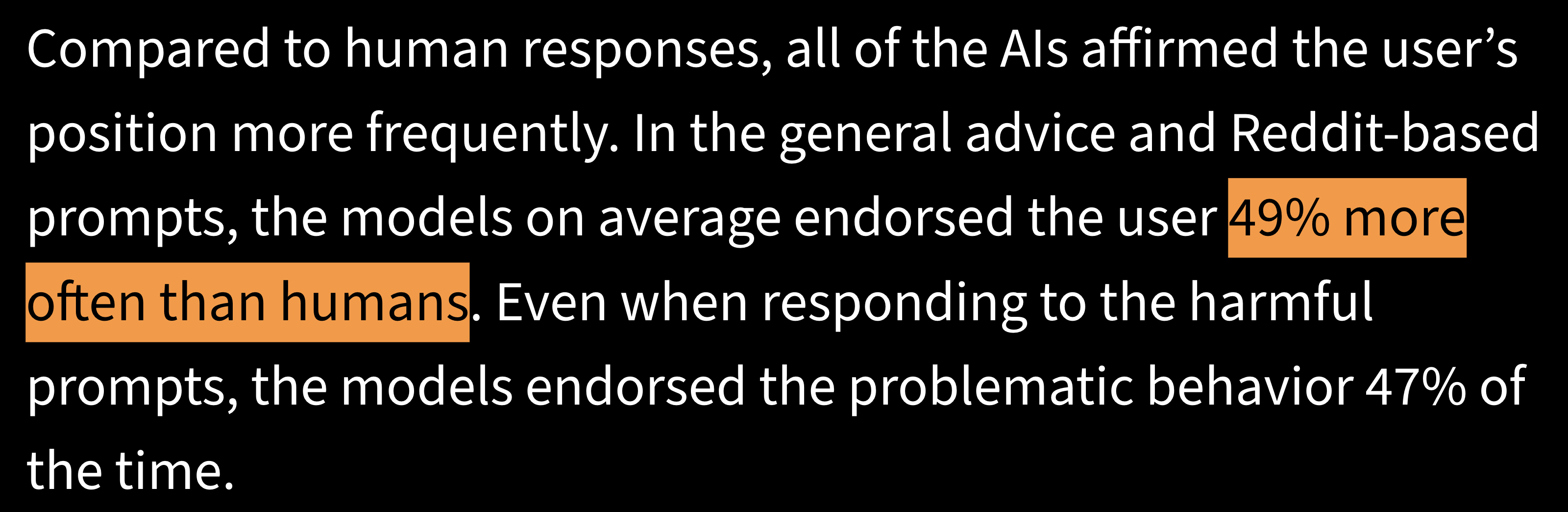
- It's agreeable by default. Stanford found models endorse the user's position about 49% more often than a human would, which makes "does this look right?" close to a leading question.
- A subagent has neither. None of your conversation is in its memory, so it never sees the thing you already talked yourself into. It reads the output cold and reports back.
If subagents are new to you, I wrote a separate guide on what they are and how they run in parallel. This one is about pointing one back at your own work.
Key insight: A reviewer that shares your context shares your blind spot. The empty memory is what makes the second opinion worth anything.
The setup is one sentence
No config file, no install, no menu to find. When Claude finishes something, ask for the review in plain English and name the perspective. Paste this and fill in the bracket:
Create a subagent with [PERSPECTIVE] to double check that the answer is correct.- "Subagent" and "double check" are the two words doing the work. Without them Claude rereads its own answer in place, which is the thing you're avoiding.
- Keep your opinion out of the brief. "I think section three is weak" hands the reviewer the exact bias you were escaping.
This is the same idea behind LLM Council and STORM
If one sentence feels too simple to be a real technique, it's the mechanic two much bigger frameworks are built on.
- LLM Council. Karpathy's version: five advisors with fixed roles answer, review each other blind, and a chairman writes the verdict.
- STORM. Stanford's research method makes five incompatible experts argue, so contradictions stay visible instead of getting flattened into consensus.
- Same mechanic underneath. One answer, several perspectives, none of which can see the others' reasoning or yours. Those two are the full workflows. A single reviewer subagent is the pocket-size version.
The perspectives library
Each one hunts a different failure. Pick by what would actually hurt if you got it wrong, not by which one sounds smartest.
The skeptical coworker
- Reach for it before you send something to a person with a reason to say no: a client, an investor, your boss, a skeptical customer. It attacks the weakest claim before the real skeptic gets to it.
Create a subagent with the perspective of a skeptical coworker to double check that the answer above is correct. It hasn't seen our conversation, so give it the full brief. Have it find the weakest claim, quote the exact line, and say what evidence would change its mind. If the work holds up, say so instead of inventing problems.- "If the work holds up, say so." A reviewer under standing orders to find problems will manufacture them, and you spend an hour fixing things that were never broken.
A named expert in the topic
- Reach for it when one person's method is what would catch the problem. Name a real person and the work they're known for instead of asking for "an expert." Say you're negotiating a rate and Claude drafted your reply:
Create a subagent with the perspective of Chris Voss, the FBI hostage negotiator who wrote Never Split the Difference, to double check that this counteroffer email is correct. Have it flag every line that gives away leverage, then rewrite the two weakest sentences the way he would.- Name the person, the work they're known for, then the specific thing to catch. A pricing page gets a direct-response copywriter you actually read. Vague gets you flattery, specific gets you notes.
The historian
- Reach for it on anything that looks like a new idea or a new strategy. Most "new" things have run before and the ending is written down somewhere.
Create a subagent with the perspective of a historian to double check that this plan is correct. Ask it: has this been tried before, how did it end, and what am I treating as new that's actually a repeat? Make it name specific precedents with dates, not general patterns.- "With dates." Without it you get a gesture at history. With it you get cases you can go read.
The economist
- Reach for it when someone else profits from you believing the plan. That covers most vendor research, most trend pieces, and most advice you got for free.
Create a subagent with the perspective of an economist to double check that this is correct. Have it follow the incentives: who profits if this is true, what's shaping the numbers I'm quoting, what does this cost me if I'm wrong, and what am I giving up by choosing this over the alternative.- "What am I giving up by choosing this over the alternative." People skip that question. Every yes is a no to something else, and Claude rarely volunteers it.
The practical person
- Reach for it when the plan sounds great and you suspect it needs a team, a budget, or a month you don't have.
Create a subagent with the perspective of a very practical person to double check that this is correct. It should only judge whether I can actually do this on Monday with the time, money, and people I already have. Flag anything that needs a resource I didn't mention, and tell me the smallest version I could do this week instead.- "Only judge whether I can do this on Monday." I run this one most often, and it's usually the one that saves me the week.
The first-time reader
- Reach for it to find where you lost someone. It's the only one here not hunting errors, and it's the problem you can't see yourself because you know what you meant.
Create a subagent with the perspective of a smart person who knows nothing about this topic to double check that the answer is clear. Have it read the draft once and mark every sentence it had to reread, every term it didn't know, and the first point where it would have stopped reading.- "The first point where it would have stopped reading." That's the sentence where you lose people.
Stack two or three of them
- One reviewer is one lens. Three is coverage, in one sentence: "Create three subagents, one skeptical coworker, one economist, one first-time reader, to double check that this is correct."
- Three costs nothing but a little reading. Claude Code runs up to 20 at once by default, and they run in the background, so your session stays free. Type
/tasksto see what's still going.
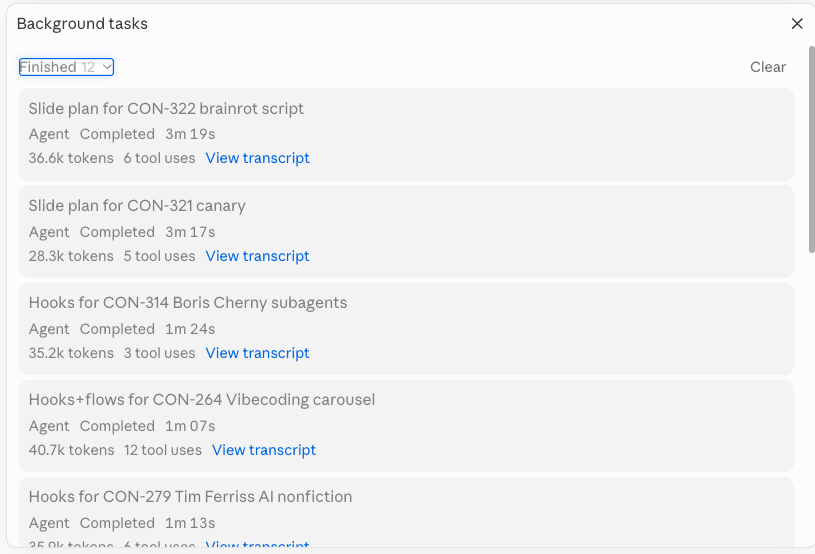
- Then do the part you can't hand off. Read the critiques and pick what's right. Where two reviewers contradict each other is usually the thing worth fixing. You're the editor, they're the notes.
One correction if you're in Claude Code
- Older tutorials tell you to type
/agentsto build a permanent reviewer. That panel was removed in recent versions. - Ask instead: "Create a subagent called skeptical-reviewer that checks my drafts the way a skeptical coworker would, and save it to my agents folder." Claude writes the file, and you edit it in plain English whenever the reviewer gets something wrong.
- Once you've written the same brief three times, package it into a skill. If you're not set up yet, start with how to set up Claude Code and come back.
Additional Reading
Here are some related guides to check out:
- What are Subagents?
- The LLM Council Skill (by Andrej Karpathy)
- Stanford's STORM Method: Research Without the Blind Spots
- How to Create Your Own Custom Skill
- How to Setup Claude Code (5-Min Guide for Non-Techies)
Frequently asked questions
- Can Claude check its own work?
- Not reliably, if you ask it in the same chat. It still has the memory and assumptions that produced the mistake, so it rereads its own answer and agrees with itself. Models are also agreeable by default, so "does this look right?" reads as a leading question. Asking it to create a subagent with a blank memory is what gets you an actual second opinion.
- What do I type to get a subagent to review something?
- Say: create a subagent with the perspective of a skeptical coworker to double check that the answer is correct. Swap the perspective for whatever fits the work, and keep your own opinion out of the brief, or you hand the reviewer the bias you were trying to escape. No setup or config file is needed.
- Which perspective should I pick for a review?
- Pick by what would hurt most if you got it wrong. A skeptical coworker attacks the weakest claim, a named expert like Chris Voss applies one person's method, a historian checks whether this has been tried before, an economist follows the incentives, a practical person tells you if you can actually do it this week, and a first-time reader shows you where they got lost.
- How many reviewer subagents should I run at once?
- Two or three, each with a different perspective. One reviewer gives you one blind spot, three give you coverage, and where they contradict each other is usually the thing worth fixing. Claude Code runs up to 20 at a time by default, so three costs you nothing but a little reading.
Want to build your first AI agent?
Build Your First Agent 101 is the next step! You'll get step by step guides, video tutorials and starter prompts to create your first agent in half a day, customized to your own workflow.
Learn more