Weekly Skill Discovery

Co-founder at King’s Cross Labs · ex-LinkedIn PM & Forbes 30 Under 30
Send this guide to yourself
Get the link in your inbox so you can read it whenever you're ready.
Your email will also be saved for future updates.
I like workflows that get better every week.
This is one of my favorites because it is a machine for creating more machines. Instead of manually auditing my own behavior, I run one weekly review that spots repeated work and tells me what to turn into a skill next.
It now hands me two lists, not one. The first is skills to build. The second is edits to the context files Claude reads before every session: preferences I repeated, corrections I made, projects that changed, things I have stopped doing that are still written down. The first list makes Claude more capable. The second makes it know me better. Together they are the difference between a weekly summary and a self-improvement loop.
If you are trying to become more AI-native, this helps a lot. You stop guessing what to automate and start building from real evidence in your day-to-day work.
Set up the routine
Put this wherever you already look backwards at your week. For me that is Sunday morning. I run mine at 5:00 AM EDT so the report is sitting there before I open anything.
Creating it takes about ten minutes. You name the routine, paste the instructions, pick a model, optionally point it at a repository, and set a trigger that repeats weekly. Give it a boring name you will still recognize in a list six months from now.
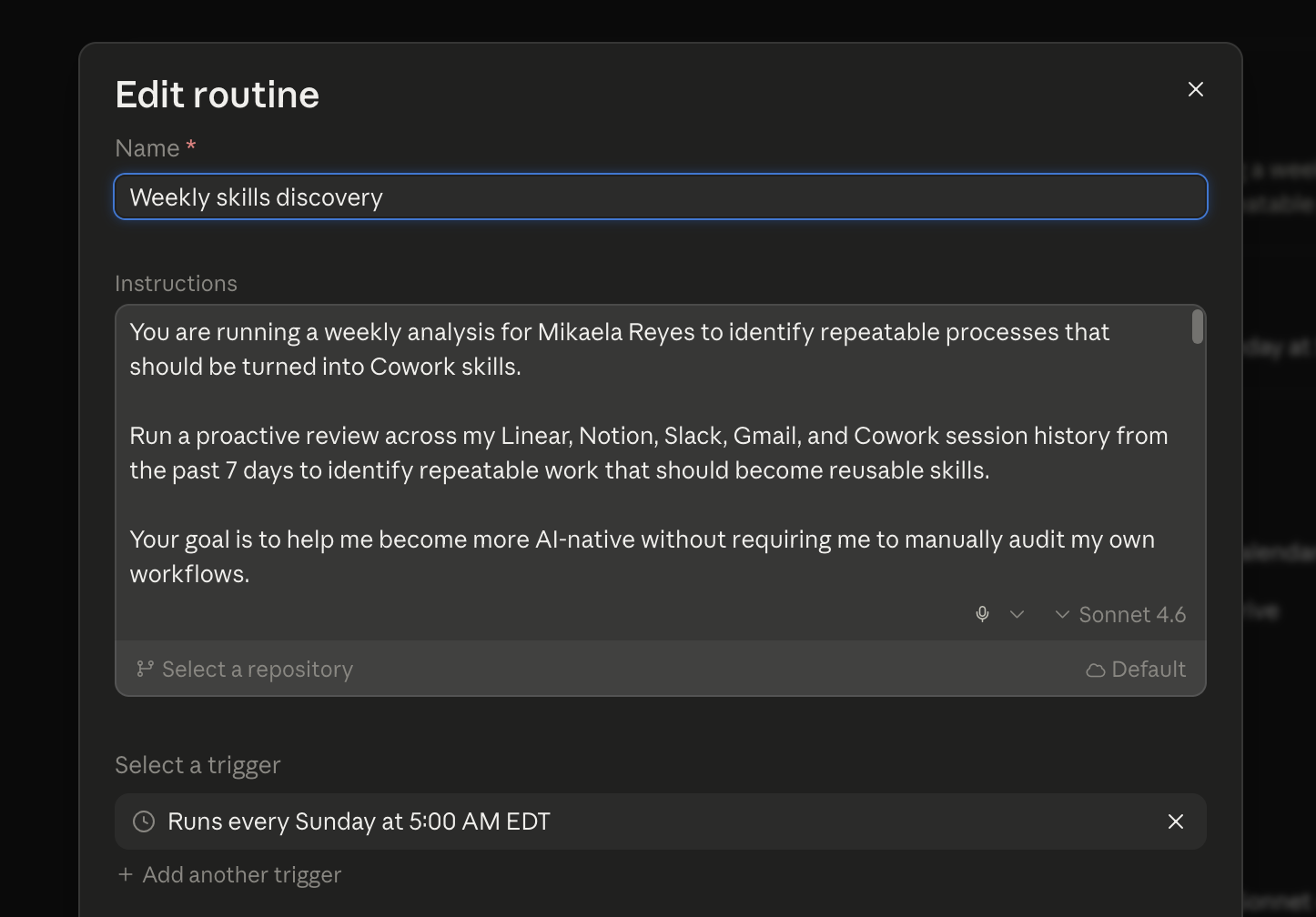
Then connect the tools that hold your actual week. The review can only spot patterns in what it can see. Mine reads Gmail, Google Calendar, Google Drive, Granola, Linear, Notion, and Slack, which between them cover almost everything I touch. You do not need all of that on day one. A calendar plus one place you communicate is enough for a real first report, and you can add connectors later without rewriting the prompt.
The prompt I use
This asks for both outputs: skills to build, and context to update. Swap in your own tools, your own context file names, and your own bar for what is worth automating.
You are running a weekly self-improvement review for me. Your job is to make
yourself more useful to me next week than you were this week.

## Step 1: Read what you already know

Read my global context files (CLAUDE.md and anything it points to, such as
about-me.md, projects.md, voice.md). Note what is already documented so you
do not propose duplicates.

## Step 2: Look at my last 7 days

Review my activity across the tools you are connected to: calendar, email,
Slack, Notion, my task tracker, and my own session history with you. You are
looking for evidence, not vibes.

## Step 3: Find the repeated work

List the tasks I did more than once this week, or that follow the same shape
each time. For each one, return:

* Skill name
* What repeated process it captures
* Where you saw it (specific threads, docs, meetings, or sessions)
* Suggested trigger, inputs, and outputs
* Priority: High (frequent and saves real time), Medium, or Low

## Step 4: Find what you keep not knowing

List things I explained to you this week that should have already been in my
context files. Look for preferences I repeated, corrections I made, new
projects or people, and anything I have stopped doing that is still written
down. For each one, return:

* File and section to change
* Current text (or "nothing")
* Proposed text
* Evidence from the last 7 days
* Confidence: High / Medium / Low
* Whether it is an Add, an Update, or a Remove

## Step 5: Give me a short top of the report

Before everything else, put:

* The top 3 skills I should build first
* The top 3 context updates I should approve first
* Anything you found that contradicts what my context files currently say
* Any question you need me to answer so next week's run is sharper

## Rules

Do not write to any file without my explicit approval. Prefer short,
high-signal additions over long paragraphs. Flag anything uncertain as Low
confidence instead of guessing. Skip one-off tasks unless they are clearly
becoming a pattern.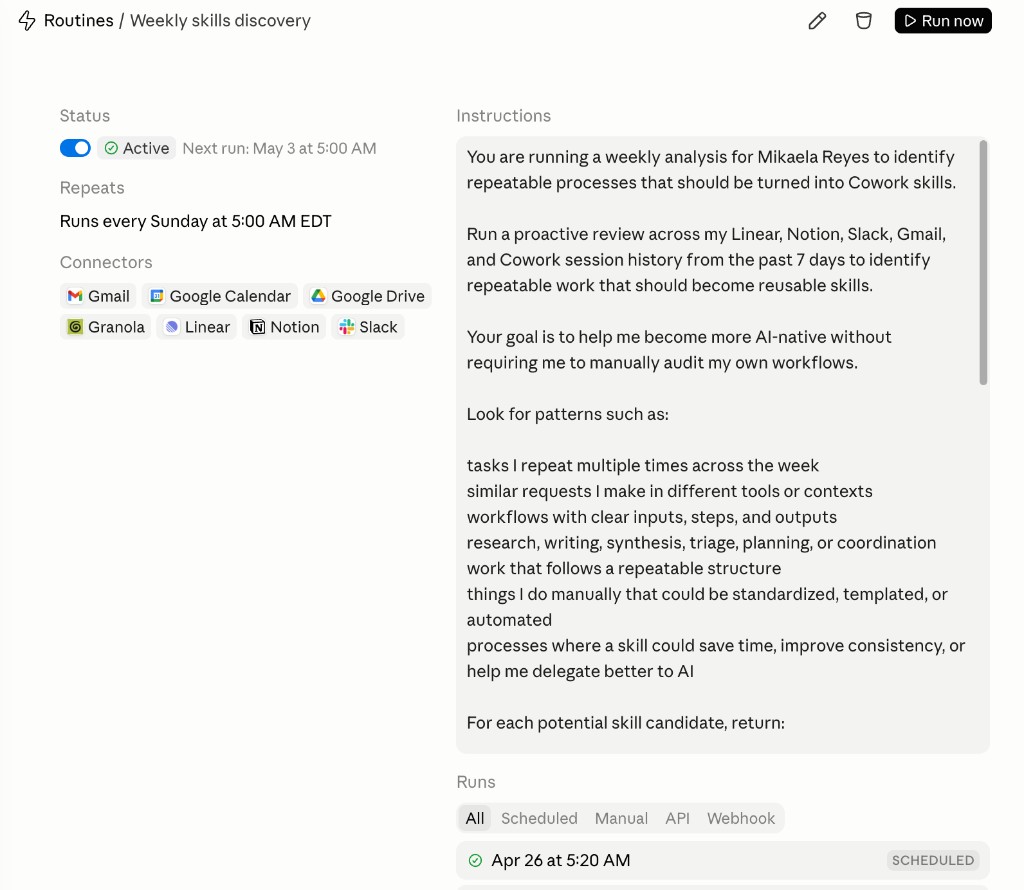
How I run this each week
-
Block this as a recurring scheduled run. I run it every Sunday at 5:00 AM so I start Monday with a clean list of what to automate next.
-
Read the report like a code review, not a newsletter. The routine's job is scanning. Mine is approving. I go line by line: approve what is right, reject what was a one-off, and answer any question it flagged. Skip this and the whole thing becomes another unread digest, which is the most common way these die.
-
Keep the output format strict. I ask for the same fields every time so I can compare weeks and see what keeps coming back. If the signals show up across multiple tools, it is usually a real pattern worth packaging.
-
Prioritize only the top three of each list. Best mix of frequency, leverage, and ease wins. Everything else goes into a backlog.
-
Ship one improvement per week, not five. I pick the single highest-value skill candidate and actually build it. If you have never packaged one before, the walkthrough for creating a custom skill covers the format. Five half-built skills are worth less than one you use every day.
-
Let Claude write the approved context changes. Once I have approved the Step 4 items, I tell it to write them into the right files. This is where your second brain stops being a folder you made once and starts being something that updates itself with your sign-off. Next week's sessions open already knowing the current version of you.
-
Audit the routine itself once a month. I look at the last four reports together. If the same skill candidate keeps appearing and I keep not building it, either I build it or I tell the prompt to stop suggesting it. If the reports are vague, the fix is almost always a tighter prompt or a missing connector, not a different model.
Key insight: A repeated workflow is already a draft skill, and a thing you explained twice is already a missing line in your context file. Weekly discovery just makes both obvious.
What "good" output looks like
A strong weekly report gives you:
- A top 3 shortlist of skills you can act on immediately
- A top 3 shortlist of context updates, each one an Add, an Update, or a Remove
- Clear evidence across Linear, Notion, Slack, Gmail, and your session history
- Trigger suggestions so you know exactly when to use the skill
- Input and output specs so implementation is fast
- A priority rating on skills and a confidence rating on context edits
Removals matter as much as additions. Stale context costs you about what missing context costs you, and it is harder to notice.
If your report reads like a summary of your week, the prompt is too soft. Push it toward proposals with file names and trigger conditions, closer to the context updater routine, which asks for exact file-level edits instead of suggestions.
Additional Reading
Here are some related guides to check out:
Frequently asked questions
- How do I figure out which tasks to turn into AI skills?
- Run a weekly review that scans your actual work (Linear, Notion, Slack, Gmail, and your Claude session history from the past 7 days) and surfaces repeated workflows worth packaging as skills, ranked by frequency and leverage. Instead of auditing your own behavior from memory, you build from real evidence of what you keep doing. It's a machine for creating more machines.
- How often should I run skill discovery?
- Weekly. Set it as a recurring scheduled run (I run mine Sunday morning) so you start the week with a fresh list of what to automate next. Keep the output format strict so you can compare weeks and see which patterns keep coming back, and only act on the top three each time. Ship one skill before chasing new ideas; that's where the compounding happens.
- What should Claude change about itself each week?
- Two things: the skills it has, and the context it reads before every session. Skills come from work you repeated. Context updates come from things you had to explain again. Everything else is a summary, and summaries do not make next week better.
- Should Claude update my context files without asking me?
- No. Have the review propose changes with evidence and a confidence rating, then approve them yourself. The split is what keeps the files accurate: Claude does the scanning, you make the judgment call, and nothing gets written because you said it once in passing.
- Do I need to know how to code to run a weekly review like this?
- No. A routine is a name, an instructions box, a model, an optional repository, and a repeating trigger. You paste the prompt in once and set it to run every week. If you already work in Claude Code, you can create the same recurring task there and point it at your local context files instead.
- How long before a weekly skill review is worth it?
- About three or four weeks. The first report is noisy because there is no history to compare against. By the third run it starts catching the same pattern twice, which is the signal that something is genuinely repeatable and worth packaging.
Want to build your first AI agent?
Build Your First Agent 101 is the next step! You'll get step by step guides, video tutorials and starter prompts to create your first agent in half a day, customized to your own workflow.
Learn more