AI Wedding Planning (Part 2): Wedding Timeline Builder

Co-founder at King’s Cross Labs · ex-LinkedIn PM & Forbes 30 Under 30
Send this guide to yourself
Get the link in your inbox so you can read it whenever you're ready.
Your email will also be saved for future updates.
The average couple spends $4,500 on a wedding planner. I replaced mine with one Claude skill that builds the entire 12-month timeline and drops every due date into our shared Google Calendar in under 60 seconds.
This is Part 2 of my 10-part AI Wedding Planning series. Part 1 was the overview. This is the move that actually saves you the $4K.
Why this matters
A wedding planner's whole job for the first six months is one thing: the timeline. When to book the venue. When to send save-the-dates. When to do the tasting. When final headcount is due. That is the deliverable you are paying thousands for.
You can build a Claude skill that does exactly that. It asks a few clarifying questions, builds a full 12-month plan sequenced correctly so you are not booking your photographer two weeks before the venue, then pushes every deadline into a shared Google Calendar or Notion with owners and reminders already assigned. No more "I thought you booked the florist."
Key insight: You are not replacing taste or relationships. You are replacing the organizational grunt work that eats your weekends and costs $4,000 when someone else does it.
Before you run the skill
Step 0: Connect Google Calendar or Notion
The skill can only push deadlines somewhere if Claude can reach your tools. Do this once before you run anything.
- Open Claude Cowork on desktop.
- Go to Settings → Connectors (or Integrations).
- Connect Google Calendar and/or Notion. Pick whichever you and your partner will actually check.
- For Google Calendar: create or pick a shared calendar and note the exact name. You will paste it into the skill template as
[GOOGLE_CALENDAR_NAME]. - For Notion: create a blank page or database you want the timeline to live in. Copy the page URL. You will paste it into the skill template as
[NOTION_PAGE_URL].
If you have not connected apps in Cowork before, my 10-minute Claude setup guide walks through the integrations panel step by step.
Once connected, you are done with setup. You will not need to do this again.
Run the wedding timeline skill
Step 1: Install the skill and fill in your placeholders
Find every [BRACKET] field in the template below and replace it with your details before you install:
| Placeholder | What to put |
|---|---|
[SYNC_DESTINATION] | google_calendar or notion — pick one |
[GOOGLE_CALENDAR_NAME] | Your shared calendar name (only if using Google Calendar) |
[NOTION_PAGE_URL] | Your Notion page URL (only if using Notion) |
Then paste the filled-in template into Claude:
"Use /skill-creator to turn the template below into a wedding-timeline-builder skill. Keep the trigger description broad so it fires when I mention wedding timelines, deadlines, or planning checklists."
Or save it as SKILL.md inside a folder called wedding-timeline-builder and upload it: Settings → Capabilities → Skills → Upload.
This is a starter prompt. Customize it as you see fit — add your own milestones, tweak owner categories, or adjust reminder timing for how you and your partner actually plan.
---
name: wedding-timeline-builder
description: Builds a 12-month wedding planning timeline and syncs every deadline to Google Calendar or Notion. Use when the user asks to plan a wedding timeline, build wedding deadlines, create a wedding checklist, sync wedding tasks to a calendar, set up wedding planning dates, or run the wedding timeline skill.
---

# Wedding Timeline Builder

Build a complete 12-month wedding planning timeline using real templates from the web, assign owners and reminders by task category, then push every deadline to Google Calendar or Notion.

## User Configuration (replace before installing)

| Placeholder | What to put |
| --- | --- |
| `[SYNC_DESTINATION]` | `google_calendar` or `notion` |
| `[GOOGLE_CALENDAR_NAME]` | Shared calendar name (e.g. `Wedding Planning`) — only if using Google Calendar |
| `[NOTION_PAGE_URL]` | Full Notion page or database URL — only if using Notion |

## Before You Start

1. **Check connectors first.** If `[SYNC_DESTINATION]` is `google_calendar`, Google Calendar must be connected and `[GOOGLE_CALENDAR_NAME]` must exist. If `notion`, Notion must be connected and `[NOTION_PAGE_URL]` must be valid. If not connected, stop and walk the user through Claude Cowork → Settings → Connectors. Do not build until the destination is ready.

2. **Ask clarifying questions before building.** Use AskUserQuestion whenever anything is missing or ambiguous. Do not guess. At minimum, confirm:
   - Wedding date (exact date or target month)
   - Destination or local (city/region; note if multi-day or international)
   - Guest count (exact number or range)

   Also ask if the answer would change the timeline:
   - Ceremony type (church, courthouse, outdoor, multi-faith, etc.)
   - Already-booked vendors (skip or mark complete)
   - Multi-day events or cultural traditions that need extra tasks

   If the user gives partial info ("we're getting married next fall in Mexico"), ask follow-up questions until you have enough to sequence deadlines correctly.

   **Owner assignment by category.** Ask who owns each type of work. Use AskUserQuestion with the category names below. Default to `Both` if they want to split evenly or skip.

   | Category | Example tasks |
   | --- | --- |
   | Venue & vendors | Book venue, photographer, caterer, florist, DJ, officiant |
   | Guest communications | Save-the-dates, invitations, RSVP tracking, seating chart |
   | Attire & beauty | Dress/suit shopping, fittings, hair/makeup trials |
   | Budget & registry | Set budget, set up registry, track payments |
   | Travel & logistics | Hotel blocks, transportation, guest travel guide |
   | Ceremony & vows | Write vows, ceremony details, rehearsal dinner |
   | Legal & admin | Marriage license, final headcount, vendor contracts |

   Record their answers and use those names (or `Both`) as owner tags on every task in that category.

3. **Research existing timelines online.** Before building, use web search to pull 2–3 established wedding planning timelines (e.g. from The Knot, Zola, WeddingWire, Brides, or similar). Search for timelines that match their situation: destination vs. local, guest count range, and months until wedding. Merge the best tasks and lead times from those sources with the milestone table below. Prefer consensus across sources over any single template. Cite which sources influenced key deadlines in a brief note at the end of the summary.

## Timeline Rules

- Work **backwards from the wedding date**. Every deadline is a specific date, not "month 8."
- **Sequence dependencies correctly.** Venue before photographer. Save-the-dates before invitations. Tasting before final menu. Never put dependent tasks after their prerequisites.
- **Adjust lead times** based on inputs and what you found online:
  - **Destination or international:** invitations must go out **no later than 9 months before** the wedding. Shift the entire timeline earlier to make this work: save-the-dates 10–11 months out, venue and hotel blocks 12+ months out, guest travel info and room blocks well before invites. RSVP deadline should be 4–5 months before (guests need time to book flights). Add tasks for guest travel guides, visa/passport reminders, welcome events.
  - **Local:** standard milestone table below applies (invitations typically 5 months out).
  - **150+ guests:** earlier venue booking, earlier RSVP deadline, earlier seating chart
  - **Under 50 guests:** some tasks can move later; still keep legal and vendor lead times
  - **Short timeline (under 9 months):** flag compressed tasks and mark anything at risk in bold. For destination weddings under 12 months, flag that the 9-month invite minimum may not be achievable.
- Merge online research with the milestone table below. Do not invent fake vendor categories. Deduplicate overlapping tasks.

## Standard Milestones (adapt dates to the wedding)

Use as a baseline for **local** weddings, then refine with online research. For **destination or international** weddings, shift everything earlier per the rules above — especially save-the-dates, invitations (9 months out minimum), hotel blocks, and guest travel tasks.

| Window | Tasks |
| --- | --- |
| 12 months out | Set budget · Draft guest list · Define wedding style · Research venues · Book venue |
| 11 months out | Book photographer/videographer · Book caterer (if separate) · Start attire shopping · **Destination: send save-the-dates** |
| 10 months out | Book DJ or band · Book florist · Book officiant · Reserve hotel room blocks · **Destination: order invitations** |
| 9 months out | Order save-the-dates · Book hair and makeup · Book transportation/shuttles · **Destination: mail invitations · set RSVP deadline** |
| 8 months out | Send save-the-dates · Order invitations · Start honeymoon research · **Destination: publish guest travel guide** |
| 7 months out | Schedule cake/dessert tasting · Book rehearsal dinner venue · Set up registry |
| 6 months out | Attire ordered (allow time for alterations) · Book rentals · Schedule menu tasting |
| 5 months out | Mail invitations · RSVP deadline set · Book day-of coordinator if needed |
| 4 months out | Finalize flowers · Hair/makeup trial · Start writing vows/ceremony · **Destination: track RSVPs · start seating chart** |
| 3 months out | Track RSVPs · Start seating chart · Confirm all vendor contracts |
| 2 months out | Final headcount to caterer · Apply for marriage license (check local rules) · Vendor final payments |
| 1 month out | Final attire fitting · Confirm day-of timeline with vendors · Rehearsal dinner details |
| 2 weeks out | Finalize seating chart · Confirm guest count · Marriage license in hand (if required before ceremony) |
| 1 week out | Confirm delivery and arrival times · Pack emergency kit · Share day-of contact list |

Add destination-specific tasks when relevant: guest travel guide, visa/passport reminders, welcome event, post-wedding brunch.

## Owner and Reminder Assignment

Assign an **owner** and **reminder** to every task automatically. Do not ask the user to tag these manually after syncing.

**Owners:** Use the answers from the owner assignment questions above. If a category was not answered, default to `Both`.

**Reminders** (set automatically on sync):
- Major vendor bookings (venue, photographer, caterer): 2 weeks before
- Guest communications (save-the-dates, invitations, RSVP): 1 week before
- Mid-priority tasks (attire, tastings, trials, rentals): 1 week before
- Final-month tasks (license, headcount, seating chart): 3 days before
- Week-of tasks (confirmations, emergency kit): 1 day before

## Output Format

### Phase 1: Show the timeline (before syncing)

Present the full timeline as a **markdown table** for easy reading. Group by month if needed (one table per month, or one table with a Month column). Every row must include:

| Task | Due date | Category | Owner | Reminder | Notes |
| --- | --- | --- | --- | --- | --- |
| Book venue | Mar 14, 2027 | Venue & vendors | Both | Feb 28, 2027 | Research 2–3 venues first |

Sort rows chronologically. End with a short "at risk" list if the timeline is compressed, plus a one-line note on which online sources informed the timeline.

Ask: *"Ready for me to push these to [GOOGLE_CALENDAR_NAME / Notion]? Every task will include an owner and a reminder."*

Wait for explicit approval before syncing.

### Phase 2: Sync to Google Calendar

If `[SYNC_DESTINATION]` is `google_calendar`, create events on `[GOOGLE_CALENDAR_NAME]`:

- **Title:** `[Wedding] Task name`
- **Date:** the due date (all-day event)
- **Description:** `Owner: [name] · Category: [category] · [one-line note if needed]`
- **Reminder:** per reminder rules above

After creating events: *"Created X deadlines on [GOOGLE_CALENDAR_NAME], each with an owner and reminder."*

### Phase 3: Sync to Notion

If `[SYNC_DESTINATION]` is `notion`, create one row/item per task on `[NOTION_PAGE_URL]`:

- Task name · Due date · Category · Owner · Reminder · Status: Not started · Notes (optional)

If no database exists, create a simple table on the page provided. Share the Notion link when done.

## Quality Checklist (run silently before presenting)

- [ ] Researched 2–3 online wedding timelines and merged best practices
- [ ] Every task has a specific date, not just a month label
- [ ] Venue is booked before dependent vendors
- [ ] Save-the-dates go out before invitations
- [ ] Destination/international: invitations mailed no later than 9 months before wedding
- [ ] RSVP deadline is at least 6–8 weeks before the wedding (4–5 months for destination)
- [ ] Destination weddings include travel and hotel-block tasks
- [ ] Every task has an owner and reminder
- [ ] User approved before anything was pushed
Step 2: Run the skill
Open a new Cowork session and say something like:
"Build my wedding timeline."
The skill will ask you clarifying questions if it needs more info: wedding date, destination or local, guest count, who owns each category of tasks, and anything else that would change the timeline. You do not need to front-load every detail. Just answer what it asks.
Step 3: Review with your partner
Skim the timeline summary before it syncs. Look for anything specific to your wedding: multi-day events, cultural traditions, a courthouse ceremony, extra travel lead time for guests. Tweak deadlines if something feels off. Five minutes now saves a fight at month eight.
Once you approve, the skill pushes every deadline to your calendar or Notion with owners and reminders already assigned by category. No manual tagging after the fact.
What you get
- A 12-month wedding timeline built from real online planning templates (The Knot, Zola, WeddingWire, and similar), not generic AI fluff
- Every deadline sequenced correctly so you are not scrambling at the last minute
- Owners and reminders assigned automatically by task category (vendors, attire, guest comms, legal, etc.)
- Due dates synced to Google Calendar or Notion so you and your partner share one view
- The whole workflow in under 60 seconds
Coming up in the series
Part 3 walks through everything we vibecoded for our wedding: the website, our singles mixer, and our thank-you cards, all bundled. Part 1 covers the full stack if you want the big picture first.
Bonus: my actual wedding planner (Notion template)
If you want a Notion home base beyond the timeline skill, here is the template Nick and I used for our wedding. It has sections for styling, website, prints, attire, guests, venues, program, gifts, and more, plus the big planning questions we asked ourselves upfront (priorities, budget, guest count, how to delegate).
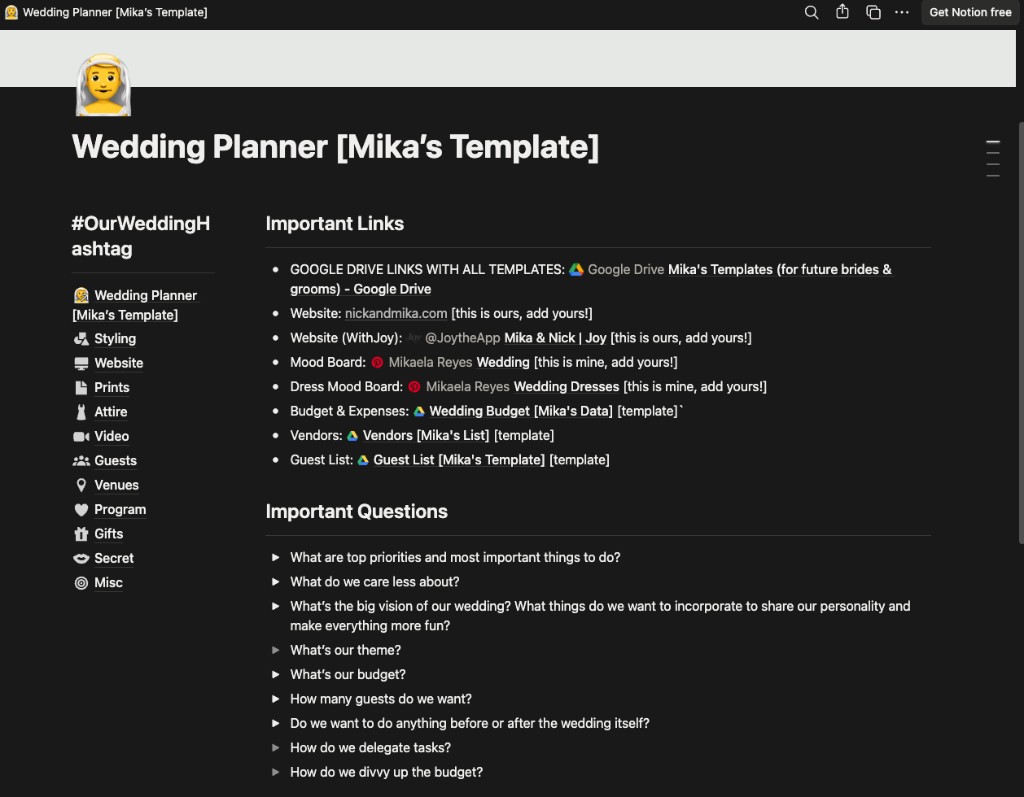
Duplicate my Wedding Planner template →
Use the timeline skill to generate deadlines, then drop them into this template (or point [NOTION_PAGE_URL] at your copy of it).
Additional Reading
Here are some related guides to check out:
Frequently asked questions
- How do I build a wedding timeline with Claude?
- Build a Claude skill that asks a few clarifying questions (your date, destination or local, and guest count), then generates a full 12-month timeline sequenced correctly and pushes every deadline to a shared Google Calendar or Notion with owners and reminders assigned. Connect Google Calendar or Notion once first so Claude can reach it. The whole run takes under a minute after setup.
- Will an AI wedding timeline get the order of tasks right?
- Yes. A good timeline skill works backwards from your wedding date and sequences dependencies correctly, so you're not booking your photographer before the venue or invitations before save-the-dates. It also pulls from real online templates like The Knot and Zola rather than generic AI fluff. Always skim the summary with your partner before it syncs to catch anything specific to your wedding.
- Does the timeline change for a destination wedding?
- Yes. Destination and international weddings shift the whole timeline earlier, with invitations mailed no later than nine months out and an RSVP deadline around four to five months before so guests can book flights. It also adds tasks like guest travel guides, hotel blocks, and visa or passport reminders. Just tell the skill it's a destination wedding and it adjusts the lead times.
Want to build your first AI agent?
Build Your First Agent 101 is the next step! You'll get step by step guides, video tutorials and starter prompts to create your first agent in half a day, customized to your own workflow.
Learn more