Health Coach

Co-founder at King’s Cross Labs · ex-LinkedIn PM & Forbes 30 Under 30
Send this guide to yourself
Get the link in your inbox so you can read it whenever you're ready.
Your email will also be saved for future updates.
Heads up: This guide is a step more technical than most on this site. You will edit a config file and connect MCP servers (Model Context Protocol) so Claude can read your Strava and Oura data. If that sounds fine, keep going. If not, start with How to Setup Claude and come back when you are ready.
You do not need to pay a personal trainer hundreds of dollars to get a workout plan that respects how you actually feel on a given day. If you already track runs in Strava and recovery in Oura (or Apple Health), Claude can read that data and help you train smarter.
I built a Health Dashboard as a Claude Cowork Live Artifact. It pulls fresh data from my wearables and Strava each time I open it: readiness, sleep, HRV, cycle phase, training load, and a week-by-week plan with nutrition notes. No spreadsheet. No copy-paste from three apps.
Key insight: The dashboard only works because Claude can call your real health data through MCP connectors. Set up the data pipes first, then ask Cowork to build the artifact.
What you need before you start
- Claude Desktop on Mac or Windows (for MCP setup)
- A paid Claude plan with Cowork and Live Artifacts enabled
- At least one data source: Strava (runs/activities), Oura (sleep/recovery), or Apple Health (beta on Claude mobile)
Connect your data sources
1. Connect Strava with MCP
We use the open-source Strava MCP server so Claude can read your activities, stats, and workout details.
Add Strava to Claude Desktop
Open your Claude Desktop configuration file:
- Mac:
~/Library/Application Support/Claude/claude_desktop_config.json - Windows:
%APPDATA%\Claude\claude_desktop_config.json
Add this block (merge with any existing mcpServers you already have):
{
  "mcpServers": {
    "strava": {
      "command": "npx",
      "args": ["-y", "@r-huijts/strava-mcp-server"]
    }
  }
}
Restart Claude Desktop
Close and fully quit Claude Desktop, then reopen it so the new MCP server loads.
Connect your Strava account
In Claude, say:
Connect my Strava account
A browser window opens. Enter your Strava API credentials, authorize the app, and you are done. Claude will confirm when the connection is live.
First-time setup (what happens)
- Browser opens to the MCP setup page
- You enter Client ID and Client Secret
- Click Continue to Strava and authorize on Strava's site
- You see a success message and can close the browser
- Claude confirms you are connected
Credentials are saved locally at ~/.config/strava-mcp/config.json and persist across sessions.
Get your Strava API credentials (one-time)
- Go to strava.com/settings/api
- Click Create an App (or open an existing app)
- Fill in the form:
- Application Name: anything (e.g. "My Claude Assistant")
- Category: any
- Website: can be
http://localhost - Authorization Callback Domain: must be
localhost
- Copy your Client ID and Client Secret
You only do this once.
Manage the connection
- Check status: "Am I connected to Strava?"
- Reconnect: "Connect my Strava account" (use
force: trueto reconnect) - Disconnect: "Disconnect my Strava account"
After Strava is connected, you can ask Claude about recent runs, pace, weekly volume, and athlete stats.
2. Connect Oura with MCP
For sleep, readiness, HRV, and cycle tags, use the Oura Ring MCP.
Get a Personal Access Token
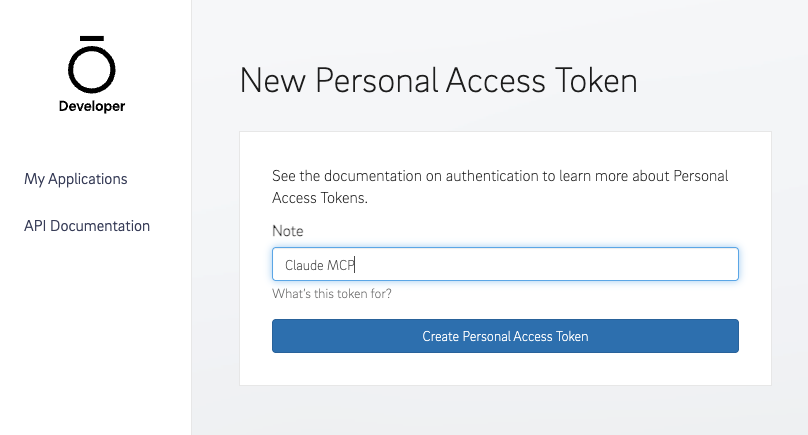
- Go to cloud.ouraring.com/personal-access-tokens
- Create a new token (e.g. note it "Claude MCP")
- Copy it (you will paste it into Claude Desktop config)
Install
npm install -g oura-ring-mcp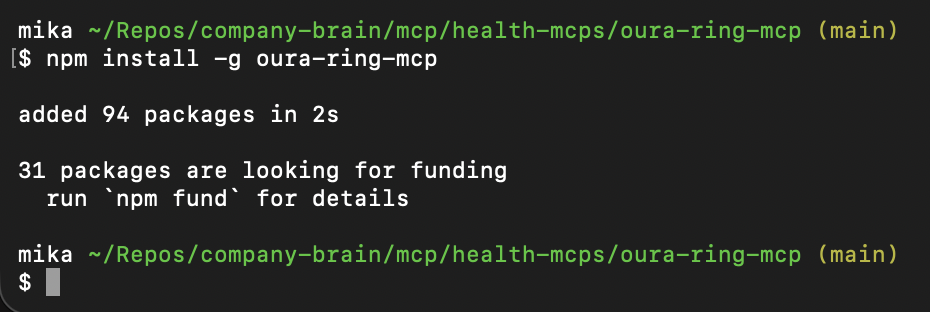
Or skip install and run via npx each time (Claude Desktop does this for you in the config below).
Add Oura to Claude Desktop
Open ~/Library/Application Support/Claude/claude_desktop_config.json on Mac (or %APPDATA%\Claude\claude_desktop_config.json on Windows). Add an mcpServers block at the root level, next to preferences:
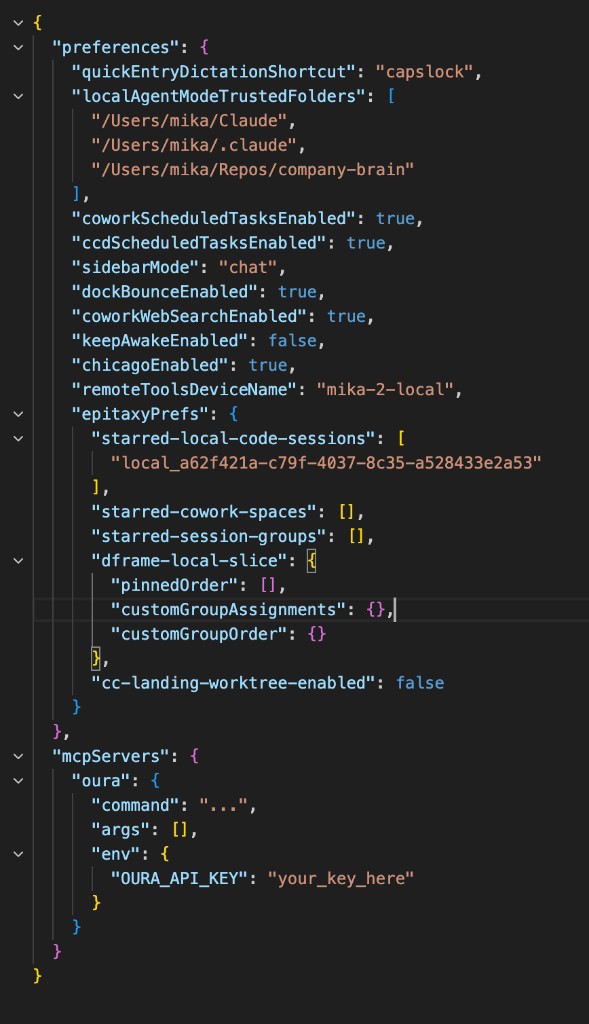
Merge this into your file (keep any other MCP servers you already have, like Strava):
{
  "mcpServers": {
    "oura": {
      "command": "npx",
      "args": ["oura-ring-mcp"],
      "env": {
        "OURA_ACCESS_TOKEN": "your_token_here"
      }
    }
  }
}
Replace your_token_here with the token you copied. Restart Claude Desktop again.
3. Connect Apple Health (beta)
On iPhone, open the Claude iOS app → Settings → Beta Features → turn on Apple Health and approve the categories you want (steps, sleep, heart rate, and so on).
On Android, use Health Connect the same way in the Claude Android app.
Apple Health in Claude is still beta and syncs through the phone, not Desktop MCP. My workaround: I send Apple Health data to Strava, then let Claude read it through the Strava MCP. That keeps everything in one Cowork session on desktop.
Build your Health Dashboard (Live Artifact)
Once Strava and/or Oura are connected in Claude Desktop, switch to Cowork and open the Live artifacts tab. Click New artifact → Chat with Claude, then paste a build prompt like the one below.
The artifact should be one self-contained HTML page that:
- Calls Oura and Strava tools on each load via
window.cowork.callMcpTool - Uses Chart.js v4 for charts
- Uses
window.cowork.askClaudefor the weekly plan and nutrition copy
MCP tools to require in the artifact
- Oura:
get_readiness,get_sleep,get_daily_sleep,analyze_hrv_trend,get_cardiovascular_age,get_resilience,get_enhanced_tags - Strava:
get-recent-activities,get-athlete-stats,get-activity-details
Two gotchas that trip people up
- MCP responses are objects, not plain strings. Shape looks like
{ content: [{ text: "..." }] }. Normalize with a small wrapper before you parse anything. - Oura often returns formatted markdown, not JSON. Parse with regex against known templates. Entries split on
---+. Examples:\*\*Score:\*\* (\d+) \(([^)]+)\),Total Sleep:\*\* (\d+)h (\d+)m,Avg HRV: ([0-9.]+).
Personalize the prompt
Before you paste the build prompt, tell Claude your chronological age and primary sport. If you track your cycle in Oura, say so. If not, ask Claude to skip cycle-related sections.
Cowork build prompt (copy and adapt)
# Build: Personal training/recovery dashboard (Cowork Live Artifact)

Build one self-contained HTML artifact that pulls fresh data from Oura + Strava MCPs each load. Use Chart.js v4 only. Call MCPs via `window.cowork.callMcpTool`, generate AI content via `window.cowork.askClaude`.

## MCP tools (all required in artifact's `mcp_tools`)

**Oura:** `get_readiness` `get_sleep` `get_daily_sleep` `analyze_hrv_trend` `get_cardiovascular_age` `get_resilience` `get_enhanced_tags`
**Strava:** `get-recent-activities` `get-athlete-stats` `get-activity-details`

## Two critical gotchas

1. **MCP responses are objects, not strings**: `{ content: [{ text: "..." }] }`. Normalize with a wrapper before every parse.
2. **Oura returns formatted markdown, not JSON.** Parse with regex against known templates. Entries split on `---+`. Examples: `\*\*Score:\*\* (\d+) \(([^)]+)\)`, `Total Sleep:\*\* (\d+)h (\d+)m`, `Avg HRV: ([0-9.]+)`.

## Cycle algorithm — derive from Oura, don't ask the user

1. `get_enhanced_tags` for last 120 days
2. Extract dates of all "Generic Period" entries
3. Group consecutive tagged days; gap >7 days = new cycle start
4. Avg gaps between starts → personal cycle length (don't assume 28)
5. Day in cycle = days since last start + 1
6. Phases: 1–5 menstrual, 6–13 follicular, 14–17 ovulatory, 18+ luteal

## Activity intensity (Strava often has no HR data)

Classify by type + pace:
- Yoga / walk → easy
- Hike / swim / strength / moderate ride → moderate
- Ride >25 km/h → hard
- Run by pace: ≥7:00/km easy, 6:30–7:00 moderate, <6:30 hard

## ACWR (training load)

Acute = last 7d km. Chronic = last 28d km / 4. Ratio = acute/chronic.
Zones: 0.8–1.3 sweet spot · 1.3–1.5 caution · >1.5 injury risk · <0.8 detraining.

## "Today's call" engine

Base from readiness: ≥85 hard · ≥75 moderate · ≥65 easy · <65 rest.

Downgrade one level if ANY of: HRV ≤−7% baseline · ACWR >1.5 (force to easy) · sleep <6h last night · menstrual phase · late luteal (≤3 days to period).

## Warnings (surface only when actionable)

- **Recovery debt** — HRV ≤−7% AND last 3d readiness <80
- **Injury risk** — ACWR >1.5 (warn at 1.3–1.5)
- **Period incoming** — late luteal, ≤3 days
- **Sleep debt** — 2 of last 3 nights <7h

## Sections, top to bottom

1. **Daily glance** (4-col grid)
   - Readiness card (span 2): big score + Optimal/Good/Fair/Pay badge + 6 contributors with mini bars
   - Today's call (span 2): title + body + workout window line
   - Sleep / HRV / RHR / Cycle (1 col each)

2. **Weekly view**
   - 8-week volume bar chart, current week highlighted, dashed 4-week-avg line
   - ACWR gauge (3 colored zones, marker for current ratio)
   - This week's activities — type badges header (🏃 5 Run, 🧘 1 Yoga …) + row per activity with emoji, name, distance, pace/duration
   - Easy/hard distribution donut bar (target ~80% easy)
   - HRV trend line: 30d → 14d → 7d → last night, with baseline line
   - Sleep regularity line over 30 days

3. **Weekly plan (Sun→Sat)** — `askClaude` returning JSON `{plan: [{weekday, type, intensity, duration, reason}], summary}`. Pass: current phase, each day's phase across the week, recent 10 activities, ACWR, today's readiness, HRV%. Constraints in prompt: hard on follicular/ovulatory, easy/rest on menstrual + late luteal, ≥2 non-running days (yoga/strength), hold volume if ACWR >1.3. Color each card by intensity.

4. **Nutrition** — `askClaude` prompt: ~140 words in 4 sections (daily anchors, pre/post fueling, one meal to make, one grocery item). Phase + training-aware.

5. **Long-term** (4-col stat grid): YTD distance · all-time count · vascular age vs chronological · resilience "Exceptional" streak count.

## Info tooltips on every metric

Small ⓘ icon next to each metric label. Click → popover with **(a) what it is** (2 sentences) **(b) how to read it** (concrete thresholds). Cover: readiness, HRV, RHR, sleep, cycle, ACWR/training-load, weekly volume, easy/hard distribution, vascular age, resilience, workout window, recovery debt, weekly plan. Generate the copy yourself — keep it tight.

## Style

Light mode. Off-white background, white cards, soft shadows, generous whitespace. Status colors: sage (good), amber (caution), muted red (danger), dusty rose (cycle), cool blue (HRV). Big numbers, small labels.

## Before building

1. Call `get-athlete-profile` once → hardcode the athlete ID
2. Probe each Oura and Strava tool with one real call → inspect actual response shape
3. Then build

## Personalize this prompt

Tell the LLM your chronological age, primary sport, and whether you track your cycle in Oura.
Claude will probe your MCP tools, then generate the HTML artifact. Expect a few rounds of "fix the HRV parser" or "highlight this week on the volume chart." Live Artifacts keep version history, so you can roll back if an edit breaks something.
What mine looks like
Here is the dashboard running on my real Strava + Oura data.
Daily glance: readiness score, today's training call, sleep, HRV, resting heart rate, and cycle phase (derived from Oura period tags, not a generic 28-day guess).
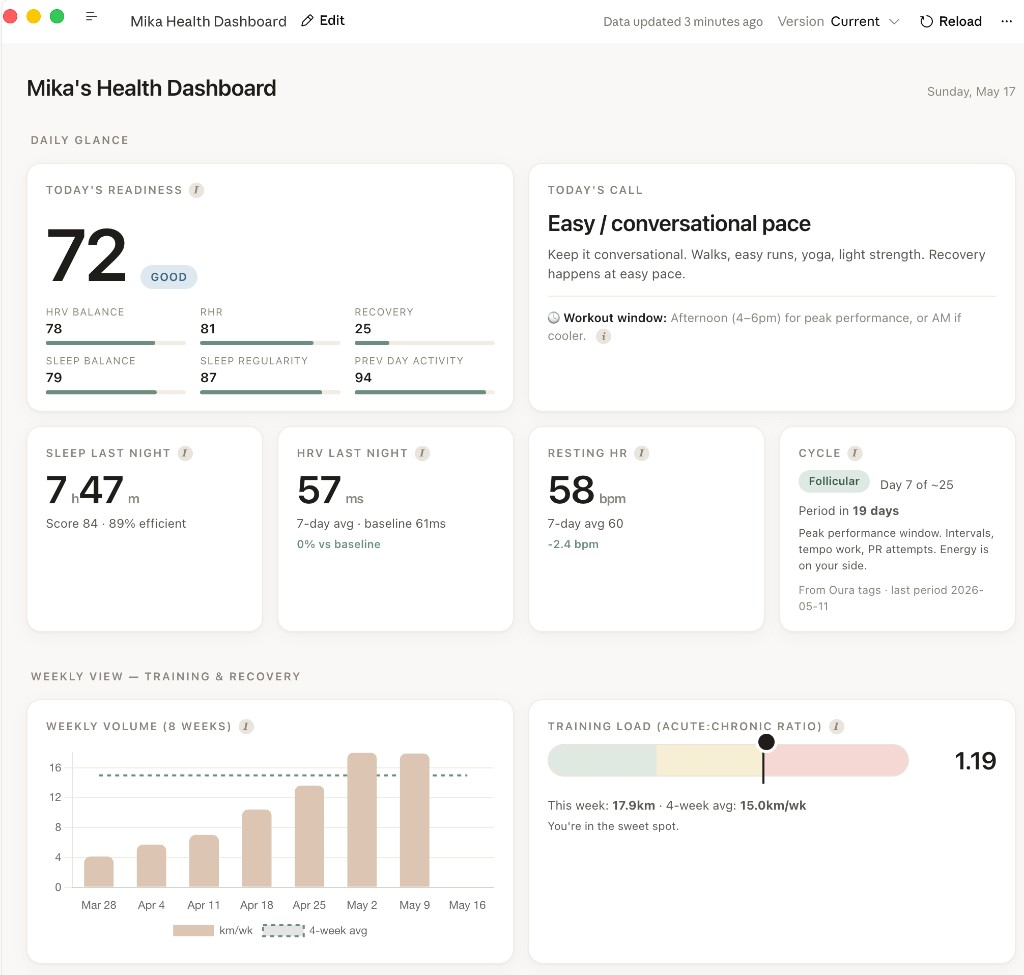
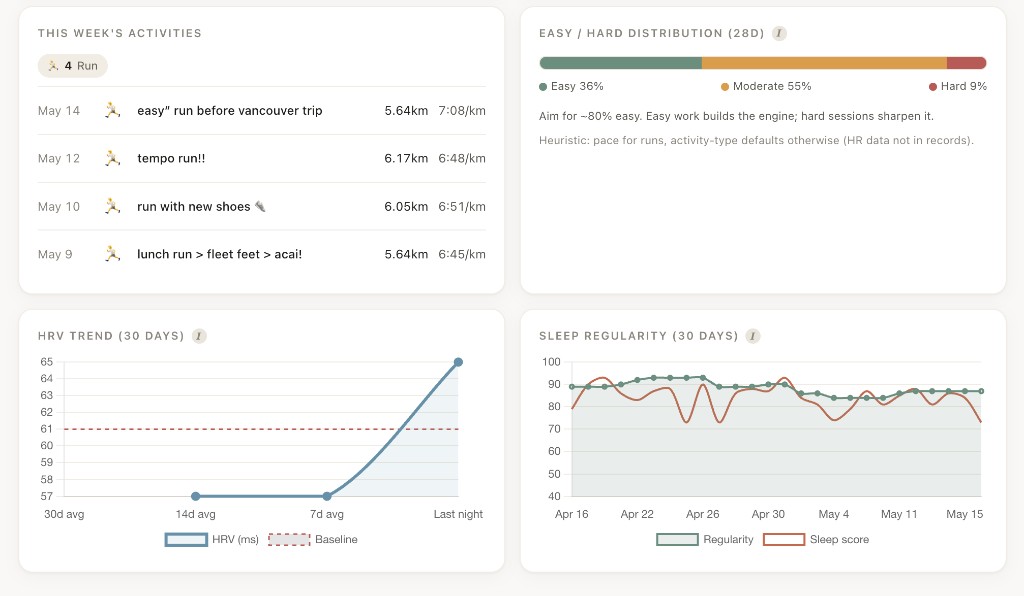
Weekly view: 8-week running volume, acute-to-chronic workload ratio (ACWR), this week's Strava activities, easy vs hard distribution, HRV trend, and sleep regularity.
Weekly plan and nutrition: Sun–Sat sessions with reasons tied to cycle phase and recovery, plus phase-aware nutrition anchors.
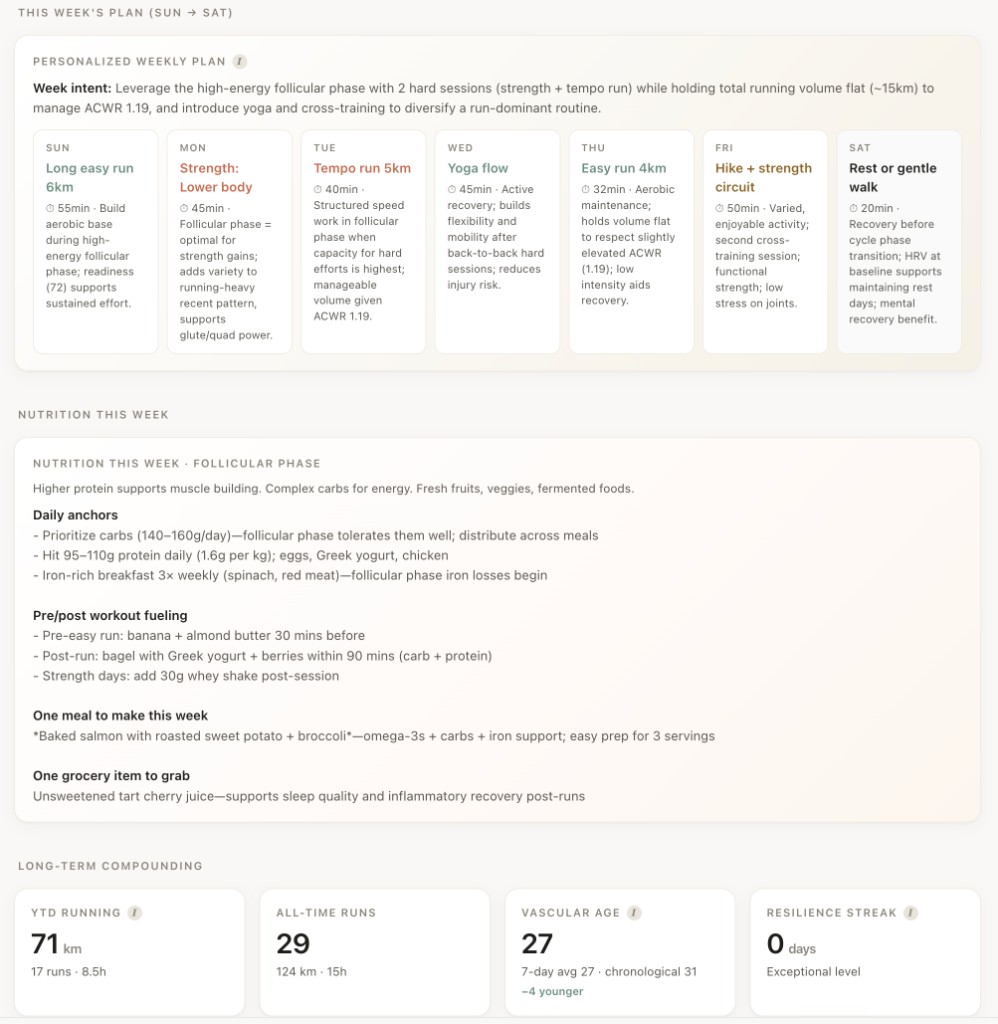
The ⓘ icons on each metric open short tooltips so you are not guessing what "ACWR 1.19" or "follicular" means for today's workout.
Tips after your first build
- Refresh before a run. Open the artifact and hit reload so readiness and HRV reflect last night.
- Iterate in plain English. "Make hard days terracotta" or "Add a warning when sleep is under 6 hours two nights in a row" works better than editing HTML yourself.
- Start with one data source. Strava-only still gives you volume and pace; add Oura when you want readiness and cycle logic.
Additional Reading
Here are some related guides to check out:
Frequently asked questions
- Can Claude use my Strava or Oura data to plan workouts?
- Yes. Connect Strava and Oura (or Apple Health) to Claude through MCP, and Claude can read your readiness, sleep, HRV, training load, and activities to build a self-updating training and recovery dashboard. It recommends how hard to train each day based on how you actually recovered. You set up the data pipes once, then ask Cowork to build the dashboard as a Live Artifact.
- Is building a health dashboard with Claude technical?
- It's a step more technical than most guides here. You edit a config file and connect MCP servers so Claude can read your Strava and Oura data. If that sounds fine, the guide walks through every step; if not, start with the basic Claude setup and come back later. Once the data is connected, you build and tweak the dashboard in plain English.
- Do I need both Strava and Oura to build the dashboard?
- No, you can start with just one data source. Strava alone gives you volume and pace; add Oura when you want readiness, HRV, and cycle logic layered on top. Start with one, get it working, then expand.
- How does the dashboard decide how hard I should train today?
- It reads your Oura readiness and adjusts from there (roughly hard above 85, moderate above 75, easy above 65, rest below), then downgrades a level if your HRV is depressed, your training load is too high, you slept under six hours, or you're in certain cycle phases. It's built to respect how you actually feel on a given day, not a fixed plan. Refresh it before a run so the numbers reflect last night.
Want to build your first AI agent?
Build Your First Agent 101 is the next step! You'll get step by step guides, video tutorials and starter prompts to create your first agent in half a day, customized to your own workflow.
Learn more