How to Give Claude Memory (Beginner to Advanced)

Co-founder at King’s Cross Labs · ex-LinkedIn PM & Forbes 30 Under 30
Send this guide to yourself
Get the link in your inbox so you can read it whenever you're ready.
Your email will also be saved for future updates.
Someone sent a meme in a group chat about Claude never remembering who you are. Every session, you're a stranger. I couldn't relate — my Claude sessions have been remembering me for months.
Here's exactly how I set that up, from the five-minute beginner version to the full second brain Nick and I built together.
By default, Claude starts every session blank. Most people accept this as a limitation. It isn't — it's a default setting. There are a few ways to change it, and they get progressively more powerful. Pick the one that fits where you are right now.
Beginner — Turn on in-app memory (5 minutes)
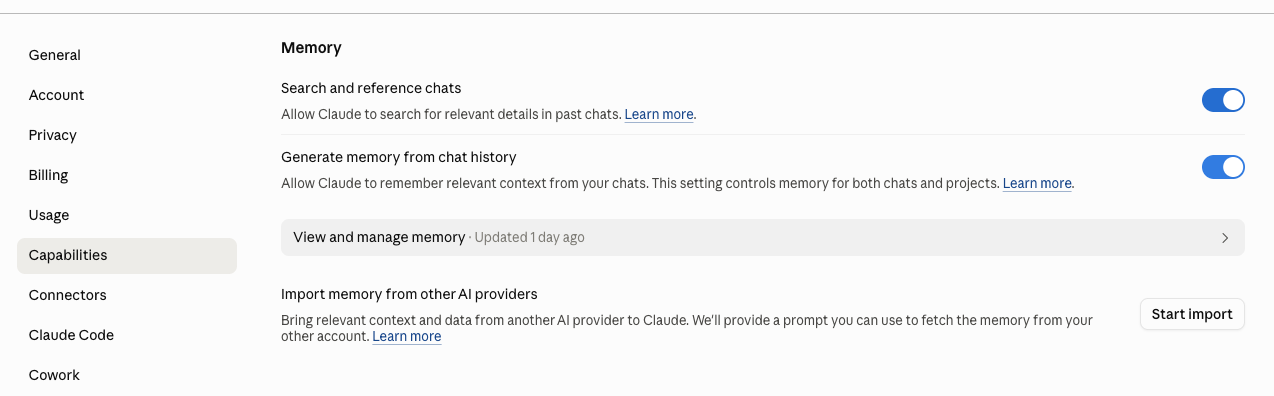
1. Turn on Claude's memory settings
Go to Settings, then Capabilities. You'll see two toggles: "Search and reference chats" and "Generate memory from chat history." Switch both on. From here, Claude automatically saves things it learns about you across sessions. You can also review and edit what it's saved at any time.
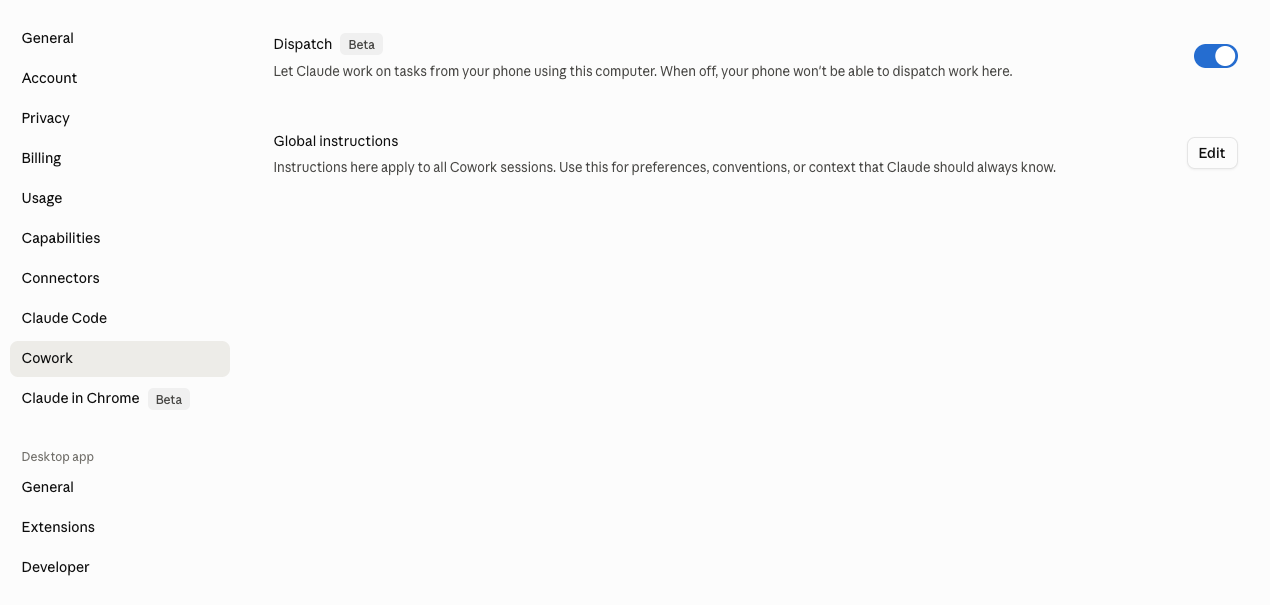
2. Add your Global Instructions
Go to Claude Cowork, then Global Instructions. This is a text field where you brief Claude before every session: who you are, how you work, what to assume by default. Think of it as a standing memo Claude reads before you say anything.
Shortcut: ask Claude to write it for you. Tell it about yourself and your work, and ask it to draft a Global Instructions section. Much easier than writing from scratch.
3. Tell Claude to remember things explicitly
When something comes up in a session that you want Claude to hold onto — a preference, a context, a decision — just say "remember this." Claude updates its internal memory in real time. You don't need settings. Just tell it directly.
Intermediate — Create context files (30–60 min to set up)
4. Set up a CLAUDE.md file
Claude's built-in memory is convenient but not fully reliable for things that matter. For that, you want a file. A CLAUDE.md file is a markdown document Claude reads automatically at the start of every Claude Code or Cowork session. Put whatever you want in there: your role, your preferences, your team context.
You can also create supplementary files like USER.md and point to them from CLAUDE.md. For a full walkthrough and the exact prompts I used to set mine up, see: How to Setup Global Context for Claude.
Advanced — Build a second brain (ongoing)
5. Create a folder system for your context
This is the deepest level and not for everyone — it takes setup and ongoing maintenance. But when it's running, Claude becomes a collaborator that knows your thinking, your history, and your work. It doesn't just remember you; it knows you.
Here's the file structure Nick and I use for our company brain:
company-brain/
├── about-kcl.md          What KCL is, current stage
├── icp.md                Current ICP hypothesis
├── voice.md              Company voice for all comms
├── glossary.md           Terms, acronyms, codenames
├── gtm/                  Go-to-market strategy
├── offerings/            Revenue offerings
├── people/               Per-person context
│   ├── mika/
│   │   ├── about.md
│   │   ├── voice.md
│   │   └── preferences.md
│   └── nick/
└── lessons/              Things we've learned
We keep this on GitHub. I've also seen people do this in Notion or Obsidian.
6. Add a scheduled task to keep it current
A second brain only works if it stays up to date. Two things that help:
- A weekly scheduled task where Claude pulls what it learned from recent sessions, proposes updates to your brain, and asks for approval before writing anything.
- A daily prompt where Claude asks you one specific question about yourself — not "what's your favorite color" but something that goes deeper. Over time, this builds a personal layer that goes way beyond what any app onboarding ever captures.
7. Update the brain when new things happen
We have a lessons/ folder. Every week in our Sunday standup, we talk through what we learned that week. That used to go in Notion. Now it goes here, and Claude can pull those lessons when we're making a decision that touches the same territory.
This is where compounding kicks in. The brain gets more useful the more you put into it.
Key insight: The default Claude experience is a goldfish memory. These setups turn it into a collaborator that actually knows you — and gets better the longer you use it.
Additional Reading
Here are some related guides to check out:
Frequently asked questions
- Does Claude remember me between conversations?
- Not by default. Claude starts every session blank, but that's a setting you can change, not a hard limit. The fastest fix is turning on Claude's memory toggles under Settings → Capabilities so it saves what it learns across sessions. For anything that really matters, a CLAUDE.md context file is more reliable, and a full folder-based "second brain" is the deepest level.
- How do I make Claude remember my preferences?
- Three levels, from quick to deep: turn on the in-app memory toggles and add Global Instructions (5 minutes), create a CLAUDE.md context file it reads at the start of every session (30–60 minutes), or build a folder system it pulls from as a second brain (ongoing). You can also just say "remember this" in a session to save something on the spot. Pick the level that fits where you are.
- What's the most reliable way to give Claude long-term memory?
- A context file like CLAUDE.md. Built-in memory is convenient but not fully reliable for things that matter, and a file is read automatically at the start of every Claude Code or Cowork session. Put your role, preferences, and team context in it, and point to supplementary files like USER.md. It doesn't drift or forget the way auto-memory can.
- What is a "second brain" for Claude?
- It's a folder system of context files (about you, your company, your voice, your lessons) that Claude reads so it knows your thinking, history, and work, not just remembers you. It's the deepest level and takes ongoing maintenance, often kept in GitHub, Notion, or Obsidian. A weekly scheduled task that proposes updates keeps it current, and it compounds: the more you put in, the more useful it gets.
Want to build your first AI agent?
Build Your First Agent 101 is the next step! You'll get step by step guides, video tutorials and starter prompts to create your first agent in half a day, customized to your own workflow.
Learn more