How to Humanize AI Text and Make It Sound Like You

Co-founder at King’s Cross Labs · ex-LinkedIn PM & Forbes 30 Under 30
Send this guide to yourself
Get the link in your inbox so you can read it whenever you're ready.
Your email will also be saved for future updates.
To humanize AI text, give the AI real examples of your writing and run every draft through a focused editing pass. Those two settings get my scripts, emails, and DMs much closer to my voice before I do the final read-through myself.
I use AI for first drafts because it saves me time. But I do not ask the model to guess what "sounds like Mika." I give it the evidence and editing rules it needs to get most of the way there.
How do you humanize AI text without rewriting it yourself?
Use two editing skills after the first draft, save strong examples of your own writing beside those instructions, then compare drafting tools with the same input. A skill is a saved set of instructions your AI can run on command. If that term is new to you, read What is a Skill? first.
1. Install two editing skills. I use Humanizer and Peter Yang's No AI Slop. Humanizer scans for broad AI writing patterns and protects the core meaning. No AI Slop catches habits such as binary contrasts, throat-clearing openers, fake insight setups, and robotic rhythm without polishing away your personality.
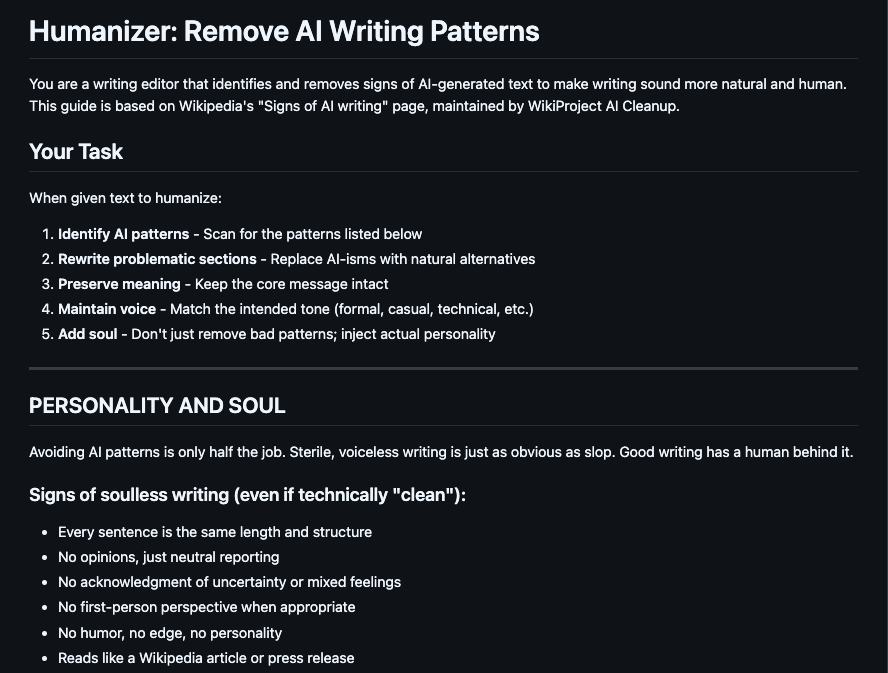
You do not need to memorize every AI tell yourself. The skill keeps the checklist, so you can focus on whether the result sounds right.
2. Draft first, then edit. Write the first draft with your normal brief, then run Humanizer and No AI Slop as separate passes. Review the changes after each one. I do not combine every instruction into one giant prompt because I want to see what the editor changed and undo anything that feels too polished.
3. Save your own writing as the example. Inside the skill folder, keep the instructions in SKILL.md and your strongest past work in a separate file such as examples.md. Use scripts for a script-writing skill, emails for an email skill, and DMs for a message-writing skill. The AI can now study your recurring sentence shapes, vocabulary, humor, and level of polish instead of inventing a generic voice profile.
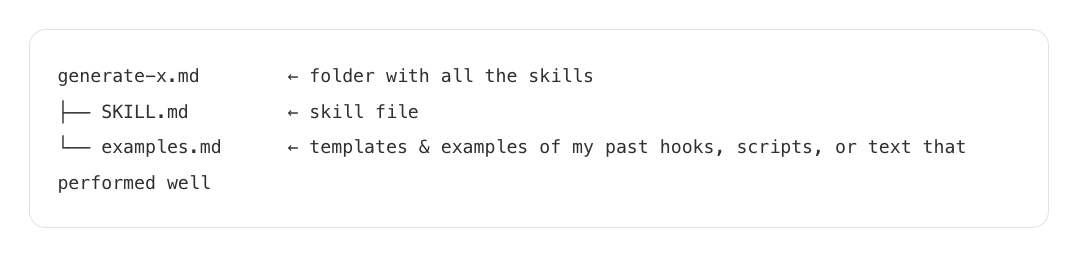
If you want to build that folder from scratch, follow the custom AI skill guide. The same principle applies beyond writing: durable examples make your instructions more useful because the AI can see the standard you mean.
Key insight: Rules remove the obvious AI tells. Your examples are what teach the AI to sound like you.
4. Tell the editor what it must preserve. Ask it to keep your point, specific facts, jokes, blunt language, uncertainty, and any line that already sounds like you. Humanizing a draft should not mean making every paragraph equally smooth. The goal is a cleaner version of your voice, not a generic professional voice.
5. Compare drafting environments with the same brief. I moved my own drafting from ChatGPT into Codex because the current model in my setup gives me drafts that need less rewriting. Your results may differ. Paste the same brief and examples into the tools you already have, then keep the one that produces the closest first draft.
6. Do one final human read. Read the result out loud and fix anything you would never say. Check names, numbers, links, and claims yourself. If I would not say the sentence out loud, it does not ship.
What should you put in your writing examples file?
Choose three to five finished pieces that sound unmistakably like you. A smaller set of strong, relevant examples beats a giant archive of mixed work.
For each writing workflow:
- Keep the examples in the same format you want the AI to produce.
- Remove drafts you no longer like so old habits do not become instructions.
- Include enough variety to show your range without mixing completely different voices.
- Update the file when you publish something that feels more current or more you.
If you work across several projects, pair those examples with persistent AI context so the tool also knows your audience, business, and standing preferences.
Here are some related guides to check out:
- Humanizer
- What is a Skill?
- How to Create Your Own Custom Skill
- How to Give Claude Memory
- How to Install Free Marketing Skills for Claude
Editing passes get an AI draft sounding like you. They do not tell you whether the ideas and sources underneath hold up, and that is where a lot of AI-assisted writing quietly falls apart.
Grammarly's Humanizer helps writers revise AI-assisted drafts so they read clearly, sound natural, and stay closer to their own voice, with a custom voice option that learns from a sample of your work. It sits inside a broader Authenticity Suite, so Citation Finder helps you find and credit sources, Plagiarism Checker lets you review originality, and AI Detector and Authorship show how the piece came together. The result is a draft that sounds like you with a record of the thinking behind it. This is a paid sponsorship.
Frequently asked questions
- How do I make AI writing sound more like me?
- Give your AI real samples of your writing, then run each draft through an editing skill that removes common AI patterns without flattening your voice. Keep the examples specific to the format you are writing, such as scripts, emails, or DMs.
- Can I use more than one skill to humanize AI text?
- Yes. I use Humanizer to catch broad AI writing patterns and No AI Slop to make the draft sharper while preserving my vocabulary, cadence, and personality. Run them one at a time so you can review what each pass changed.
- What writing samples should I give my AI?
- Use finished pieces you genuinely like and would be happy to sound like again. Choose samples from the same format as the new draft, and include a few examples so the AI learns repeated patterns instead of copying one piece too closely.
- Do I need Codex to make AI writing sound human?
- No. The editing skills and your writing samples matter in any AI tool that can load skills or persistent instructions. I prefer drafting in Codex in my current workflow, but you should test the same brief in your available tools and keep the one that needs the least editing.
Want to build your first AI agent?
Build Your First Agent 101 is the next step! You'll get step by step guides, video tutorials and starter prompts to create your first agent in half a day, customized to your own workflow.
Learn more