How to Make an Explainer Video with AI in 5 Minutes

Co-founder at King’s Cross Labs · ex-LinkedIn PM & Forbes 30 Under 30
Send this guide to yourself
Get the link in your inbox so you can read it whenever you're ready.
Your email will also be saved for future updates.
You can turn one website link into a finished animated product explainer video in about five minutes, using the Remotion plugin inside Claude Code or Codex. No developer, no motion designer, no video editor. You paste a URL, describe who the video is for, and it scrapes the page and renders an MP4.
I built one for Granola, my AI meeting notetaker, to explain it to someone who has never used an AI tool. It took 6 minutes and 32 seconds and came out as a 52-second video.
Why this matters
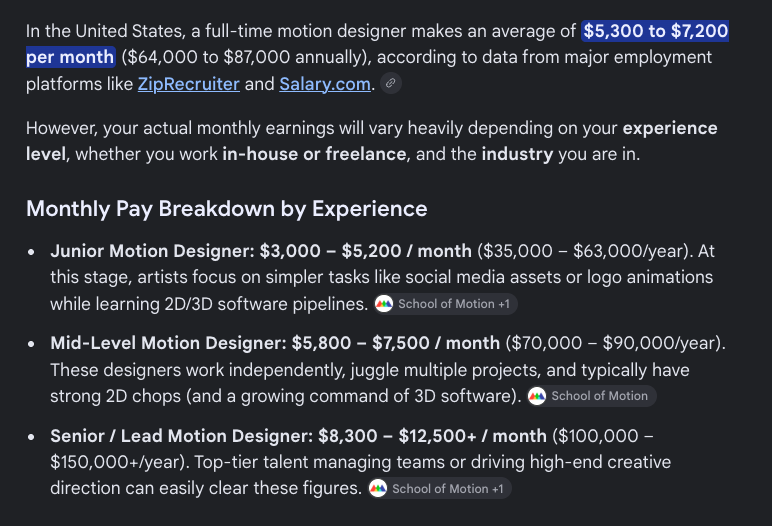
At my first startup, every launch came down to the same choice: pay a motion designer or wait weeks for one video. When I actually looked up the number recently, a full-time motion designer in the US runs about $5,300 to $7,200 a month, and freelance project rates aren't much friendlier. So most launches shipped with a screenshot and a paragraph, because the video was never worth the delay.
The other use case nobody talks about: explaining software to people who don't use software. My dad is a visual learner. Sending him a link to a product page does nothing. Sending him a 50-second animated walkthrough works.
What is Remotion?
Remotion is a tool that makes videos out of code. Instead of dragging clips on a timeline, it renders a web page frame by frame and records the result as a video. That matters here for one reason: because it's code, an AI agent can write the whole video for you.
You don't need to know any of that to use it. The plugin handles it. You just need to know that this is why the AI can build a real animated video instead of a slideshow.
How do you install the Remotion plugin?
Install it once from the plugin marketplace, and it lives inside Claude Code or Codex from then on. Pick whichever one you already use.
1. Make a folder first, and open it in your AI tool. Create an empty folder anywhere on your computer, name it something like remotion-sandbox, and point Claude Code or Codex at it. The plugin builds a small video project inside that folder, so it needs somewhere to live. If you've never opened a folder in Claude Code before, my Claude Code setup guide covers that part in five minutes.
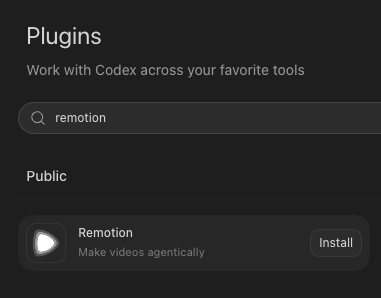
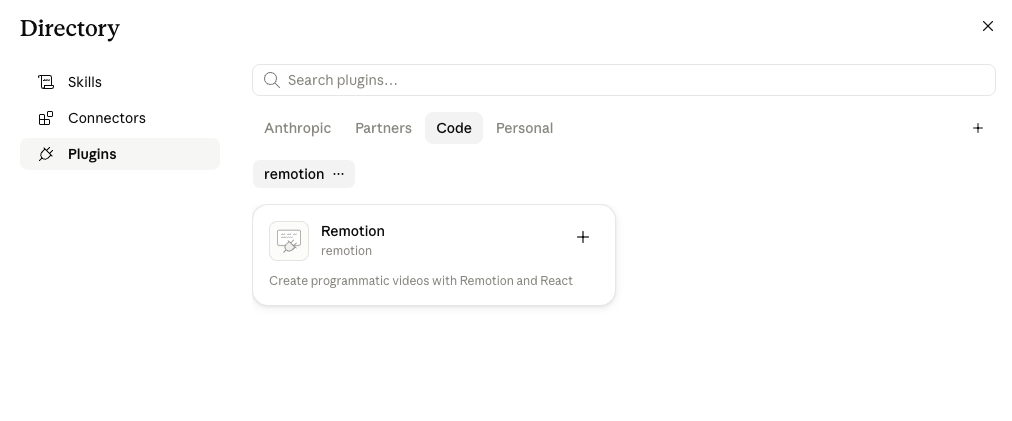
2. If you're on Codex: search the plugin directory and install. Go to Plugins, type "remotion" in the search bar, and hit Install on the Remotion result. That's the whole thing.
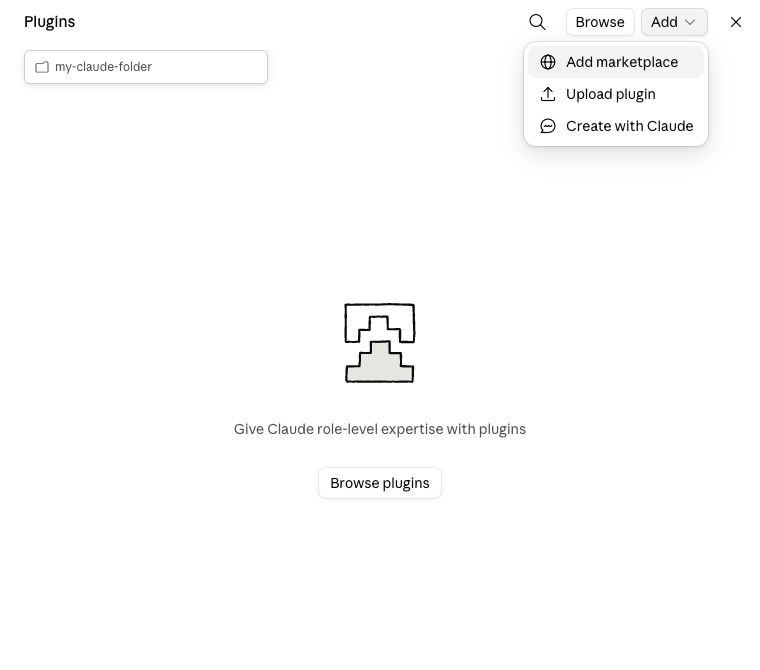
3. If you're on Claude Code: add the marketplace, then install. Claude Code needs one extra step because Remotion lives in its own marketplace rather than Anthropic's. Open Plugins, click Add, and choose Add marketplace.
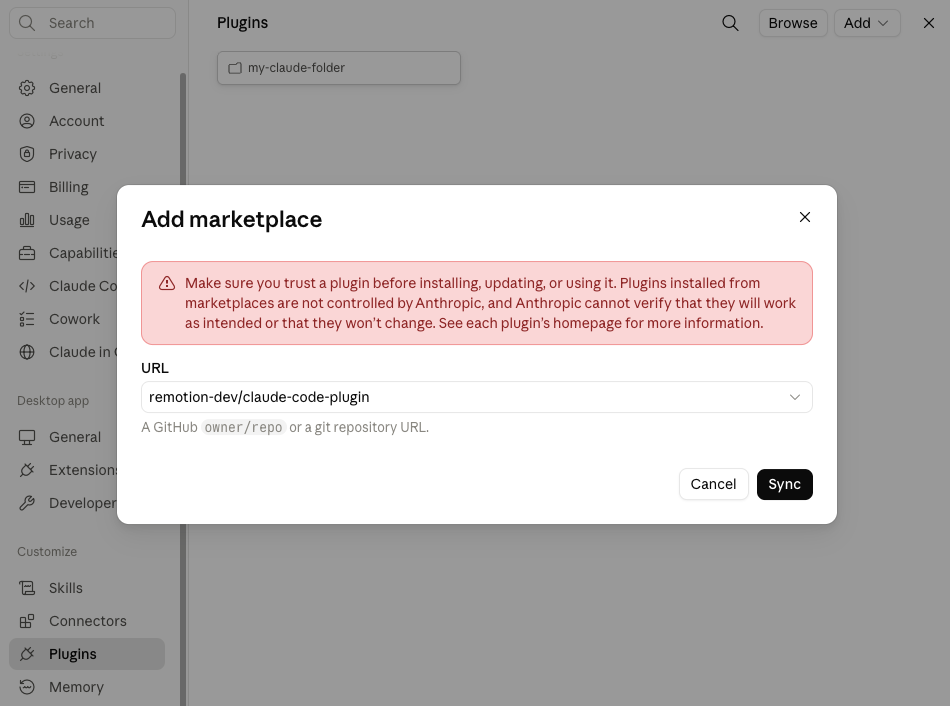
4. Paste remotion-dev/claude-code-plugin and hit Sync. That string is a GitHub repo, which is where the plugin's code lives. Claude will warn you that plugins from outside marketplaces aren't verified by Anthropic, which is a fair warning to read every time before you install something from anyone.
5. Install the Remotion plugin from the directory. After the sync, a remotion marketplace appears under your plugin directory with one plugin inside it. Click the + to install. If you want more plugins worth having in there, I rounded up a few in my guide on free marketing skills for Claude.
How do you turn a website into a video?
Give it one link and one sentence about who the video is for. That's the entire input.
6. Write a prompt with the link, the audience, and the style. This is the part that decides whether the video is good. Mine was: create a video explaining Granola for older folks who may not be familiar with AI or AI agents but want to use it for their meetings, read some docs for how they can use it and what benefits it has, use simple terms so they don't get overwhelmed, and keep it in the same style as the website so it's familiar when they visit it themselves.
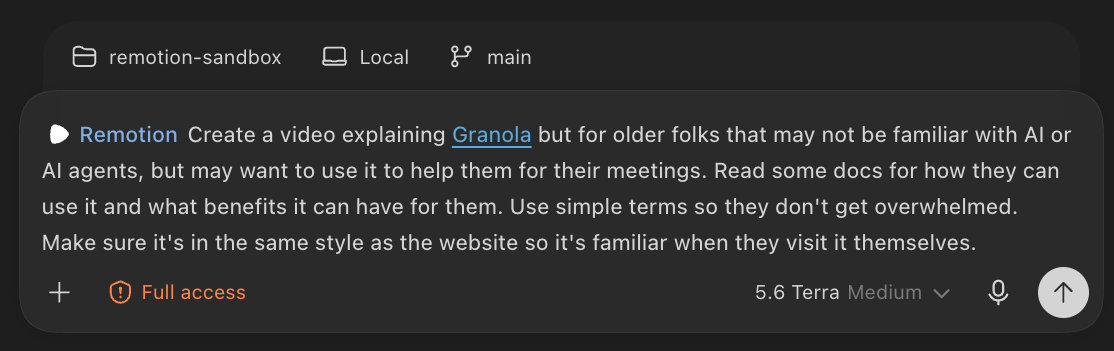
Three ingredients matter in that prompt. The link, so it has real content to pull from. The audience, because "for someone who's never used AI" produces a completely different video than "for a technical buyer." And match the website's style, which is the line that keeps the video from looking like a generic template. If you already have a BRAND.md file for your own product, point it at that instead and the colors and fonts come out right on the first try.
7. Let it cook. It reads the page, writes the scenes, and renders the file. Mine ran 6 minutes 32 seconds and produced a 52-second, 720p explainer across 11 files. You'll see it working through actual scene files with names like AfterMeeting.tsx, which is just the section of the video about what happens after your meeting ends.
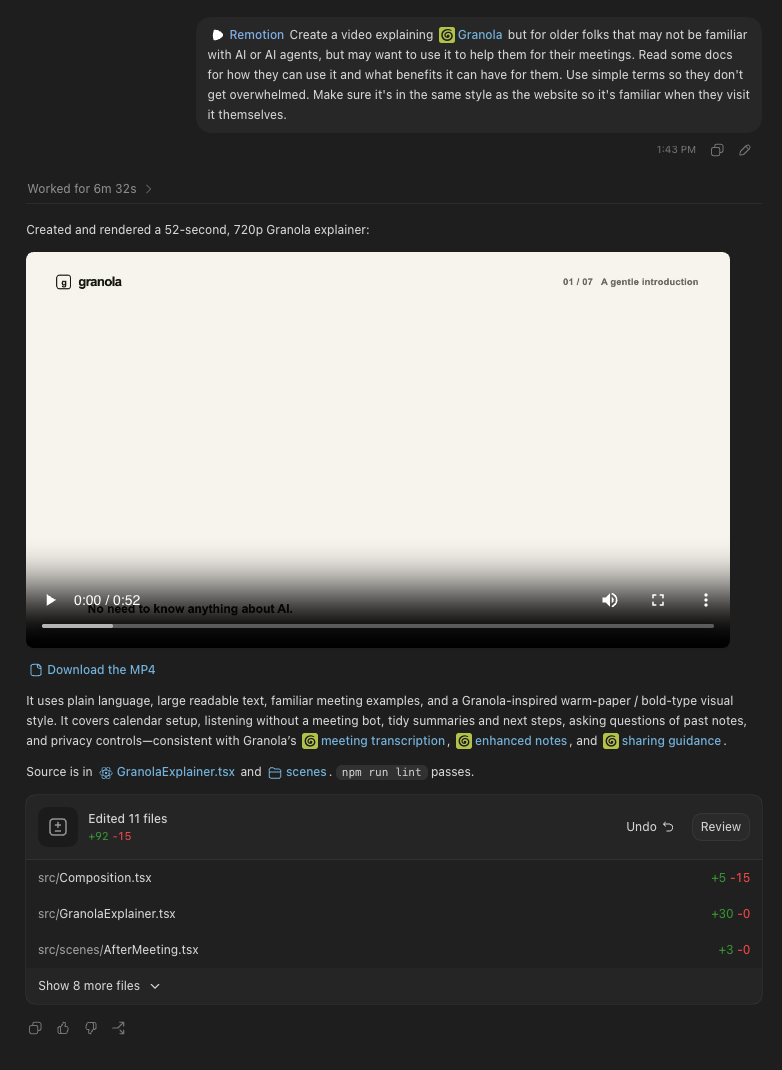
8. Everything after this is taste, not tech. The first render is a draft. Ask for slower animations, bigger fonts, a simpler layout, fewer words on screen. Each change re-renders in minutes instead of going back into a designer's queue for a week.
9. Build three versions, then pick one. This is the actual unlock. Not "I got a video." It's that the cost of a second version dropped to nearly zero, so you can try three different ways of explaining your product in one afternoon and keep the one that people actually understand. That was never an option when each version cost weeks.
Key insight: The win isn't that AI made the video. It's that making the second version is now free, so you can test how you explain your product instead of guessing once and living with it.
What to use this for beyond product launches
The obvious use is a launch video. The less obvious ones are better:
- Explaining a tool to a non-technical person. Parents, clients, a board member who won't read the doc.
- Turning a blog post into a video. If your announcement post has screenshots, that's already a valid input.
- Onboarding. Take your help docs page and make the 60-second version.
- Sales follow-up. A short custom explainer beats a PDF attachment.
AI handled the animation here. I still decided the pacing, the fonts, and which version actually explained the product. That part is still the job.
Additional reading
Here are some related guides to check out:
Frequently asked questions
- Do I need to know how to code to use the Remotion plugin?
- No. You install the plugin once and then talk to it in plain English. Remotion is built on code under the hood, which is exactly why an AI agent can write the whole video for you, but you never open a code file unless you want to.
- Can I use this with ChatGPT's Codex instead of Claude Code?
- Yes, and Codex is actually the faster install. In Codex you go to Plugins, search remotion, and click Install. In Claude Code you first add the marketplace remotion-dev slash claude-code-plugin, sync it, and then install the plugin from the directory.
- How long does it take to make one video?
- About five to seven minutes for the first render. Mine ran 6 minutes 32 seconds and produced a 52-second video. Changes like slower animation or bigger fonts re-render in a couple of minutes each.
- What do I actually give it as input?
- One website or blog link, plus a sentence saying who the video is for. Naming the audience matters more than anything else, because a video for someone who has never used AI looks completely different from one for a technical buyer. Adding to match the style of the website keeps it from looking like a generic template.
Want to build your first AI agent?
Build Your First Agent 101 is the next step! You'll get step by step guides, video tutorials and starter prompts to create your first agent in half a day, customized to your own workflow.
Learn more