How to Make Instagram Carousels with Paper and Claude

Co-founder at King’s Cross Labs · ex-LinkedIn PM & Forbes 30 Under 30
Send this guide to yourself
Get the link in your inbox so you can read it whenever you're ready.
Your email will also be saved for future updates.
You can build a full on-brand Instagram carousel in about ten minutes using Paper and Claude, without opening a design tool and nudging boxes around. Paper is a design canvas like Figma, except it was built so an AI agent can actually design inside it. You connect Paper to Claude once, load your brand in as tokens, hand over your slide copy, and watch the slides get laid out in real time.
I posted about this workflow and a lot of you asked for the full walkthrough, so here it is.
Why this matters
I have tried to do this in Canva and in Figma, and both times the AI part was bolted on. It could suggest, but I still had to move every layer myself. The difference with Paper is that the agent has real write access to the canvas, so "make slide 4 match slide 3" takes a sentence instead of twenty minutes of clicking. This is the workflow I wish I had two years ago.
How do you connect Paper to Claude?
You download the Paper desktop app and connect its MCP to Claude, which is a one-time setup that takes about ten minutes.
1. Download the Paper desktop app. The MCP connection only works with the desktop app, not the browser version. Install it and open a blank file so there is a canvas for Claude to look at.
2. Connect the Paper MCP to Claude. An MCP is just a connector that lets Claude read from and write to another app. Once it is connected, the loop is simple: you select the artboard or canvas you want to change in Paper, then talk to Claude, and the change appears in Paper.
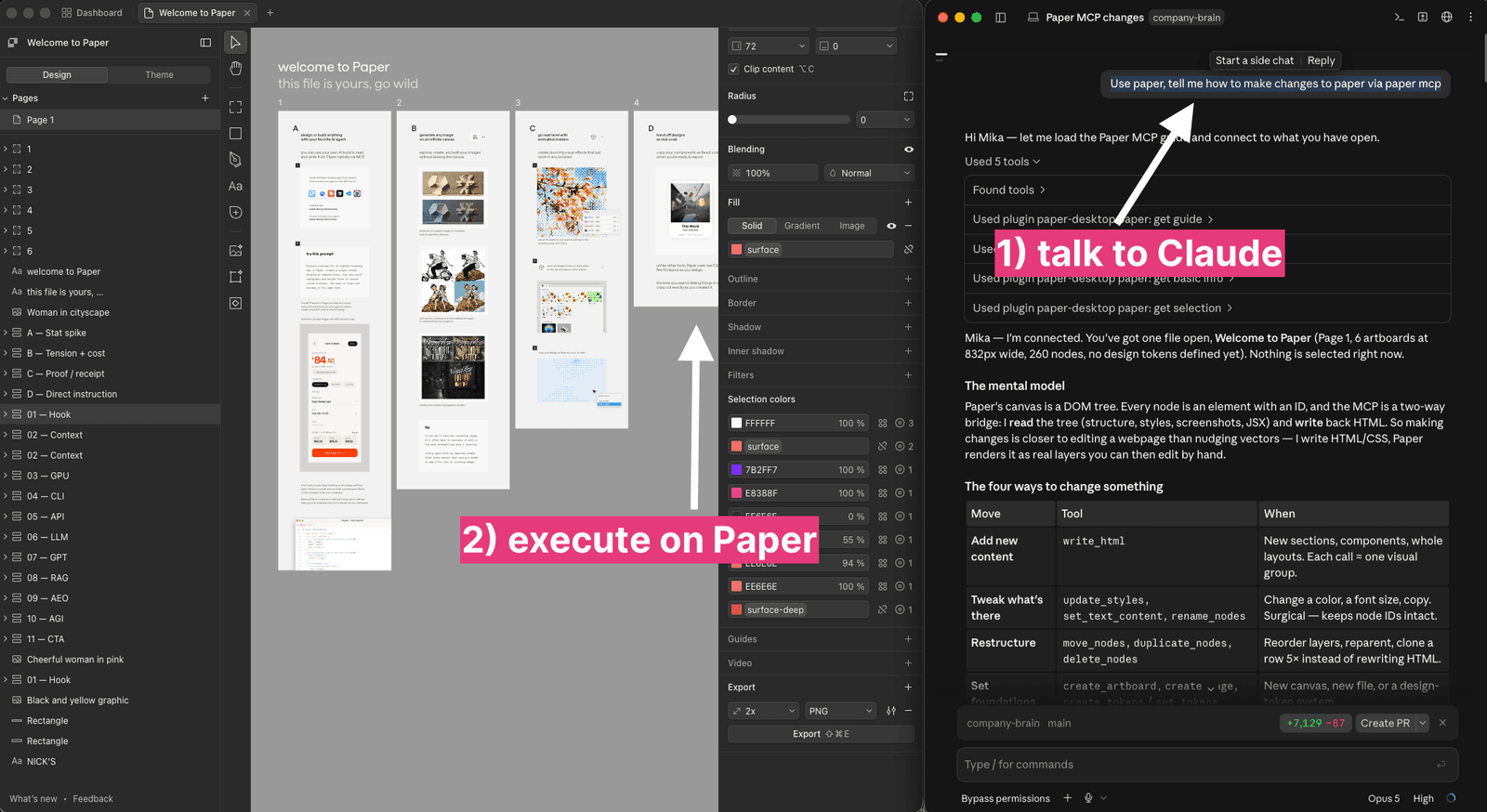
When it connects, Claude reports back which file is open, how many artboards, how many nodes, and whether any design tokens exist yet. Mine said zero tokens, which is what the next step fixes.
How do you get your brand into Paper?
Tell Claude to read your brand file, and it loads your colors, fonts, spacing, and sizes into Paper as design tokens.
3. Load your brand as tokens. Point Claude at your BRAND.md file and ask it to set up your tokens in Paper. Tokens are named values, so instead of typing a hex code every time, the design references color-accent-magenta and every slide stays consistent automatically.
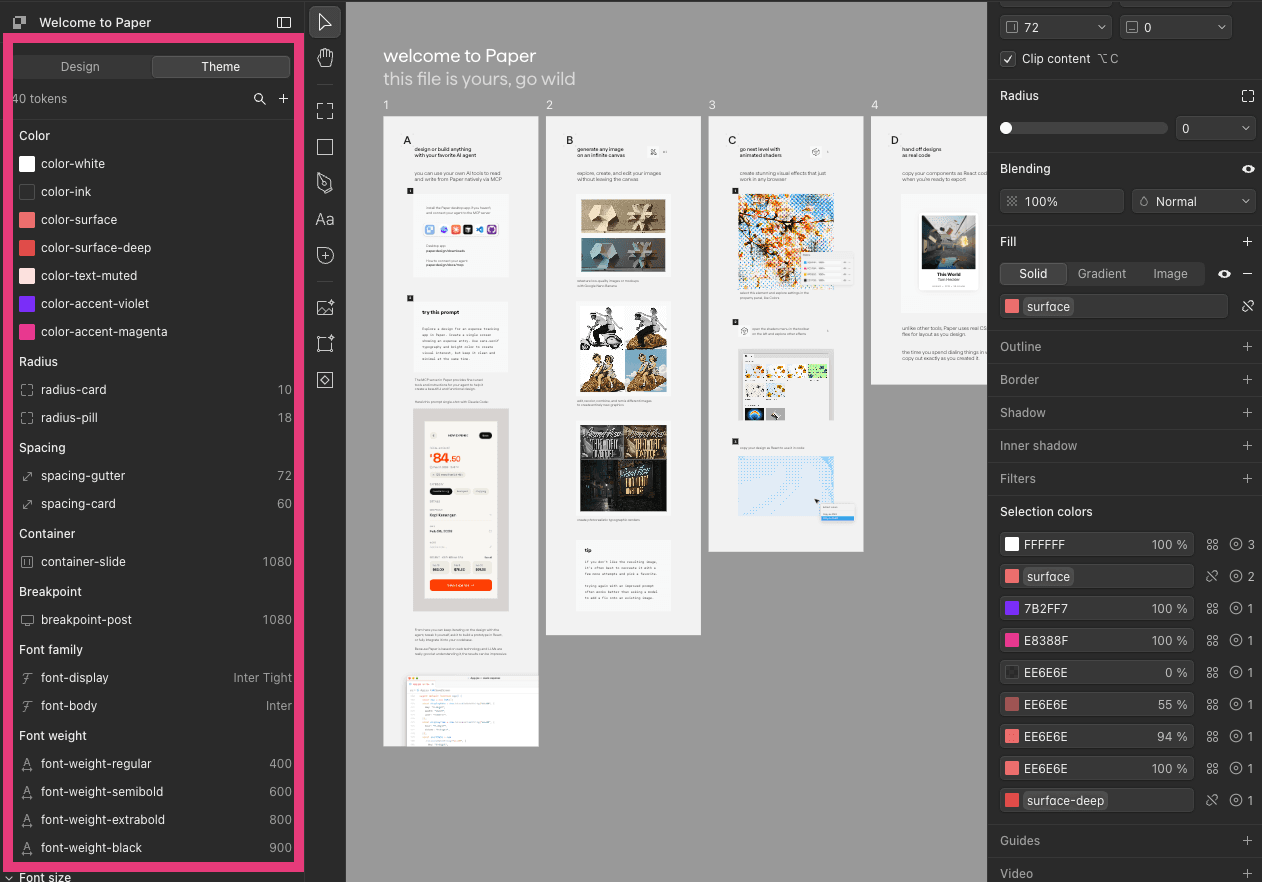
If you do not have a brand file yet, drop three or four of your old carousels onto the canvas and ask Claude to pull the tokens out of those. It will read the colors and type off your existing work, which is usually closer to your real brand than anything you would write from scratch.
Key insight: The tokens are the reusable asset. Set them up once and every carousel after this one takes ten minutes instead of an afternoon.
How do you build the actual carousel?
You write the slide copy first, one idea per slide, then tell Claude to build it in Paper.
4. Write your slide copy, one idea per slide. Give each slide a label and a single idea, and keep the hook slide separate from the context slide. A carousel with two ideas on one slide is where people swipe away. I run this through a carousel skill that drafts the copy in my voice and structure, so I am editing rather than starting from a blank page.
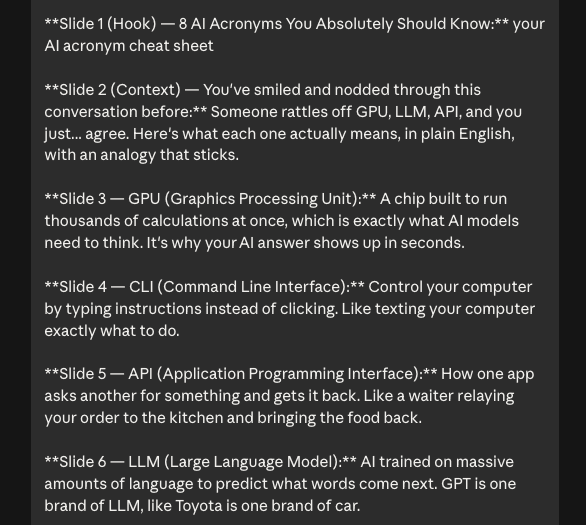
5. Tell Claude to build it in Paper. Hand Claude the copy and ask it to build the carousel on the canvas using your tokens. You will watch the artboards appear one at a time, already in your colors and fonts.
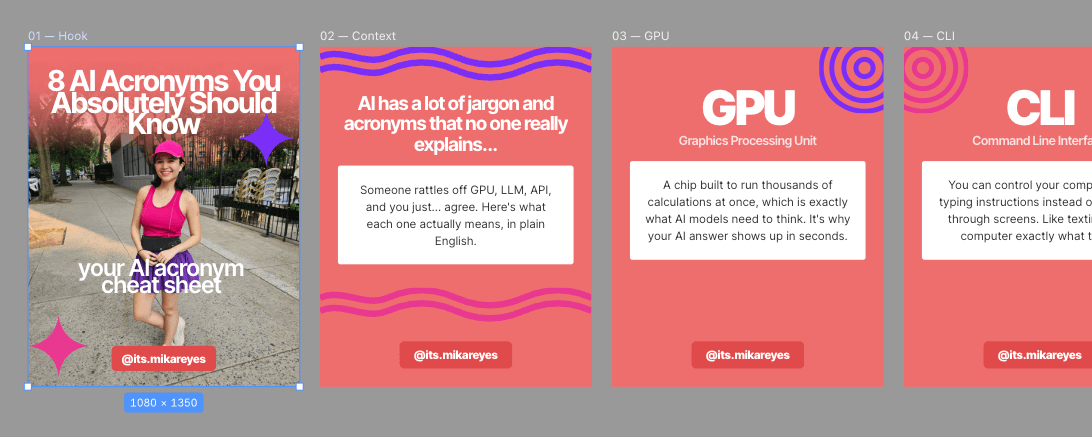
6. Fix individual slides by asking or clicking. Everything on the canvas is a real editable layer, so you can nudge things by hand. But it is usually faster to say "slide 3's headline is too long, cut it to six words" and let Claude do the surgical edit without disturbing the rest.
7. Export at 1080 by 1350. Paper exports at 2x PNG by default, which is what you want for Instagram. Portrait at 1080 by 1350 takes up more feed real estate than square, so use it unless you have a reason not to.

Can you turn this into a repeatable workflow?
Yes, and you should. Once you have run this twice, save the whole thing as a Claude skill so it becomes one command instead of a prompt you rewrite every time.
A skill packages the instructions, your brand rules, and your slide structure into something Claude loads on its own. If you have not built one before, here is how to create a custom skill, and here is what a skill actually is if the term is new to you.
Additional reading
Here are some related guides to check out:
Frequently asked questions
- What is Paper and how is it different from Figma?
- Paper is a design canvas that an AI agent can design inside directly. In Figma, AI can suggest things but you still move the layers yourself. In Paper, Claude writes the layout and Paper renders it as real editable layers you can still nudge by hand.
- Do I need a brand file before I start?
- It helps a lot but it is not required. If you have a brand file, tell Claude to read it and it loads your colors and fonts into Paper as tokens. If you do not have one, drop in a few of your old carousels and ask Claude to pull the tokens from those instead.
- Can I still edit the carousel after Claude builds it?
- Yes. Everything Claude creates lands on the Paper canvas as normal design layers with real IDs. You can move, recolor, or retype anything by hand, and you can ask Claude to change one specific slide without touching the others.
- How long does this actually take?
- About ten minutes once the setup is done. The one-time setup, meaning downloading Paper and connecting the MCP, takes another ten. After that, most of your time goes into writing the slide copy, not designing.
Want to build your first AI agent?
Build Your First Agent 101 is the next step! You'll get step by step guides, video tutorials and starter prompts to create your first agent in half a day, customized to your own workflow.
Learn more