How to Create a BRAND.md File for AI Design

Co-founder at King’s Cross Labs · ex-LinkedIn PM & Forbes 30 Under 30
Send this guide to yourself
Get the link in your inbox so you can read it whenever you're ready.
Your email will also be saved for future updates.
If your AI graphics look like they came from five different companies, you are missing one small file. A BRAND.md is a single markdown file that holds your colors, fonts, and voice, and every AI tool reads it before it designs anything. You can generate one in about ten minutes with a free Claude Code plugin, and after that you stop describing your brand in every single prompt.
Why this matters
Nick and I built a landing page, a pitch deck, and an Instagram graphic for our startup in the same week. All three looked like three different companies. I was retyping our hex codes and font names into every prompt like a maniac, and I still got a different result each time. What fixed it was giving the AI one file to read before it designs.
What goes in a BRAND.md file?
A BRAND.md holds everything a designer would ask you before starting work: what your brand sounds like, what colors it uses, what fonts it uses, and what your site and decks are supposed to feel like. It works the same way a brand guideline document works inside a marketing department, where everyone pulls from the same rules instead of guessing.
The format is plain markdown with a bit of YAML at the top, so it renders on GitHub, any editor highlights it, and any AI tool can read it without a plugin.
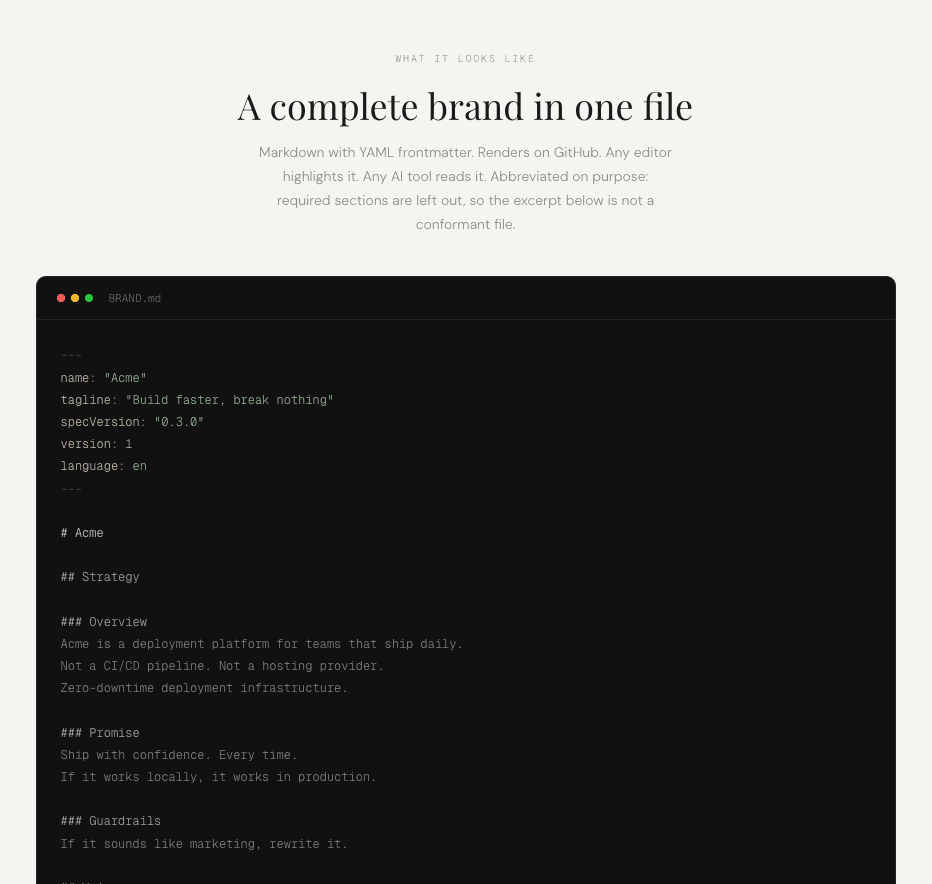
The Guardrails section does the heaviest lifting. One line, "if it sounds like marketing, rewrite it," beats three paragraphs describing your tone.
Key insight: These are rules for a machine to follow, so write them blunt and specific. Vague adjectives get you vague designs.
How do you generate a BRAND.md file?
You can write it yourself, but there is an open standard for this that the best brands follow, and a free Claude Code plugin that generates a conformant file for you. It takes three commands. If you have not set up Claude Code yet, start with the Claude Code setup guide first.
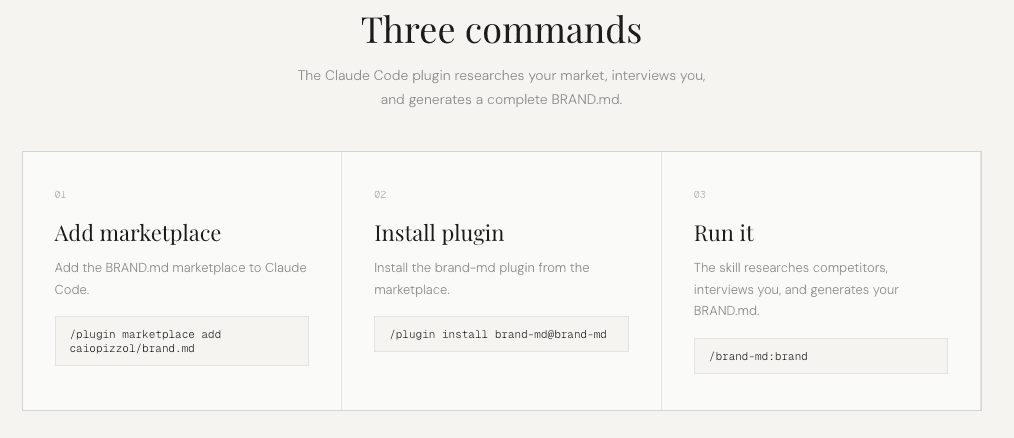
1. Add the marketplace. In Claude Code, run this to point Claude at the brand-md plugin marketplace:
/plugin marketplace add caiopizzol/brand.md2. Install the plugin. This pulls the plugin down from the marketplace you just added:
/plugin install brand-md@brand-md3. Run it. This kicks off the actual generation:
/brand-md:brandIf typing commands is not your thing, you can skip all three and just tell Claude "please install the brand.md plugin from caiopizzol/brand.md and run it." Claude will do the plugin steps for you.
4. Answer the interview honestly. The plugin researches your competitors first, then asks you questions about your brand. Give it real answers about who you serve and what you refuse to sound like. Every design you generate from here traces back to what you type in this step.
5. Edit what it got wrong. It is a markdown file, so open it and fix anything that does not sound like you. Treat what the plugin writes as a first draft.
Where should the file live?
Put a copy in every folder where you generate assets, because Claude only reads files in the project it has open. One BRAND.md sitting in your website repo does nothing for the deck you are building in a different folder.
The three that matter most:
- Your website project, so landing pages and new sections match
- Your deck folder, so pitch decks and content decks match
- Your content folder, so carousels, posters, and graphics match
If you hate keeping three copies in sync, you can symlink your AI context files so all three point at one source of truth.
What can you do once you have it?
Once the file exists, it becomes the input to almost everything else. You can build on-brand Instagram carousels in about ten minutes, generate ten design directions instead of one, or make your website look expensive by pairing it with a reference design file. All three of those workflows assume you already have a brand file, and none of them work well without one.
The file takes ten minutes once, and every design task after it gets shorter.
Additional reading
Here are some related guides to check out:
Frequently asked questions
- What is a BRAND.md file?
- A BRAND.md file is a single markdown file that holds your brand in one place: your voice, your colors, your fonts, and how your site and decks are supposed to look. AI tools read it before they design anything, so you stop retyping your brand into every prompt.
- Do I need to write my BRAND.md by hand?
- No. The brand-md plugin for Claude Code generates it for you. It researches your competitors, interviews you about your brand, and writes the file. You can still edit anything it produces afterward.
- Where do I put my BRAND.md file?
- Put a copy in every folder where you generate assets. That means your website project, your deck folder, and your content folder. If the file is not in the folder Claude is working in, Claude will not read it.
- Does a BRAND.md only work with Claude?
- No. It is a plain markdown file, so any AI tool that can read a file can use it. Claude Code, Cursor, and ChatGPT all work. The plugin that generates it is built for Claude Code specifically.
Want to build your first AI agent?
Build Your First Agent 101 is the next step! You'll get step by step guides, video tutorials and starter prompts to create your first agent in half a day, customized to your own workflow.
Learn more