How to Learn Anything with Anthropic's ELI5 Skill

Co-founder at King’s Cross Labs · ex-LinkedIn PM & Forbes 30 Under 30
Send this guide to yourself
Get the link in your inbox so you can read it whenever you're ready.
Your email will also be saved for future updates.
Claude Code's ELI5 skill turns any confusing topic into a picture-heavy HTML explainer. You add Anthropic's community plugin marketplace, install eli5, then type /eli5 plus whatever you want explained.
I keep hitting concepts I need to understand tonight, not after a weekend of documentation. A skill the Claude Code team uses internally does that job in one command, and the output is mostly pictures.
Why this matters
Thariq Shihipar works on Claude Code at Anthropic. He posted that people there have been using ELI5 a lot to simplify hard concepts: how a module works, why a tradeoff got made, what caused an incident. The post has millions of views, which is usually a yellow flag. This one held up when I ran it.
You don't need to be a developer. You need Claude Code set up and one thing you actually want explained. That's the time it buys you: a first picture of the system, so the dense docs start meaning something.
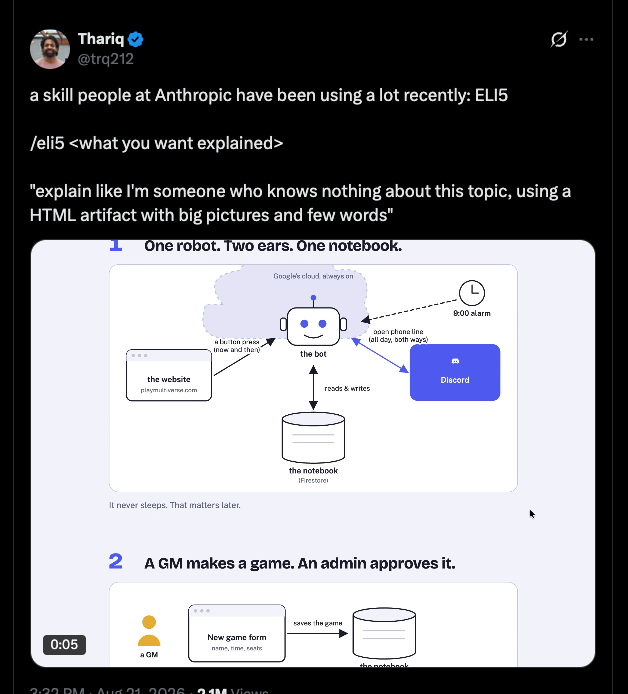
A Claude skill is a packaged workflow Claude can run on a trigger. ELI5's trigger is the slash command. Under the hood it is one instruction: explain like someone who knows nothing about this topic, as an HTML artifact with big pictures and few words.
How do you install the ELI5 skill from the marketplace?
Two slash commands, in order, inside Claude Code. This is not the official Anthropic plugin directory. It lives in the community marketplace Anthropic hosts at anthropics/claude-plugins-community. Thariq said they're still debating whether to make it official, so treat it as a team-used community plugin, not a preinstalled Claude feature.
1. Add the community marketplace. In Claude Code, type:
/plugin marketplace add anthropics/claude-plugins-communityThat points Claude at the catalog. You only do this once.
2. Install the plugin. Then type:
/plugin install eli5@claude-communityThe @claude-community part is the marketplace name, not a username. If /eli5 doesn't show up after install, start a new Claude Code session. Plugins often don't attach until the next chat.
If you already collect skills this way, it's the same pattern I use for free marketing skill packs: add a marketplace, then install the plugin from it.
Key insight: ELI5 is a first picture, not a final briefing. Use it to get oriented, then go read the real docs with a model in your head.
How do you use ELI5 after it's installed?
Type the slash command, then the topic, in plain English. No special prompt. No extra setup.
3. Run /eli5 plus the thing you don't get yet. I typed /eli5 LLMs in a real folder (company-brain) with nothing else in the prompt.
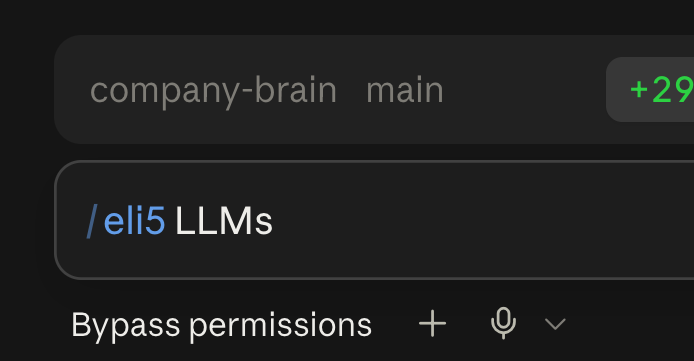
4. Let it build the artifact, then scroll it. Claude writes an HTML page with big pictures and almost no text. Mine was a visual walkthrough of how LLMs work.
That's the point of the skill. Not a wall of analogy. A simple visual model you can look at.
5. Start with the prompts Anthropic actually runs. Thariq named three:
/eli5 how does this module work/eli5 why did we make this tradeoff/eli5 what caused this incident
Those are work prompts, not toy ones. Swap in your version: how does this campaign work, why did we pick this landing page, what caused this drop in conversions.
6. Treat "too simple" as a feature you have to watch. I tried it. It really does simplify hard things. Sometimes it strips a topic so far it comes out a little too simple. If that's what makes a technical thing finally click, the big visuals are worth it. If you need precision, use ELI5 to get the shape, then ask Claude a normal follow-up with the details you still need.
If this becomes a workflow you repeat, you can package your own custom skill the same way. ELI5 is the beginner version of that habit: one trigger, one job, pictures instead of a lecture.
Here are some related guides to check out:
Frequently asked questions
- Can I use the ELI5 skill in regular Claude chat, without Claude Code?
- No. ELI5 installs as a Claude Code plugin from the community marketplace, so you need Claude Code, not the regular chat box on claude.ai. Once it is installed, you run it with the slash command /eli5 plus your topic. If you are still on chat-only Claude, set up Claude Code first, then come back to these two install commands.
- Is the ELI5 skill an official Anthropic plugin?
- Not yet. It lives in Anthropic's community plugin marketplace, and Thariq, who works on Claude Code, said the team is still debating whether to make it official. People at Anthropic use it internally, which is why it's worth trying, but it is not a preinstalled Claude feature. Install it from anthropics/claude-plugins-community as eli5 at claude-community.
- How do I run it after I install it?
- Type /eli5, then the topic, in a Claude Code session. Example: /eli5 LLMs. Claude builds an HTML artifact with big pictures and few words. If the command does not appear, start a new session after the install, because plugins often load on the next chat.
- What if the explanation comes out too simple?
- That happens. ELI5 is built to strip a topic down to pictures, so it will sometimes oversimplify. Use that first picture to get oriented, then ask a normal follow-up for the details you still need. It is a starting model, not the last word on the subject.
Want to build your first AI agent?
Build Your First Agent 101 is the next step! You'll get step by step guides, video tutorials and starter prompts to create your first agent in half a day, customized to your own workflow.
Learn more